Hi,

thanks for the exhaustive report, now I understand :)
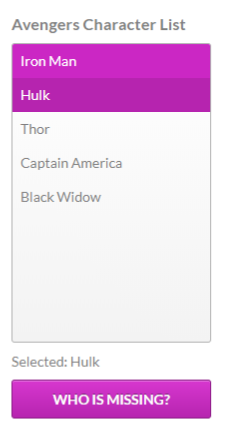
I can see the problem in the website, but not in the actual project built
just now. Since I make some changes I think I fixed the issue without even
notice it. I use to update all blog examples as I evolve Jewel, so I'll
update it as I get something more yummy to invest time in change it

So if you update and build with latest code, you should not be any problem
with this :)

Best,

Carlos


2018-07-10 13:21 GMT+02:00 pynenburgad <[email protected]>:

> I noticed this in my adaptations to your example, but it is also visible in
> your unaltered Jewel List example:
> When I follow these steps:
>
> 1. go to [1] (using Chrome, or FireFox), scroll down to the iframe to view
> the example result
> 2. mouse click first item ('Iron Man') ->result [2]
> 3. mouse hover over second item ('Hulk') -> screen shot [3]; notice that
> item.hover color is identical to item.selection color
> 4. now mouse click second item ('Hulk') and then mouse hover over first
> item
> ('Iron Man') -> [4]; notice that item.hover color is slightly
> lighter/different from item.selection color
> 5. now mouse click first item, and then mouse hover over second item ->
> [5];
> notice that the hover color over the second list item is now different from
> the screen shot [3] after step 3; the only difference I can think of is
> that
> at step 3 the second item ('Hulk") hasn't been selected yet, while at step
> 5. the second item it has been selected.
>
> Regards, Ad
>
>
> [1]  https://royale.apache.org/adding-an-item-to-a-jewel-list/
> <https://royale.apache.org/adding-an-item-to-a-jewel-list/>
> [2]  https://snag.gy/FX7yQH.jpg <https://snag.gy/FX7yQH.jpg>
> [3]  https://snag.gy/vTOsh3.jpg <https://snag.gy/vTOsh3.jpg>
> [4]  https://snag.gy/P8FpKB.jpg <https://snag.gy/P8FpKB.jpg>
> [5]  https://snag.gy/EjY6az.jpg <https://snag.gy/EjY6az.jpg>
>
>
>
> --
> Sent from: http://apache-royale-users.20374.n8.nabble.com/
>


--
Carlos Rovira
http://about.me/carlosrovira