Hi Alvaro,

thanks, but I believe it's a VirtualBox issue, not Vagrant (as I
didn't change vagrant but updated virtualbox).
And I bet it's Windows specific, too.

Just wondering whether other windows users are seeing such behaviour too...

Cheers,
Torben


On Fri, Jan 30, 2015 at 11:24 PM, Alvaro Miranda Aguilera
<[email protected]> wrote:
> Hello, I have one per VM.
>
> YEsterday or so,  was an email of someone saying that after upgrade some
> things like provisioners were being started twice (or 3?)
>
> perhaps quicker delete the vagrant folder and reinstall ??
>
> rm -fr /Applications/vagrant/
>
> On Sat, Jan 31, 2015 at 8:31 AM, Torben Knerr <[email protected]>
> wrote:
>>
>> Hi everybody,
>>
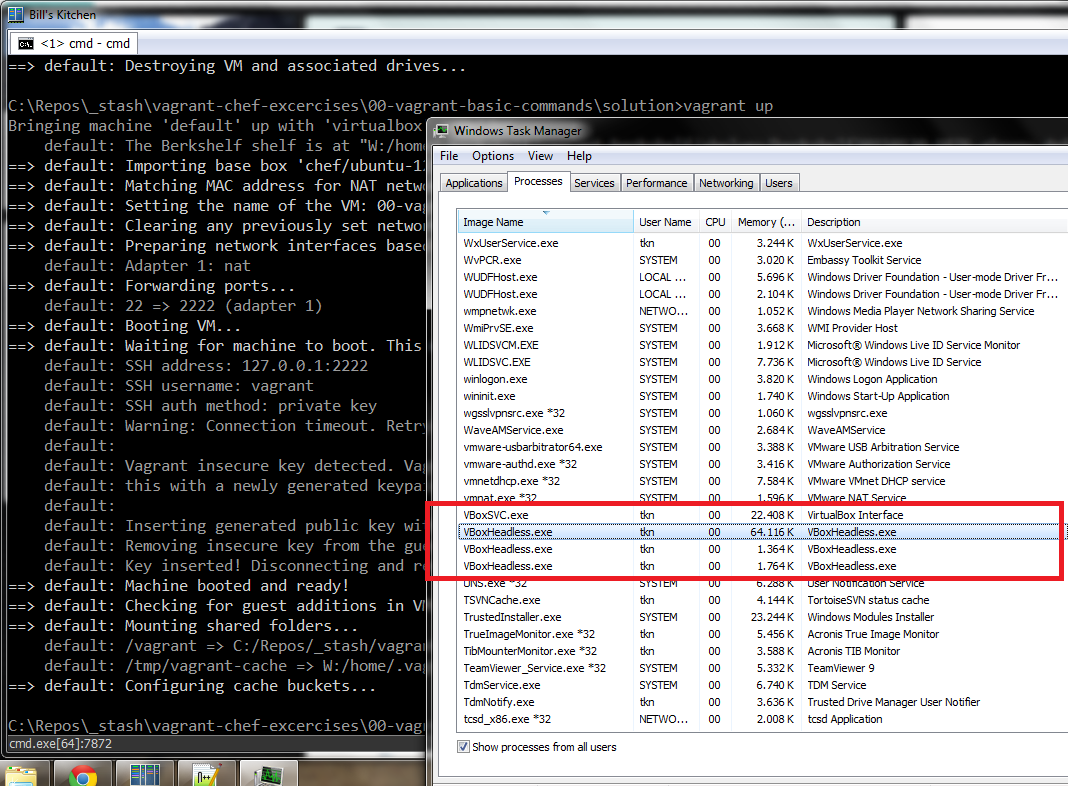
>> after uprading to VirtualBox 4.3.20 I got some hangs when the VM was
>> booting.
>>
>> Looking at the task manager I see three(!) VBoxHeadless.exe processes
>> being spawned every time I `vagrant up` a single Vagrant VM.
>>
>> Screenshot here:
>> https://pbs.twimg.com/media/B8noW3jIcAApLSB.png:large
>>
>> I'm not 100% sure, but I never seen this before and believe it was only a
>> single VBoxHeadless.exe process earlier...
>>
>> Can someone confirm?
>>
>> Cheers,
>> Torben
>>
>> --
>> You received this message because you are subscribed to the Google Groups
>> "Vagrant" group.
>> To unsubscribe from this group and stop receiving emails from it, send an
>> email to [email protected].
>> For more options, visit https://groups.google.com/d/optout.
>
>
> --
> You received this message because you are subscribed to the Google Groups
> "Vagrant" group.
> To unsubscribe from this group and stop receiving emails from it, send an
> email to [email protected].
> For more options, visit https://groups.google.com/d/optout.

--
You received this message because you are subscribed to the Google Groups
"Vagrant" group.
To unsubscribe from this group and stop receiving emails from it, send an email
to [email protected].
For more options, visit https://groups.google.com/d/optout.