Hi,

2014/4/5 Sat 7:28:09 UTC+9 [email protected] wrote:
> >
> > Start from vim -u NONE -N
> >
> > and try again. If possible please show a screenshot.
> >
>
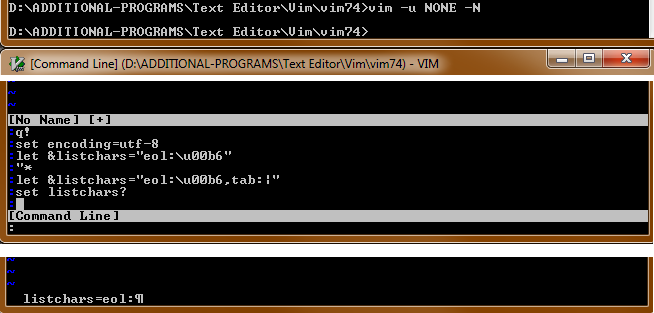
> I've attached an edited collage of screenshots (and here's the link also)
> http://i245.photobucket.com/albums/gg79/traycerb/vim_listchars_error_zpsc42a1081.png
>
> In case it's not clear, top to bottom screenshot shows starting Vim from
> cmdline w/ options, the command-line window (q:), and the output of the 'set
> listchars?' command.  Only the first option in listchars is set.  I'm noob to
> all this, so perhaps I'm missing some obvious step?
You must set two characters for tab. See ":help lcs-tab".
Please try this:

  :let &listchars="tab:| ,eol:\u00b6"

or:

  :set listchars=tab:\|\ ,eol:


Regards,
Ken Takata

--
--
You received this message from the "vim_dev" maillist.
Do not top-post! Type your reply below the text you are replying to.
For more information, visit http://www.vim.org/maillist.php

---
You received this message because you are subscribed to the Google Groups
"vim_dev" group.
To unsubscribe from this group and stop receiving emails from it, send an email
to [email protected].
For more options, visit https://groups.google.com/d/optout.