On Mon, 29 Nov 2010, Edward Marczak wrote:
On Mon, Nov 29, 2010 at 8:36 AM, guivho <[email protected]> wrote:
Using (mac)vim in a default terminal is - at least to my eyes - rather
difficult. ...
...
I'd sure like to read how you pros handle this. I doubt that you,
like me, always try to use gvim to avoid this problem.
While there are plenty of other colorschemes, one problem is that
Apple's Terminal.app only supports 16 colors. So, either use a
16-color colorscheme, use MacVim (GUI), or use a terminal that can
handle 256 colors (like iTerm2: http://code.google.com/p/iterm2/).
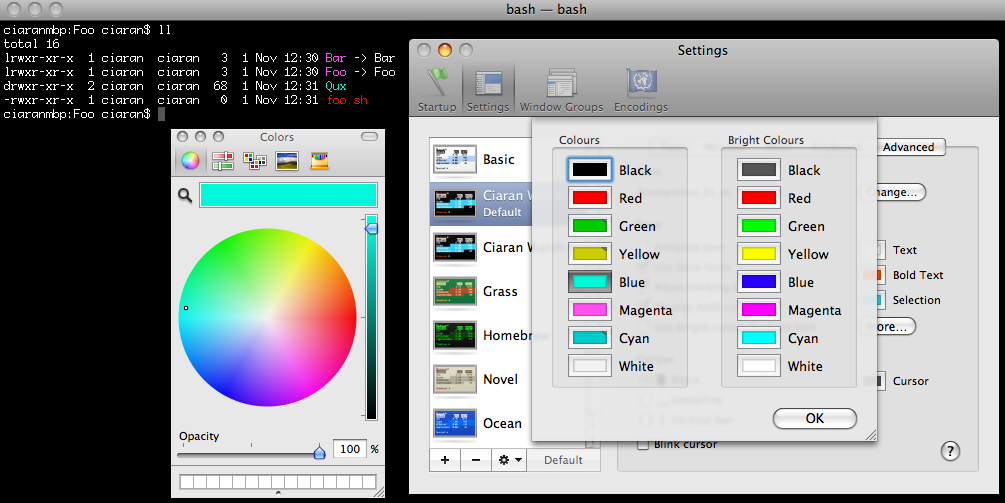
Another approach (which works *much* better than its convoluted history
would suggest), is to augment Apple's Terminal.app with TerminalColours,
an extension which adds a simple "More..." button to Terminal >
Preferences > Text, which, in turn pops up a dialog box for setting
the actual shades that Terminal.app will use for each of the "ANSI"
colors, as seen here:
http://ciaranwal.sh/images/TerminalColours.png
although I have the colors set more subdued, like this (which works
well with various pastel-colored Terminal windows):
    http://carlrj.com/images/Sane_TerminalColours_selection.png

TerminalColours started life as TerminalColors, here:
    http://www.culater.net/software/TerminalColors/TerminalColors.php

(don't download that one, it's for 10.4), then "moved" here for 10.5:
    http://ciaranwal.sh/2007/11/01/customising-colours-in-leopard-terminal

and finally here for 10.6:
    https://github.com/timmfin/terminalcolours
(this last one originally cropped up towards the end of the comments on
Ciaran Walsh's blog post above it.) And you'll also need SIMBL to get
TerminalColours to load:
http://www.culater.net/software/SIMBL/SIMBL.php
As I said, complicated history, but not too difficult to set up, and
then you can set Terminal.app's notion of ANSI colors to work with the
rest of your Terminal's color scheme. You're still limited to 16
colors, but I've found this setup to work quite well (and, as a bonus,
anything else in the Terminal that throws colors at you, like "ls -G",
will also benefit from your tweaked colors).
I work on a variety of remote servers, spending a lot of time in
Terminal, with ssh, and using the installed versions of Vim on the
remote Linux and FreeBSD servers, so I don't use any special color
scheme in (command-line) Vim, though I use MacVim (with various
colorschemes) constantly on my local system (MBP), and have been
experimenting lately with ExpanDrive (http://www.expandrive.com/mac)
to let me edit remote files locally (yeah, could do similar with
Netrw inside MacVim, but I don't like the interface as much).
Cheers,
Carl

--
You received this message from the "vim_mac" maillist.
Do not top-post! Type your reply below the text you are replying to.
For more information, visit http://www.vim.org/maillist.php