jason wrote:

> I found ccomplete function is not OK for every time.
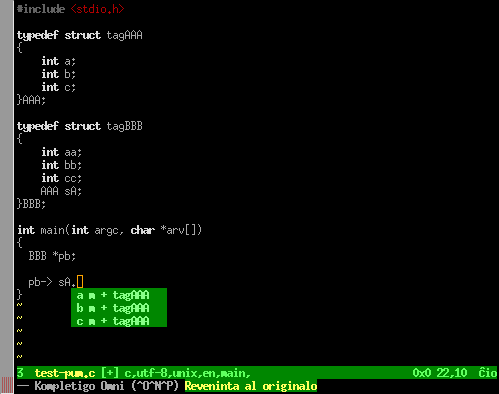
> As first_level_ok.jpg shows, I have generated tags by ctags.
> When I press C-X C-O after "pb->", it completed OK, and I selected "sA".
> Now I press C-X C-O again, it show error completion info.
> It just the same as first one. Second_level_error.jpg shows the error info.
> If I input a space before "sA", and put the cursor behind of "sA.",
> then press C-X C-O again, it show right completion info.
> As second_level_ok.jpg shows.
> I am no sure whether you can see these pictures.
> Thanks.
> B.R.
Hi Jason

I could not reproduce this bug using Linux x86, Vim-7.2.262,
ctags-5.7 and omnicppcomplete-0.41 plugin.

Completion works fine for me as shown in this screenshot:

  http://dominique.pelle.free.fr/pic/tag-ok.png

But I see different information in the pum than what you
show in your screenshot.  So I must not be using the
same options.

I created the tag file as follows:

:!ctags -R --c++-kinds=+p --fields=+iaSn --extra=+q .

And in my ~/.vimrc, I have:

" OmniCppComplete
if version >= 700
  if has('insert_expand')
    let OmniCpp_NamespaceSearch   = 1
    let OmniCpp_GlobalScopeSearch = 1
    let OmniCpp_ShowAccess        = 1
    let OmniCpp_MayCompleteDot    = 1
    let OmniCpp_MayCompleteArrow  = 1
    let OmniCpp_MayCompleteScope  = 1
    let OmniCpp_DefaultNamespaces = ["std", "_GLIBCXX_STD"]

    if has('autocmd')
      " Automatically open/close the preview window.
      au CursorMovedI,InsertLeave * if pumvisible() == 0 | sil! pclose | endif
      set completeopt=menuone,longest,preview
    endif
  endif
endif

set tags=tags
set wildmode=longest,list
set wildmenu


Some questions:
- which version of Vim, ctags, and omni completion plugin are you using?
- how did you create the tag file?

Regards
-- Dominique

--~--~---------~--~----~------------~-------~--~----~
You received this message from the "vim_use" maillist.
For more information, visit http://www.vim.org/maillist.php
-~----------~----~----~----~------~----~------~--~---