I am thinking of canceling Apple Music as the as it just does not seem to meet
my needs, the radio stations are not great, trying to set up the For You tab
speaks but does not react as many other things in VO, I have yet to figure out
exactly how to work that tab, seems I think I have selected what I like but
then it seems I select nothing.  The only part that works right is the music
already on my iPhone.  I probably am not figuring out something here but in the
just over a month that I have played with it, it seems rather worthless, just a
bit but not much better than iTunes 12.2.  A help section to explain especially
the For You tab would help, as the rest except for the music on my phone have
not been especially useful in my limited experience.  But then, I really did
not like iTunes radio either.
Until this summer I have been unable to play with the music much.


Rose Combs

 <mailto:[email protected]> [email protected]

A picture may be worth a thousand words but it takes up three times the memory!


From: [email protected] [mailto:[email protected]] On Behalf Of
Christina C.
Sent: Thursday, July 30, 2015 4:01 PM
To: [email protected]
Subject: Re: Apple Music in iOS 9 gets a much-needed redesign | Macworld


bummer. I was hoping they would add a thumbs down/ban option. I really don’t
like any of apple music’s stations. Its find for having access to such a huge
music library and therefor one can create all kinds of playlists but I just
don’t care for their stations. It sucks when I keep having to hear the same
songs and artists that I don’t care for over and over. So, I just don’t use the
apple Music stations.


Christina

On Jul 30, 2015, at 4:03 PM, Mary Otten <[email protected]> wrote:


Here is an article in MacWorld that talks about the new look for Apple music in
iOS nine. One thing they have changed which I do not like is that now, you can
start a radio station without having to put the song you're station is based on
into my music. With iOS nine, at least in the beta being discussed by MacWorld,
this is not possible. You can't start a radio station from a song unless that
song is in "my music". If you want to keep all of your music being just things
that you own and don't want to mix in rented stuff, this change is clearly not
good.
Mary

http://www.macworld.com/article/2953973/ios-apps/apple-music-in-ios-9-gets-a-much-needed-redesign.html#tk.nl_mwdaily


Apple Music in iOS 9 gets a much-needed redesign


Remember the good old days when the only thing you could do to a song was play
it?

When Apple Music first launched in iOS 8.4 on June 30, the streaming service
was bombarded with hidden menus and a wild array of options. In fact, this
“menus on menus on menus” design was one of
<http://www.macworld.com/article/2946190/apple-music-complaints-why-this-streaming-service-needs-some-work.html>
 our biggest complaints about Apple Music when it first launched.

Well, if the
<http://www.macworld.com/article/2946063/ios-9-public-beta-is-live-heres-everything-you-need-to-know.html>
 iOS 9 public beta is any indication, it looks like Cupertino’s UX design
wizards have started to clean up Apple Music’s messy interface. The iOS 9
update gives the Music app a subtle but much-needed makeover so you can spend
less time browsing through options and more time actually listening to music.

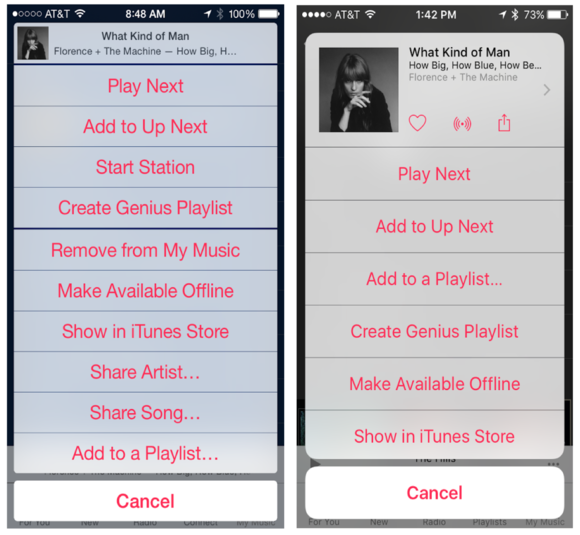
The most drastic change to Apple Music in iOS 9 is the redesign of the More
Options menu that can be accessed by clicking on the ellipses (...) next to
each song. In iOS 8.4, this More Options menu was just a long list of
options—pretty overwhelming, especially when listening to music on the go.
Tapping it surfaced no fewer than 10 options for each song, and that didn’t
even include the hidden-but-basic functions to View in Album or View Artist.

Everything that you can possibly do with a song on Apple Music you can do via
this bloated More Options menu, so it makes sense that it took a few tries for
Apple to get the design just right. In iOS 9, all the functions are still
there, but in a more elegant way that gives each option some breathing room.

Why this matters: Early reviews of Apple Music called it “
<http://recode.net/2015/06/30/apple-music-first-look-rich-fluid-but-somewhat-confusing/>
 uncharacteristically complicated by Apple standards,” while others basically
said it was a “
<http://www.bloomberg.com/news/articles/2015-07-07/review-apple-music-is-a-hot-mess-with-a-few-bright-spots>
 hot mess.” Even though streaming services like Spotify and Tidal can be
equally confusing, Apple prides itself on the simplicity of its products. The
Apple Music updates in iOS 9 prove that the company is looking to simplify its
streaming service, quickly getting rid of all the clutter to soften the
learning curve.

 Apple_Music_ios_9
<http://images.techhive.com/images/article/2015/07/screen-shot-2015-07-28-at-2.34.32-pm-100598885-large.png>


Apple Music in iOS 8.4 (left) and in iOS 9 (right)

First off, the top section makes the album cover and song information more
prominent, and it adds new, nearby icons to signify different actions. Tap on
the heart icon if you want to see more songs like it in the For You tab, the
plus sign to add the song to My Music, the radio signal to launch a radio
station, and the share icon... well, you’ve probably seen that before.

This section also includes a very small arrow on the right to View in Album and
View Artist. This is a far more instinctive way to get to these options than in
iOS 8.4, where you simply had to guess (or read on Macworld) that you could tap
on the album info to get there.

Now that some of Apple Music’s most basic song functions have been designated
to intuitive icons at the top, the More Options menu is less cluttered and
easier to read. Each option button is also larger on the screen so you won’t
accidentally tap the wrong one. Perhaps most importantly, the More Options menu
no longer causes minor anxiety whenever it pops up. There is one hidden option
in the iOS 9 update, though. Scroll down and right below “Show in iTunes Store”
you’ll get the “Remove from My Music” option.

 Apple_Music_ios_9
<http://images.techhive.com/images/article/2015/07/screen-shot-2015-07-28-at-2.36.44-pm-100598886-large.png>


Apple Music in iOS 8.4 (left) and iOS 9 (right)

The options available in the More Options menu change accordingly, depending on
whether you are listening to a song from the Apple Music catalog, the My Music
library, or a random radio station. In iOS 8.4, for example, you could start a
radio station from a song that was not in My Music. In iOS 9, it seems that you
must first add a song to My Music (the plus sign) before being able to create a
radio station. Once you add the track to My Music, you are able to start a
station (radio signal), create a Genius playlist, and “Make Available Offline.”


Sent from my iPhone


--
The following information is important for all members of the viphone list. All
new members to the this list are moderated by default. If you have any
questions or concerns about the running of this list, or if you feel that a
member's post is inappropriate, please contact the owners or moderators
directly rather than posting on the list itself. The archives for this list can
be searched at  <http://www.mail-archive.com/[email protected]/>
http://www.mail-archive.com/[email protected]/.
---
You received this message because you are subscribed to the Google Groups
"VIPhone" group.
To unsubscribe from this group and stop receiving emails from it, send an email
to  <mailto:[email protected]>
[email protected].
To post to this group, send email to  <mailto:[email protected]>
[email protected].
Visit this group at  <http://groups.google.com/group/viphone>
http://groups.google.com/group/viphone.
For more options, visit  <https://groups.google.com/d/optout>
https://groups.google.com/d/optout.


--
The following information is important for all members of the viphone list. All
new members to the this list are moderated by default. If you have any
questions or concerns about the running of this list, or if you feel that a
member's post is inappropriate, please contact the owners or moderators
directly rather than posting on the list itself. The archives for this list can
be searched at http://www.mail-archive.com/[email protected]/.
---
You received this message because you are subscribed to the Google Groups
"VIPhone" group.
To unsubscribe from this group and stop receiving emails from it, send an email
to [email protected].
To post to this group, send email to [email protected].
Visit this group at http://groups.google.com/group/viphone.
For more options, visit https://groups.google.com/d/optout.

--
The following information is important for all members of the viphone list. All
new members to the this list are moderated by default. If you have any
questions or concerns about the running of this list, or if you feel that a
member's post is inappropriate, please contact the owners or moderators
directly rather than posting on the list itself. The archives for this list can
be searched at http://www.mail-archive.com/[email protected]/.
---
You received this message because you are subscribed to the Google Groups
"VIPhone" group.
To unsubscribe from this group and stop receiving emails from it, send an email
to [email protected].
To post to this group, send email to [email protected].
Visit this group at http://groups.google.com/group/viphone.
For more options, visit https://groups.google.com/d/optout.