This is so nice of you Chuck. This really worked. Both the codes to click
on the button also worked.
Just one thing I am unsure about is the behavior of the Firefox browser.
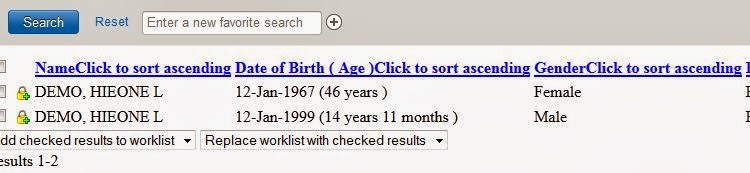
When I run the below 3 lines of code, I get the below(image). They are
supposed to be like the second image. But this issue did not happen in IE.
The difference between the 2 images is that in the second image I can click
on any of the 2 searched results to navigate to the next screen. But both
the results in the 1st image is not clickable.

<https://lh5.googleusercontent.com/-kDthauenpcw/Us81CKfheWI/AAAAAAAAACw/J8Okq-cm1Sc/s1600/Capture1.JPG>

<https://lh3.googleusercontent.com/-ndtElxyqAuU/Us81bQ5KjwI/AAAAAAAAAC4/MJMh1zYLx1k/s1600/Capture2.JPG>


Thank you so much again...!!! Really appreciate your time.

On Thursday, January 9, 2014 12:10:40 AM UTC-5, Sanjeev Singh wrote:
>
> Hi All,
>
> I am trying the below code and it is really really slow to respond....
>
> browser.div(:id => "context-wrapper").frame(:id =>
> "ConcertoContext").div(:id => "cpo-folder").div(:class =>
> "cpo-content-wrapper").div(:class => "cpo-content").frame(:id =>
> "application-content").frame(:name => "SearchFilter").div(:class =>
> "dt-filter filter").form(:id => "filterForm").text_field(:id =>
> "attribute.Name-given").set "DEMO"
> browser.div(:id => "context-wrapper").frame(:id =>
> "ConcertoContext").div(:id => "cpo-folder").div(:class =>
> "cpo-content-wrapper").div(:class => "cpo-content").frame(:id =>
> "application-content").frame(:name => "SearchFilter").div(:class =>
> "dt-filter filter").form(:id => "filterForm").text_field(:id =>
> "attribute.Name-surname").set "HIEONE"
> browser.div(:id => "context-wrapper").frame(:id =>
> "ConcertoContext").div(:id => "cpo-folder").div(:class =>
> "cpo-content-wrapper").div(:class => "cpo-content").frame(:id =>
> "application-content").frame(:name => "SearchFilter").div(:class =>
> "dt-filter filter").div(:class => "actions").span(:id =>
> "default-button").span(:class => "first-child").button(:id =>
> "default-button-button").click
>
> All of the above 3 lines of code takes 3-4 minutes each to execute and by
> the time the last line gets executed the browser session expires.
> Please help me if there is any quicker way to find out the last object and
> set the values.
>
> Thanks in advance...!!!
>

--
--
Before posting, please read http://watir.com/support. In short: search before
you ask, be nice.

[email protected]
http://groups.google.com/group/watir-general
[email protected]

---
You received this message because you are subscribed to the Google Groups
"Watir General" group.
To unsubscribe from this group and stop receiving emails from it, send an email
to [email protected].
For more options, visit https://groups.google.com/groups/opt_out.