Hi!
Here is my solution for upload/download files with originals filename. I
hope it help you.
1. Make  a *modUle* file (don't confuse with m*O*del ) with name

*file_serv.py: *
# coding: utf8
#
# --------- file_serv.py -------

from gluon import *
import os
import shutil

# --------------------- custom store file with original file name
---------------
# *BEWARE:* !!! this fun overwrites existing files without any warnings!!!
# *BE CAREFUL*: !!! it not sanitize filename, but you MUST do it !!!
# it works properly with *English* filenames only (I couldn't to win utf-8
win-style filenames with spaces and other nightmares - too lazy to do it yet
)

def store_file(file, filename=None, path=None):

    path=path or current._files_dir  # _files_dir - must be defined in any
mOdel-file (in db.py for example). it's ABSOLUTE path
    # for relative path use *current.request.folder, it's == application
folder*

    if not os.path.exists(path):
        os.makedirs(path)
    pathfilename = os.path.join(path,filename)
    dest_file = open(pathfilename, 'wb')
    try:
        shutil.copyfileobj(file, dest_file)
    finally:
        dest_file.close()

    return filename # filename is what will be store in db upload field (in
fact it's just string-field) , so you can store file with name filename+...
and return it instead


# --------------------- custom retrieve file with name=db.uploadfield
---------------
# keep in mind that this fun is sharpened for call from ordinary web2py
controller  - .../default/download
# filename-arg (which is passed by .../default/download ) has a format:
tablename.upfieldname.upfieldvalue
# upfieldvalue == filename was returned by function *store_file()* (see
upper)

def retrieve_file( filename, path=None):

    path=path or current._files_dir # or something else

    strip_filename=filename.split('.',2)[2] # fetch filename, i.e. remove
tablename.upfieldname - prefix

    pathfilename=os.path.join(path,strip_filename)

    return (strip_filename, open(pathfilename,'rb') ) # strip_filename in
returning - is just a suggestion, so it can be any what you like

2. Include in any model file at least:
#---  in any model file --------------------

import file_serv

_files_dir='Z:/any_folder/and_so_on/any_uploads_dir'
# or _files_dir=os.path.join(request.folder, 'any_relative_uploads_dir')

#represent fun returning filename compatible with ordinary default/download
controller
def file_repr(v,r):
    href = URL('default','download', args=['tablename.upfieldname.%s'%v ])
    return  A(v, _href=href)

#the same but a little bit smarter:
def file_img_repr(v,r):
    href=URL('default','download', args=['tablename.upfieldname.%s'%v ])
    if os.path.splitext(v)[-1].lower() in ('.tiff', '.tif', '.jpg', '.bmp',
'.png', '.gif'):
        return  DIV(
                     DIV( A( v,_href=href)), # ref for download full image
                     IMG(_src=href ) #  try add args:
_style='width:200px' or _class='your_img_css_class' or  something else
                   )
    else:
        return  A(v, _href=href)


db.define_table( 'tablename',
                    Field('upfieldname', 'upload',  #
db.tablename[id].upfieldname
- return original filename
                           uploadfolder = _files_dir,
                           custom_store = file_serv.store_file,
                           custom_retrieve = file_serv.retrieve_file,
                           represent = file_repr # or file_img_repr
                          )
               )


3. That's all! but:

   -  This example will work only with DAL object with 'db'- name  (not
   'my_db' or 'db_file_storage' or some one else ). If you want to solve this
   problem you have a choice:
   - change default/download fun to:
      @cache.action()
      def download():
          """
          allows downloading of uploaded files
          http://..../[app]/default/download/[filename]
          """
          return response.download(request, *my_db_file_storage*) #
      ATTENTION: all upload fields of other DAL objects (*including db*) *will
      not work!*

      - write your own default/download (just copy one upper and change it
      to):


   -
      # ATTENTION: in this case you must *explicitly* specify *URL* arg ( =
      URL('default','*my_download*') ) wherever it's used !
      # at least in the *file_repr()* definition: _href= URL('default','
      *my_download*', ...) and so on
      @cache.action()
      def *my_download():*
          return response.download(request, *my_db_file_storage*)


      - or more web2pythonic:
      -
      @cache.action()
      def download():
          """
          allows downloading of uploaded files
          http://..../[app]/default/download/[filename]
          """
          if not request.vars.db_file_storage:
      return response.download(request, *db*) # download from *db* by
      default
          else:
      # download from specify DAL obj which name is passed in
      *db_file_storage*
      # it's necessary *explicitly* specify *URL* due to pass DAL_obj_name
      (if it's not 'db'):
      # = URL('default', 'download', vars=dict(
      *db_file_storage='any_DAL_obj_name'*))
      return response.download(request, *globals()[*
      *request.vars.db_file_storage]*)


4. Some useful functions:

def upload_from_dir(path, fld_obj):
    """
    Copy files to fld_obj.uploadfolder and populate table with filenames
from existing folder
    Args:
      - path - existing absolute path
      - fld_obj - upload field-object, for example: db.table.my_files
    return filenames list
    """

    from os import listdir
    from os.path import isfile, join

    all_files = [f for f in sorted(listdir(path)) if isfile(join(path,f))]
    for f_name in all_files:
        with open(join(path,f_name), 'rb') as stream:
             fld_obj.table.insert( **{fld_obj.name:fld_obj.store_file(stream,
f_name, fld_obj.uploadfolder)} )

    return all_files


def fake_upload_from_dir(path, fld_obj):
    """
    Populate table with filenames from existing folder
    Args:
      - path - existing absolute path
      - fld_obj - upload field-object, for example: db.table.my_files
    return filenames list
    """

    from os import listdir
    from os.path import isfile, join
    all_files = [f for f in sorted(listdir(path)) if isfile(join(path,f))]
    for f_name in all_files:
        #stream = open(join(path,f_name), 'rb')
        fld_obj.table.insert(**{fld_obj.name:f_name})
    return all_files


On Wednesday, August 12, 2015 at 3:00:27 PM UTC+3, Vladimiras Lomovas wrote:
>
>
> <https://lh3.googleusercontent.com/-Fw4lgUUChZE/Vcs1x2WWAzI/AAAAAAAAAC8/488bLLkzOdk/s1600/Selection_005.png>
>
>
> <https://lh3.googleusercontent.com/-5NBxevJLglM/Vcs2CygnxgI/AAAAAAAAADE/jRtUSIJ6Gd0/s1600/pic2.png>
> Hello Anthony,
> I'll try to do according to the book but unfortunately it won't work.
>
> import os
> user_name = request.vars['user_name']
> path_ = "/var/www-data/web2py/applications/app_name/uploads/%s" % user_name
> db.define_table('media',
>     Field('user_name', 'string', length=30, required=True),
>     Field('file_name', 'string', length=30, required =True),
>     Field('file_', uploadfolder=path))
> #uploadfolder=os.path.join(request.user_name, path))), 'upload')
>
> Upload function in the controller
>
> # Create folder(name it as username) upload file to that folder.
> def upload_File():
>     if request.vars['user_name'] is not None:
>         user_name = request.vars['user_name']
>         file_name = request.vars['file_name']
>         row = db(db.driver.user_name==user_name).select().first()
>         path = "/var/www-data/web2py/applications/app_name/uploads/%s" %
> user_name
>         if row is not None:
>             if not os.path.exists(path):
>                 os.makedirs(path)
>             if request.vars['upload'] is not None:
>                 uploadedFile = request.vars['upload']
>                 inserted_id =
> db.media.insert(user_name=user_name,file_name=file_name, file_=uploadedFile)
>                 return "Inserted file ID: %s, folder created %s" %
> (inserted_id, user_name)
>     return 'Username "%s" does not exist or file wasn\'t chosen' %
> user_name
>
> if i user 'upload' file uploaded in the uploads folder (as it should) and
> I can download file by clicking "file" link in the "Database db select" as
> shown in the pic 1
>
> https://lh3.googleusercontent.com/-Fw4lgUUChZE/Vcs1x2WWAzI/AAAAAAAAAC8/488bLLkzOdk/s1600/Selection_005.png
>
> But if I use:
>
> import os
> user_name = request.vars['user_name']
> path_ = "/var/www-data/web2py/applications/app_name/uploads/%s" % user_name
> db.define_table('media',
>     Field('user_name', 'string', length=30, required=True),
>     Field('file_name', 'string', length=30, required =True),
>     Field('file_', uploadfolder=path)) # or this ->
> uploadfolder=os.path.join(request.user_name, path))),
>
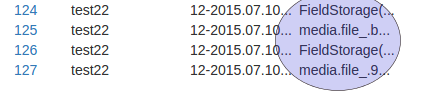
> In "database db select" changes file downloading link "file" as shown in
> pic2.:
>
> https://lh3.googleusercontent.com/-5NBxevJLglM/Vcs2CygnxgI/AAAAAAAAADE/jRtUSIJ6Gd0/s1600/pic2.png
>
>
> is this therefore download function? if it is how should I modify it or
> create new one? if not please redirect to the solution.
> Thank you.
>
>
> On Monday, August 3, 2015 at 11:33:56 PM UTC+3, Anthony wrote:
>>
>> You could follow this method to store the original filenames:
>> http://web2py.com/books/default/chapter/29/07/forms-and-validators#Storing-the-original-filename
>> .
>>
>> Anthony
>>
>> On Monday, August 3, 2015 at 3:52:19 PM UTC-4, Vladimiras Lomovas wrote:
>>>
>>> Thank you for such quick answer.
>>> Could you suggest solution(or where to look) on returning list of
>>> uploaded files(without renaming them or otherwise) for the user to view or
>>> download them?
>>>
>>>
>>> On Monday, August 3, 2015 at 3:55:12 AM UTC+3, Massimo Di Pierro wrote:
>>>>
>>>> web2py exposes only actions, not all functions. An action is a function
>>>> in a controller that takes no arguments and does not start with two
>>>> underscores.
>>>>
>>>> Be very careful with using the original filename as name of the file.
>>>> There are many possible vulnerabilities associated with this behavior,
>>>> including directory traversal. This is why most frameworks, including
>>>> web2py, rename files on upload. Consider that the sender can inject any
>>>> character it in filename and that character may have a special meaning on
>>>> your filesystem (think of / \ : for example). Also consider a file with
>>>> that name many already exist.
>>>>
>>>> Massimo
>>>>
>>>>
>>>> On Sunday, 2 August 2015 18:56:37 UTC-5, Vladimiras Lomovas wrote:
>>>>>
>>>>>
>>>>> <https://lh3.googleusercontent.com/-rj-e4oMWCIk/Vb5xxX8VZRI/AAAAAAAAACo/pnTUX_lqYA0/s1600/nolist.jpg>
>>>>>
>>>>> Hello I'm new to programming and web2py but here I'm doing my first
>>>>> project.
>>>>> I'm using web2py as a back-and for android app to get and transfer
>>>>> data.
>>>>> I need to return list of user uploaded files( in JSON ) but web2py
>>>>> save files with unique name.
>>>>> I find most accurate solution to my problem:
>>>>> http://stackoverflow.com/questions/8008213/web2py-upload-with-original-filename
>>>>>
>>>>> but it's not working for some reason
>>>>> and some functions is not listed in "exposes:"(shwon in picture). why?
>>>>>
>>>>>

--
Resources:
- http://web2py.com
- http://web2py.com/book (Documentation)
- http://github.com/web2py/web2py (Source code)
- https://code.google.com/p/web2py/issues/list (Report Issues)
---
You received this message because you are subscribed to the Google Groups
"web2py-users" group.
To unsubscribe from this group and stop receiving emails from it, send an email
to [email protected].
For more options, visit https://groups.google.com/d/optout.