Here is a simple fix if there hasn't been one added to Web2Py yet. Use the
Bootstrap readonly attribute.
example:

form.element('input', _id='RentalTransactionMaster_TotalAmt')['_readonly']=''


Placed in controller after the form = SQLFORM(...) declaration.


On Friday, March 31, 2017 at 5:25:59 AM UTC-4, Joe Barnhart wrote:
>
> I'm going a little nuts with forms that have readonly fields.  Examples
> are forms where some fields are shown to the user so they can see the
> contents, but they aren't allowed to change them.  For example, an
> "expiration date" for a subscription.  They can see when it expires, but
> they can't just edit it.  They have to go thru an ordering process for that.
>
> The Field flag of writable=False has not proved useful.  It changes the
> field to a simple piece of text and thus breaks any custom formstyle I'm
> using.  The simple text without an input field looks ugly and doesn't match
> spacing, fonts, or any of the other myriad styles used in the read/write
> fields.  Sad to say, writable=False just is not useful.
>
> I have created an alternative that creates the fields as usual, but marks
> them with a "readonly" attribute.  Javascript can then be used to ensure
> the contents are not modified, even for tricky fields like date selectors
> and list box widgets.  But now we get to the underlying problem -- the form
> validator fails when I take this approach.
>
> Because the readonly fields are readonly, they do not show up in the
> request.vars when the form is submitted.  But since the SQLFORM knows
> nothing of this, it just sees null values for the fields and throws a
> validation error for elements like list boxes (which can't be empty).
>
> It's almost like I want to change the SQLFORM definition after the form is
> created (with the readonly list boxes) and then remove those fields from
> the SQLFORM when it does its validate processing, so it would just ignore
> the missing fields and not try to update the record with empty values.
>
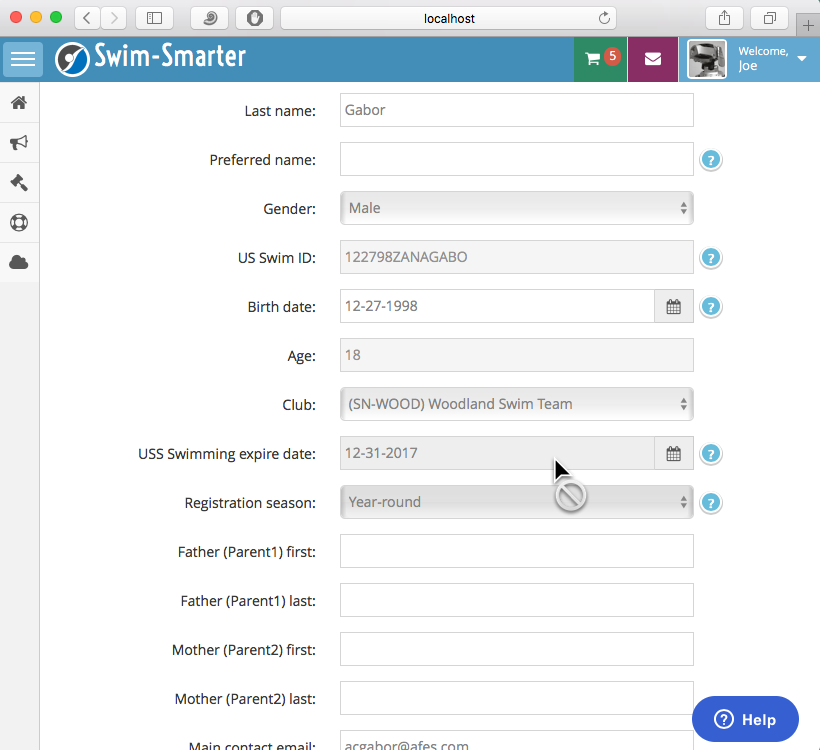
> Here's an example.  You can see the cursor which tells the user the field
> is not editable.  On this view the expire date, the season, the age, and
> the US Swim ID are all non-editable fields.  But the season is an example
> of an option list which causes the form processing to throw an error and
> fail.
>
> Just looking for some ideas.
>
> Joe
>
>
> <https://lh3.googleusercontent.com/-BqVuGZtmcZw/WN4frOAVqLI/AAAAAAAAAoc/Hd37dU2uKB89UIRmwZTI5bfx9q2wqDN-QCLcB/s1600/Form_with_readonly.png>
>
>

--
Resources:
- http://web2py.com
- http://web2py.com/book (Documentation)
- http://github.com/web2py/web2py (Source code)
- https://code.google.com/p/web2py/issues/list (Report Issues)
---
You received this message because you are subscribed to the Google Groups
"web2py-users" group.
To unsubscribe from this group and stop receiving emails from it, send an email
to [email protected].
For more options, visit https://groups.google.com/d/optout.