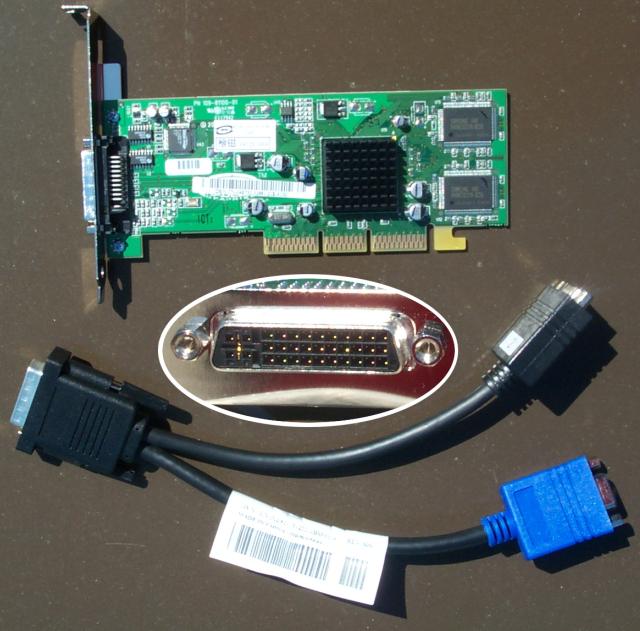
>   We have bought a number of Dells with the OEM RadeonVE card.  I can
> certainly confirm that they are strange compared to the out-of-box
> Radeon VE QY, although the PCI vendor id is identical.  Have a look at:
>
>     http://wetlogic.net/stewart/xfree-radeon-ve/radeon-ve-dell.jpg
>
> to see the card and the single connector on the board.  Unlike the
> retail version of the board I have, this board does not duplicate
> output on both connectors, but instead displays only on cable 1 (the
> blue connector on the Y-adaptor in the picture), and nothing at all
> on cable 2.
Nice picture. Just to add, Dell also has a different Y-adaptor with two
DVI-D outputs (working for the same card) as disscussed below.

> When I tried a dual-head configuration that works successfully on a
> retail version of the Radeon VE versions, I found two problems which
> I patched:
>
>   - The first problem is that the primary interface does not report
>     the BIOS value that radeon_driver.c expects in the function
>     RADEONGetBIOSParameters().  Instead, it reports only a CRT on
>     the secondary connector.  In the single-headed case this works
>     correctly.
>
>     In the dual-head case things would also work correctly except
>     that when RADEONPreInit() is called on the second screen instance,
>     it checks for BypassSecondary and quite silently returns FALSE.
>     This stumped me for a long time since there were no error
>     messages in the X log file that indicated why Screen 1 was
>     completely ignored in my XF86Config-4.
>
>     I'm not sure I understand why it is an error ifthe BIOS
>     doesn't claim to detect a second monitor.  Does this mean
>     the user must reboot in order to attach a second monitor, or
>     in many cases just because it happened to be off at boot time?
>     In my patch, I commented the return out, but I think it's
>     worth opening a discussion (I'm not on Xpert, so please Cc
>     me).  The behavior as a result of this change is that if
>     there's a second screen definition and the card is multi-head,
>     and there's at least one monitor attached, the second monitor
>     is pre-initted.

Current driver uses BIOS settings to detect connected monitors, this
requires you to have correct monitors connected during the boot (some
versions of BIOS can handle hot-plug, which will set correct settings even
after boot). Ideally the driver should do monitor probe itself (scan through
all DDC types and try to talk to the possible connected monitors). Even
more, it should handle hot-plug interrupt, so that you can swap or plug a
monitor even after X started. But all this takes time and man power to get
implemented.
BypassSecondary is used when only one monitor connected to the second CRT
port while you have dual-head setup in the config file. I remember there was
some problem before this flag was added. So be careful to comment it out. In
you case, it seems you didn't have all monitors connected during the boot,
the BIOS didn't detect one of your monitor which causes it's bypassed.

>   - The second problem is that the secondary monitor on the OEM
>     Dell Radeon VE uses DAC2 for output.  There was actually a
>     bit of commented out code in RADEONInitCrtc2Registers() already,
>     so I simply added an option named "Crt2Dac2" and tested for
>     it there.  The true maintainers of this code may want to add
>     another boolean field to RADEONEntRec and hunt for the option
>     elsewhere, if they think that's cleaner.
>     Thesecond screen definition in my XF86Config-4 now looks like:
>
>         Section "Device"
>             Identifier "ATI Radeon 1"
>             Driver "radeon"
>             BoardName "Radeon"
>             BusID "PCI:1:0:0"
>             Option "AGPMode" "4"
>             Option "Crt2Dac2"
>             Screen 1
>         EndSection

DELL card can be auto detected from Sub-System Card ID of PCI configuration
space. So you don't really need an option for it's special configuration.
Yes, for DELL's two CRTs adaptor, you need to turn on TV DAC to drive
secondary CRT (RADEON_DAC2_DAC2_CLK_SEL). For dual DVI-D cable, things are
more complicated, mode validation routines have to be added and FP2
registers need to be programmed for the second flat panel.

>   The third problem, which I didn't deal with, is that the DDC info
> for the two monitors attached was swapped.  In other words, the DDC
> info listed for screen 0 (the monitor displaying the settings listed
> in the "Screen 0" Section, also the monitor connected to the first
> cable) appeared in the section of the log file dedicated to screen 1,
> and vice versa.  This wasn't a big enough problem for me to solve,
> and since it's hard to solve it without yet another option, I decided
> to forego it.

The DDCType from DELL card's BIOS does not follow the old rule, it need to
be hard coded.
I have working code on my system for both 2-CRT and 2-DVI adaptors. The code
has lots of other changes since XF4.20, part of them is being merged into
current CVS tree. I can send you a copy if you are interested. I've sent to
other people for testing a couple of days ago.

>   Anyway, I hope this helps some people.  Here it is, based on
> 4.2.99.1 (CVS as of yesterday):

Thanks, it's certainly useful. And good for you to dig into this.


_______________________________________________
Xpert mailing list
[EMAIL PROTECTED]
http://XFree86.Org/mailman/listinfo/xpert