
Frequently Asked Questions
Participate
- How can I archive a public list?
- Will this service work for my list?
- Can I delete a message from the archive?
- How do I contact a list administrator?
- Where can I discuss the The Mail Archive's service?
- What is your privacy policy?
- What about spamming?
- Why is there spam in the archive?
- What guarantees do you provide?
Usage
- What is the search syntax?
- Do you have message-id search?
- How can I import existing archives?
- Messages don't show up.
- My list splits into multiple archives.
- Do you support RSS?
- Do you support multiple languages (i18n/l10n)?
- Do you support keyboard shortcuts?
- Can I customize the look and feel of my list's pages?
- How can I change an archive's info page?
- How can I download all or part of an archive?
- Do you handle high volume lists?
- Do you archive attachments?
- How good is message threading?
- How is the service performing?
General interest
- How can my organization partner with The Mail Archive?
- Why is it free? What's the business plan?
- Do you give back to the community?
- What is your engineering philosophy?
- How can list servers integrate better?
- DMCA agent?
- Any public acknowledgments?
- How can I archive a public list?
-
- If you are a Google Groups administrator, please directly subscribe archive+gg1@mail-archive.com. For Yahoo Groups, please use yahoo@mail-archive.com. Otherwise subscribe archive@mail-archive.com to the mailing list. Contact us for help if needed.
- Are you the list administrator? Yes: The Mail Archive does not respond to "confirmation requests". You should add the subscription such that a confirmation is not required. No: go to the subscription confirmation page, find the confirmation message, and follow the instructions.
IMPORTANT: The Mail Archive will create a publicly readable archive.
- The Mail Archive merely provides an archival forum for mailing lists.
- The Mail Archive does not necessarily agree or endorse any particular viewpoint posted to a mailing list.
- The Mail Archive exercises no editorial control unless required by applicable law.
The Mail Archive automatically detects when it receives mail from a new list. Thus, you are encouraged, although certainly not required, to send a test message to the newly archived list. If you are adding several lists to the archive, send a separate and distinct test message to each one.
- Will this service work for my list?
-
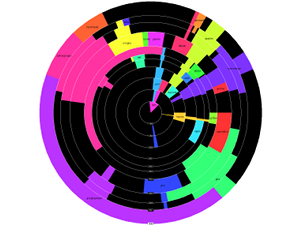 10 years of growth
Almost certainly. We require that the name of the list be present somewhere in the email headers. Almost all mailing lists do this automatically. For example, when people send mail to the list foobar@jab.org, the name of the list shows up prominently in the
To:header as well as other places. A few lists do funny tricks with email headers, and try to hide the name of the list. Spammers are notorious for forging and hiding headers. Sometimes even legitimate lists will try to hide the listname. This is most common when the list is for one-to-many communications, as opposed to many-to-many communications. Any list that mangles email headers to hide its name is incompatible with the service and will not be archived. We do not archive lists whose name does not begin with a letter. We've found that list names beginning with numbers or unusual punctuation are almost always noise, i.e. unsolicited commercial email or spam. The illustration shows growth (one year per ring) of some major users of The Mail Archive. - Can I delete a message from the archive?
-
List administrators may remove any message from their list. In addition, any poster may request removal of messages that that they themselves have written without having to get administrator approval. Deletion requests for messages written by another user (including messages where an individual’s public post may have been quoted by someone else) will require list administrator approval. We feel this policy strikes a balance between respect for individual privacy and respect for the concept of public mailing lists and open public discussion. Removal requests should be sent to our support address themailarchive@gmail.com.
- How do I contact a list administrator?
-
We do not know the contact information for the mailing list administrators. Most mailing list services have a "-owner" address where you can reach the list admin (for example, if the list is gossip@mail-archive.com then the list admin can likely be reached at gossip-owner@jab.org). We maintain an automated web page for each mailing list that may contain the List Owner's contact information. You can reach this page by going to "info.html" on the list archive. For example, if the list is gossip@mail-archive.com, then you can go to http://www.mail-archive.com/gossip@mail-archive.com/info.html. If none of the above works, you will need to search for the website that hosts the mailing list, or post a question to the mailing list.
- Where can I discuss the The Mail Archive's service?
-
The public mailing list gossip was created for informal support or discussion amongst users of the archiving service. Only subscribers may post.
NOTE: The gossip@mail-archive.com list is strictly for discussions related to the mail-archive.com service, AND ONLY the mail-archive.com service. Messages related to the content archived on The Mail Archive are NOT appropriate for the list and will be ignored.
Examples of appropriate topics for gossip@mail-archive.com:
- My list does not show up in the archives.
- List messages are not getting archived.
- Searching is not working.
- ...
We also have a support team.
- What is your privacy policy?
-
The Mail Archive does not solicit personal information, does not try to identify individual visitors, and does not send out junk email. We comply with internet standard email headers which restrict or prohibit archiving. System logs record server activity, including IP addresses of visiting computers. These logs are stored for a limited time (less than 90 days) and used for troubleshooting, aggregate statistics, and performance tuning only. Advertisements are governed by the advertising agency's privacy policy, please consider installing advertisement blocking for your web browser. Questions regarding privacy issues should be sent to the support team. See also Can I delete a message from the archive?
- What about spamming?
-
Do not send unsolicited commercial email to any mailing list or individual in the archive. Spamming is expressly forbidden, and also illegal. The service is based in California, USA which has anti-spam laws, including California Penal Code Section 502 (added by Assembly Bill 1629 (1998), approved by Governor September 26, 1998), California Business and Professions Code, Division 7, Part 3, Chapter 1, Article 1.8 (added by S.B 186 (2003), approved September 23, 2003). We consider spammers a very serious threat to mailing lists, archiving and internet communication in general. The Mail Archive despises spam and will never send unsolicited email to any list or list member for any reason.
The Mail Archive utilizes two levels of electronic countermeasures to prevent spam incidents. First, we explicitly block spam harvesting robots (spambots) from accessing our server. We deny access, at the server level, for any software that matches the browser ID of a known spambot. Our second line of defense is to make sure that the web pages themselves are spambot resistant. We do not use any unshielded
mailto:hyperlinks, email addresses and we strip out, scramble, or obfuscate email addresses from message headers and bodies. Yet we still provide a way for people to reply to an archived message, using their regular email software. This feat is achieved with a special POST protected CGI gateway which returns amailto:URL to the user agent. This technique is extremely effective in blocking generic spam harvesting robots; for more information, see Mullane's Spambot Beware guide. The effectiveness of our spam-blocking preventative measures are monitored by spambot trap addresses like honeypot@jab.org and many others.Despite all these steps, recognize that any time an email address is exposed on the internet, obfuscated or otherwise, spammers could potentially abuse it. Open mailing lists are vulnerable to spam attacks. Thus there is some risk associated with using The Mail Archive, and we do not assume any legal liability for spammers. Suggestions or feedback regarding privacy or anti-spamming enhancements are appreciated.
- Why is there spam in the archive?
-
Any spam that finds it way into The Mail Archive is coming from an evil spammer sending their garbage to the mailing list. Spam appearing in the archive is not coming from us and never would. We apply an inbound spam filtering service to remove spam before it ever gets to us, to minimize the problem. If you would a specific piece of spam removed, please contact our support team.
- What guarantees do you provide?
-
None! There are no quality of service guarantees. We work very hard to keep the service running smoothly, but we cannot provide any guarantees.
The Mail Archive has been running since 1998. Archiving services are planned to continue indefinitely. We do not plan on ever needing to remove archived material. Do not, however, misconstrue these intentions with a warranty of any kind. We reserve the right to discontinue service at any time.
And yes, we regularly backup data just in case something goes wrong.
- What is the search syntax?
-
Searches span all archived messages in a particular mailing list. More complex searches are supported through advanced query syntax. Phrase search is supported. So are fancy boolean operators like
+ - AND OR NOT
            ()
. Finally, searches can be limited to a particular email field such asfrom,date,subjectormessage. For example, one can find all messages from April 2002. The sort order can be controlled by addingsort:newestorsort:oldestto your search string.- "battle royale"
- +Jeff -Breidenbach -Marshall
- (dualing OR dueling) AND banjos
- from:"Mac Oglesby"
- date:[19980101 TO 19981231] Breidenbach
- date:200204*
- help sort:newest
To place a search form on a web page, use the following HTML. Don't forget to replace
gossip@mail-archive.comwith the listname of interest.<form action="/search" method=get>
<input type="hidden" name="l" value="gossip@mail-archive.com">
<input type=text name="q" value="" size=25>
</form>The North American Sundial Society published an excellent reference document describing search in more detail. Very advanced users may also wish to read the Lucene documentation, noting The Mail Archive defaults to the AND conjunction operator.
- Do you have message-id search?
-
Sure, you can search right from the homepage. Advanced users who wish to programmatically search for a RFC2822 Message-Id may use this form as an example. We also have a hyperlink example.
- How can I import existing archives?
-
By far the easiest way to import messages into The Mail Archive is via an mbox file. First make sure the archive is started, then contact our support team if you have an mbox file you wish to import. Advanced users may find an email conversion utility useful for Eudora, MH, IMAP, maildir, YahooGroups, and the ever popular broken mbox files that don't have >From quoting. Mailman users who already have gzip'd text or mbox archives online can just supply a URL. Please don't even think about forwarding old messages directly to the archival address. First, there's an excellent chance they will be eaten by a spam filter. Second, unless you really really know what you are doing, the forwarding process will add extra headers to the message, which will confuse the sorting software and the messages will not archive correctly.
- Messages don't show up.
-
Some email messages specifically request not to be archived. Any messages bearing the header
X-No-Archive: yeswill not be archived by this service. - My list splits into multiple archives.
-
Sometimes a mailing list will have multiple email address. For example, a list might use both "adorable@odc.com" and "adorable@vorlon.odc.com". When The Mail Archive automatically sorts incoming email, it has to figure out that both email addresses are actually for the same list. It looks (rather thoroughly) for clues in the email headers to do this sorting; usually this works very well.
Sometimes, however, it can be difficult or impossible by just looking at headers to know that two email addresses really belong to the same list. For example, when email comes from "mhonarc@ncsa.edu" and "mhonarc@rosat.de" it is tough to know, automatically, if that is one list or two. If you run a list, and are experiencing this problem, add a header such as
x-mailing-list:
            mhonarc@rosat.de
to each and every email (as many lists currently do). This blatant clue will give the automatic sorting program all the hints it needs. - Do you support RSS?
-
Yes. Each list has an associated RSS feed. The feed provides metadata for syndication purposes - typically websites who wish to link to the most recent messages in a particular archive. The RSS lives at the fixed location <LISTURL>/maillist.xml. For example, the gossip@mail-archive.com RSS file would be located at
http://www.mail-archive.com/gossip@mail-archive.com/maillist.xml. Additionally, we maintain a master list of all active RSS feeds in OPML format. - Do you support multiple languages (i18n/l10n)?
-
The Mail Archive will handle email in any language. By default, an archive's localization will be in English. That means you will see English language labels like "Search" or "earlier messages" even if the message itself is not in English. To request a different localization, use the menu on the archive's info page. Currently supported localizations include Arabic, Catalan, Chinese, Czech, Danish, Dutch, English, French, Galician, German, Greek, Hebrew, Hungarian, Indonesian, Italian, Japanese, Korean, Lithuanian, Norwegian, Polish, Portugese, Romanian, Russian, Serbian, Spanish, Swedish, Tamil, Turkish, Ukrainian, and Vietnamese. It is very easy to add a new localization. Translate the following words to your language and send the results to the support team. It is much more important to make sense in context and sound good than to provide a literal translation.
  Search

  Date Index

  Thread Index

  Earlier messages

  Later messages

  Date

  Thread

  Reply to Jeff

  No matches were found for Jeff

  Advanced search

  1-10 of 204 results


  The Mail Archive home

  Add your mailing list

  FAQ

  Support

  Privacy

  Previous message

  View by thread

  View by date

  Next message

  all messages

  about the list

  Share
Note to internal staff - translations must be in UTF-8.
- Do you support keyboard shortcuts?
-
If your browser supports access keys, the following keyboard shortcuts should be available when reading messages.
Access key Mnemonic Action Alt-n Next Later message by thread Alt-p Previous Earlier message by thread Alt-f Forward Later message by date Alt-b Back Earlier message by date Alt-i Index Chronological index Alt-c Contents Thread index - Can I customize the look and feel of my list's pages?
-
Yes. It is very easy to brand an archive with a custom logo. Logo images may be submitted on the archive's info page. The maximum allowed size of a logo is 300 pixels wide by 50 pixels tall; larger images will be automatically downscaled.
- How can I change an archive's info page?
-
QR code
Each archive has an infomation page describing the list. For example, the information page might say how to a user can subscribe or unsubscribe to a list, or reference alternate archives. There is also a field called "hints" which allows one to add keywords describing the list. While some fields can be directly edited from the webpage, most fields are generated automatically based on standard email headers sent with list messages. To update this information, the list administrator must adjust settings on the list server software; consult the documentation for the list server software for details. Not all list server software has the ability to set or adjust these headers although it is becoming increasingly common. The information page also contains a QR Code. People with fancy mobile phones can take a picture of this barcode and directly access the corresponding archive without any typing.
- How can I download all or part of an archive?
-
You can use any website mirroring tool to download an archive in HTML format to your local computer. Please don't hammer The Mail Archive's servers too hard; do not request more than one page a second, do not try to download millions of web pages. Most importantly, do not abuse a list archive content in any way shape or form; if in doubt please check with the list admin first. The Mail Archive usually keeps a copy of the raw email messages as well, but they are not web accessible. This is mostly to prevent address harvesting by spammers. However, we also sometimes move older raw messages to cold storage since they are not actively used. Sometimes the list admin needs access to the raw messages, for example to export to another archive. We'll accommodate such requests when practical.
- Do you handle high volume lists?
-
We accept lists that get tens of messages per day. Only the most recent 3000 messages are available via date or thread indexes. Everything should be accessable via the search engine.
- Do you archive attachments?
-
Currently image attachments and excessively large attachments of any sort are unlikely to be archived. It is possible that in the future, no attachments of any sort will be archived.
- How good is message threading?
-
Threading usually works very well, but occasionally there is a hiccup. For example, one might see two different topics threaded together. Usually this occurs when a message author hits reply to a message in one topic, but manually changes the subject line to match another topic. When this happens, the threading subsystem has to decide whether to track "who replied to what", or to track the subject line. The Mail Archive goes with the former because that is usually more reliable. For more information about threading and the special email headers that get inserted into a message whenever you hit reply, see the MHonArc FAQ entry.
- How is the service performing?
-
Historical and current uptime statistics are available starting 2005. We typically have an annual uptime somewhere around 99.7% every year.
Trailing 30 days: Trailing 12 months: Total uptime:
 archiving latency over last 24 hours
Archiving latency can vary dramatically. First, The Mail Archive has a never ending capacity battle. More and more people use the service, slowing down archiving performance. We upgrade the software and hardware to keep pace, improving performance. Second, under high load the service gracefully switches over to a more efficient batch mode, which means that many messages are processed at a time, not necessarily in the order received. Archiving latency is an important metric and under typical operating conditions messages appear in the archives within minutes of receipt. However, performance depends greatly on message traffic patterns. The graph shows how many messages are piled up and waiting in the service's inbox at any given time.
 HTTP queries per second
 HTTPS queries per second
The Mail Archive has not experienced any major problems with serving capacity and we don't foresee near term problems. Most computational resources are spent up front during archiving time. So far we we have no trouble keeping up with both users, and the ravenous web crawlers from the global search engines. And they sure are ravenous! The unique IP address count should provide a rough idea of human visitors, while the graphs describe overall traffic.
visitors and new messages yesterday - How can my organization partner with The Mail Archive?
-
The Mail Archive works with a number of organizations to provide primary or secondary list archives. For example, some organizations run a large number of mailing lists and systematically archive everything on this service. Contact the support team for assistance or discussion. Users of the mailman list server software on Linux may want to use the following script as a starting point.
# cd /var/lib/mailman/lists

# echo archive@mail-archive.com > /tmp/foo

# ls | xargs -n 1 add_members -r /tmp/foo
- Why is it free? What's the business plan?
-
The Mail Archive was a creation of Jeff Breidenbach in 1998 and run for six years as a personal hobby project. Jeff Marshall joined in 2004 and the service ran as an advertisement supported small business through 2018. As of 2019 the service has returned to hobby status.
- Do you give back to the community?
-
Yes, we regularly donate to organizations, people, and projects that have directly or indirectly helped The Mail Archive to exist, or to organizations that simply do good.
In 2016 we donated to the following:
In 2015 we donated to the following:
In 2014 we donated to the following:
In 2013 we donated to the following:
In 2012 we donated to the following:
- American Forest Foundation
- Energy Made in Uganda
- Peninsula Humane Society & SPCA
- The Internet Archive
In 2011 we donated to the following:
- Ada Initiative
- American Cancer Society
- Global Alliance for Clean Cookstoves
- Japanese Red Cross Society
In 2010 we donated to the following:
In 2009 we donated to the following:
- Alisa Ann Ruch Burn Foundation
- American Birkiebeiner
- AUFS
- CORA
- Doctors Without Borders
- MIT Museum
- Orphans of the Storm
- Peninsula Catworks
- SETI
In 2008 we provided donations to the following:
- Free Software Foundation
- Mailman
- The Marine Mammal Center
- Michael J. Fox Foundation
- MHonArc
- National Park Foundation
- The Public Press
- San Francisco Food Bank
- SETI
In 2007 we provided donations to the following:
In 2006 we donated to the following:
- Debian
- Electronic Frontier Foundation
- Free Software Foundation
- MIT EECS Department
- MIT OpenCourseWare Fund
- World Wide Web Consortium
In 2005 we donated to the following:
- American Civil Liberties Union
- American Red Cross
- Creative Commons
- Foundation for a Free Information Infrastructure
- Free Software Foundation
- GNOME Foundation
- Habitat for Humanity
- htDig
- MHonArc
- MIT OpenCourseWare Fund
- Mozilla Foundation
- Ubuntu Foundation
- X Prize Foundation
In 2004 we donated to the following:
- What is your engineering philosophy?
-
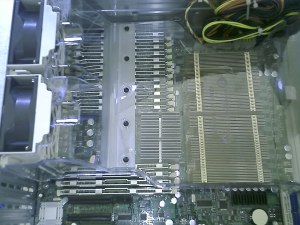 "gen8" undergoes hardware testing
For hardware, The Mail Archive primarily utilizes an x86-64 architecture server attached to high speed RAID disk array with a multi-terabyte raw capacity. The server is housed in California in a professionally managed datacenter, including battery buffered power, high speed network connect, and high clue network administrators. Our preferred server vendor is Ashford Computer Consulting Service.
For software, the service utilizes best of breed Free Software programs running under the Ubuntu operating system. Application software includes the Apache web server, MHonArc archiving software, and PyLucene search library. Both the core OS and the Ubuntu application collection are automatically upgraded on a daily basis against distribution bug fixes and security patches. We contribute directly to the maintenance of key packages at the Linux distribution level.
A custom design element of The Mail Archive is the sorting system. List mail comes into a single address and is automatically separated. The competing approach would be to provide a separate email address to each list, and then let the MTA and SMTP infrastructure do the work. The Mail Archive's sort-based design is partly historical (it was derived from personal email filters), partly intellectual (the challenge of making a great sorting algorithm), and partly user oriented (it's a little easier from the user's perspective to work with a fixed address). The purely technical downsides of using a sort algorithm is computational cost and complexity, especially with respect to crossposts. And it can be a challenge when lists that migrate from server to server or widely fluctuate their headers.
The graphic layout and general look-and-feel of the website was done by Russ Weakley from Max Design. Russ performed most of The Mail Archive's site design, first in 2004 and more recently in 2012 with a redesign of the message pages. Any shortcomings in the site's design are ours alone, however, as we alter the design. We highly recommended Russ if you are looking for a great design experience.
- How can list servers integrate better?
-
If you program list server software, first and foremost please support RFC2369. If you are interested in tighter integration with The Mail Archive, we'd love to be an explicit configuration option. User interface is important; the option should be easy for list administrators to invoke but not cause confusion or accidents. The option must add archive@mail-archive.com as a subscriber to the list. It may make archive@mail-archive.com immune from automatic unsubscribe mechanisms and ban it from posting. It may add the RFC2369 header
List-Archive:
	  <http://www.mail-archive.com/gossip@mail-archive.com>
with gossip@mail-archive.com replaced by the posting address used in the List-Post header. It may add a reference to the archive in the message footer._______________________________________________ Gossip mailing list http://www.mail-archive.com/gossip@mail-archive.com
For fancy integration, you can make a live hyperlink to the archive in the footer. You can do this using the message-id.
_______________________________________________
Computer Guys Mailing List
http://mid.mail-archive.com/e332889b0807292221r2aea3975l3d6f66848d13b279@mail.gmail.com
For really fancy integration (maybe too fancy), you can add a hashed reference archive message in the footer. We also recommend transmitting the URL via an RFC5064 header, such as
Archived-At:
	    <http://go.mail-archive.com/6B4LX8klSXjr7Ot_gvb6ZkUybHI=>
. This python implementation demonstrates the hash calculation used by The Mail Archive._______________________________________________ Computer Guys Mailing List http://go.mail-archive.com/6B4LX8klSXjr7Ot_gvb6ZkUybHI=
	    import hashlib

	    import base64

	    message_id = "e332889b0807292221r2aea3975l3d6f66848d13b279@mail.gmail.com"

	    list_post = "computerguys-l@listserv.aol.com"

	    sha = hashlib.sha1(message_id)

	    sha.update(list_post)

	    hash = base64.urlsafe_b64encode(sha.digest())

	    url = "http://go.mail-archive.com/%s" % hash
- DMCA agent?
-
Please note we submit a copy of each DMCA take down notice we receive (with your personal information removed) to Chilling Effects for publication. An example of such a publication may be seen at http://www.chillingeffects.org/dmca512/notice.cgi?NoticeID=1498.
- Any public acknowledgements?
-
Paul Kryzanowski, Michael Yount, Paul Mitchell, Amir Karger, Arthur Merlin, James Manning, Andrew Vyrros for code contributions, Mac Oglesby and Carl Sabanski for documentation contributions, Earl Hood, Geoff Hutchison, for their excellent coordination work with their free software programs, Carole Nasra, Randal Matheny, Valens Riyadi, Gerrit Haase, Waldemar Dworakowski, Alex Patak, Daniel Peder, Ervin Jakab, Andrius Kurtinaitis, Luc Verhelst, Albert Cuesta, Filip Brcha, Toshiyuki Kimura, Mie Onnagawa, Ahmad Gharbeia, S K, Leandro Regueiro, Guan Yang for help with language localization, Jay Ball, Lishin Lin for encouragement, Victoria Stodden for system administration help, Rob Walker, Robert Flemming, Kevin Collins for support at VA Linux Systems, David Weekly for his work with the California Community Colocation Project, Peter Ashford for hardware expertise, Lars Magne Ingebrigtsen for GMane coordination, Tom Lobato and Shahrukh Merchant for helping with mailman imports, the HURL mailing list for regularly flooding my inbox, Tomoyuki Tanaka, Mate Wierdl, Nathaniel Irons, Graham Todd, Randal Matheny, Martin Herbener, Joe Tainter, Florian Effenberger and other users for providing feedback, and the cast of thousands involved with the Free Software movement whose foundation made this project possible.


General software revision: 2019-03-10