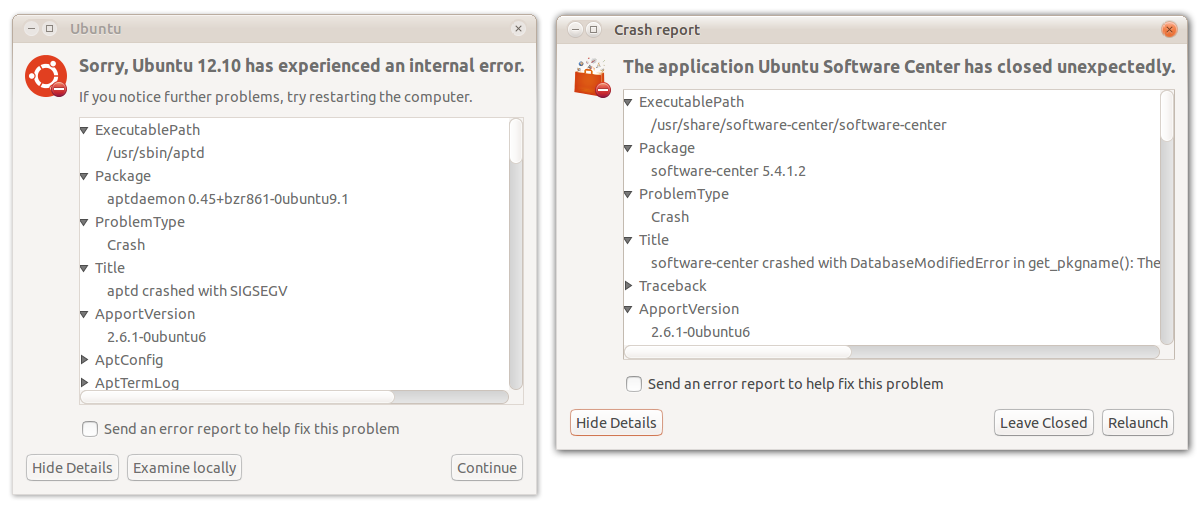
I tried to reproduce this bug by starting a package installation, and
then entering at a terminal
    sudo pkill -SEGV aptd

Doing that, I didn't get the "Task cannot be monitored or controlled"
alert at all. Instead I got these two Apport alerts: one "internal
error" for aptd itself, and one "The application Ubuntu Software Center
has closed unexpectedly" (an example of bug 1033902).

How can I trigger the "Task cannot be monitored or controlled" alert
reliably?

It's possible those two Apport alerts may be combined into one or even
zero (merged with a later alert). So I think it may still be appropriate
for the Python aptdaemon client to be responsible for showing an error
message in this situation. If it is, what can we suggest as ways to
solve the problem?

** Attachment added: "screenshot of Apport alerts"

https://bugs.launchpad.net/ubuntu/+source/aptdaemon/+bug/441686/+attachment/3435669/+files/441686-aptd-segv.png

--
You received this bug notification because you are a member of Ubuntu
Bugs, which is subscribed to Ubuntu.
https://bugs.launchpad.net/bugs/441686

Title:
  "Task cannot be monitored or controlled" alert is unhelpful and scary

To manage notifications about this bug go to:
https://bugs.launchpad.net/ubuntu/+source/aptdaemon/+bug/441686/+subscriptions

--
ubuntu-bugs mailing list
[email protected]
https://lists.ubuntu.com/mailman/listinfo/ubuntu-bugs