You guys solved it.  I had created my v18 test databases as database projects
instead of databases.  Database Projects appear to be new and I’ll have to read
up on them.  I knew that 4D v18 was introducing a way to manage code in a
non-binary format, but I did not know the details.
Thanks,


David Belote


From: Jeremy French <[email protected]>
Date: Thursday, February 27, 2020 at 1:01 PM
To: 4D iNUG Technical <[email protected]>
Cc: David Belote <[email protected]>
Subject: Re: 4D v18.0 LTS - Form Wizard Missing


Hi David,


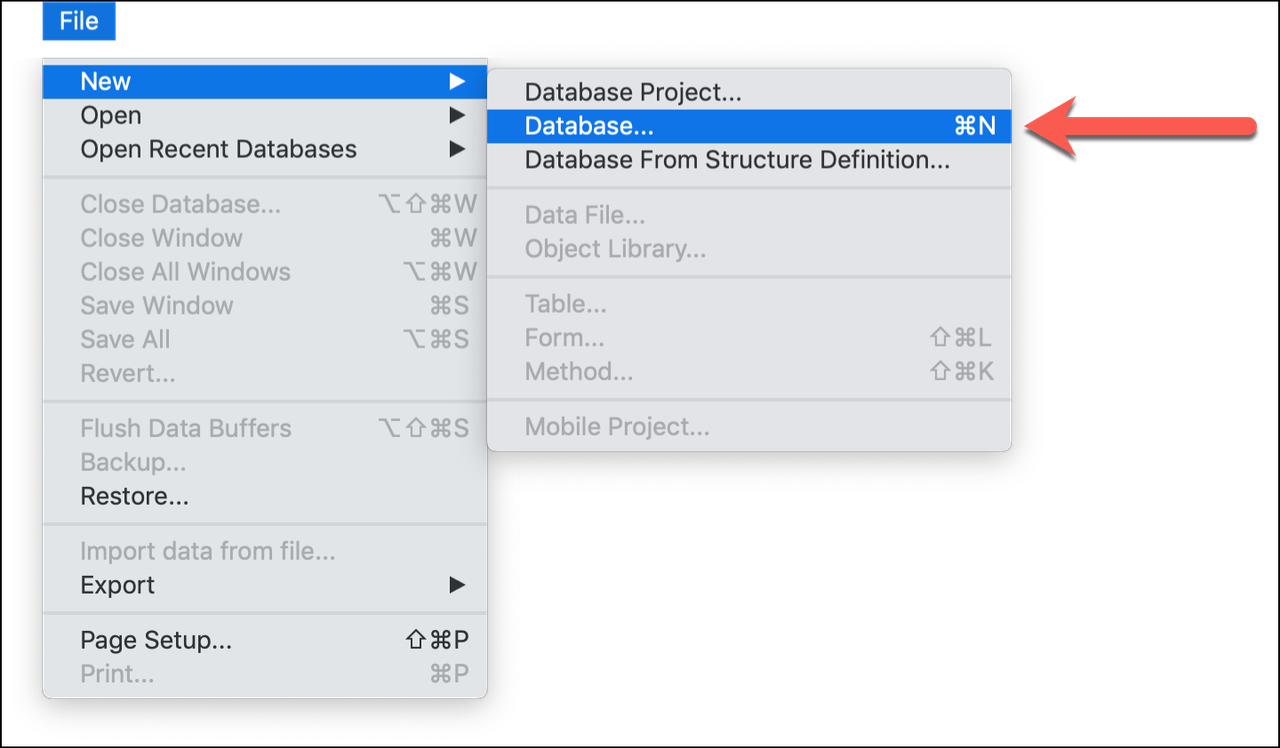
When you create a new database with v18, you can choose between:

1) Database Project; or

2) Database.


Database Project (also known as Project Mode) has no form wizard.


Database (also know as Binary Mode) has the familiar form wizard: the gear
button behaves as it did in v17 and earlier.


To create a v18 database in Binary Mode, choose FILE -> NEW -> DATABASE, as
shown in this screen shot:


https://i.postimg.cc/mrsb44rY/2020-02-27-14-49-22.png


Best regards,

Jeremy French


On Feb 23, 2020, at 10:01 PM, David Belote via 4D_Tech <[email protected]>
wrote:


Specific version is 4D v18 build 18.246707…


The Gear button at the bottom of the Forms page used to provide options for
using the Form Wizard.  Now all it lists is “New Form” which provides the exact
same functionality that the plus sign to the left of it has.  Both of them just
let a blank form be with no buttons or field chooser to pick from.

Is that what others see as well?  How do I fix this?


**********************************************************************
4D Internet Users Group (4D iNUG)
Archive:  http://lists.4d.com/archives.html
Options: https://lists.4d.com/mailman/options/4d_tech
Unsub:  mailto:[email protected]
**********************************************************************