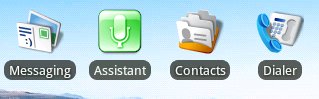
Note that Home uses a custom view derived from TextView to create this
effect. Also, if you want your widget to look like a shortcut, why
provide a widget in the first place? It's very easy for applications
to offer shortcuts and let Home take care of how it looks (what will
happen to your widget with other Home screens? What if we decide to
change the radius of the background behind the text? etc.)
On Wed, Nov 4, 2009 at 1:55 PM, Evan Ruff <[email protected]> wrote:
> Susan,
>
> I've tweaked it a little bit more and here is where I'm at:
>
> http://i243.photobucket.com/albums/ff2/gte619n/widgetLayout.png
>
> Pixel for Pixel, the text is exactly the same. The location within the
> bounding box is the same, as is the distance between the text and the
> graphic. In order to do this, I used the XML Layout and an XML
> drawable, no 9-patch was necessary.
>
> Here's the code:
> res/drawable/text_border.xml
> <shape xmlns:android="http://schemas.android.com/apk/res/android";>
>    <solid android:color="#AA111111"/>
>    <padding android:left="5dp" android:right="5dp"
> android:bottom="1dp" android:top="1dp" />
>    <corners android:radius="8dp" />
> </shape>
>
> res/layout/widget.xml
> <?xml version="1.0" encoding="utf-8"?>
> <FrameLayout xmlns:android="http://schemas.android.com/apk/res/
> android"
>            android:layout_width="fill_parent"
>            android:layout_height="fill_parent"
>            android:layout_gravity="center"
>        >
>        <LinearLayout xmlns:android="http://schemas.android.com/apk/res/
> android"
>            android:orientation="vertical"
>            android:layout_width="wrap_content"
>            android:layout_height="wrap_content"
>            android:layout_gravity="center"
>            >
>          <ImageView android:id="@+id/icon"
>            android:layout_gravity="center"
>            android:src="@drawable/icon_gray"
>            android:layout_width="wrap_content"
>            android:layout_height="wrap_content"
>            android:paddingBottom="5px"
>            android:paddingTop="5px"
>          />
>          <TextView android:id="@+id/message"
>            android:layout_width="wrap_content"
>            android:layout_height="wrap_content"
>            android:background="@drawable/text_border"
>            android:textColor="#FFFFFFFF"
>            android:layout_gravity="center"
>            android:text="Assistant"
>            android:textSize="13px"
>        />
>        </LinearLayout>
> </FrameLayout>
>
> Hope this helps!
>
> E
>
>
>
> On Nov 4, 4:28 pm, Susan <[email protected]> wrote:
>> Evan,
>>
>> You may find this post helpful as well. Not exactly right, but closer
>> than what I have...
>>
>> http://www.anddev.org/viewtopic.php?p=28996#28996
>>
>> On Nov 3, 11:39 pm, Susan <[email protected]> wrote:
>>
>>
>>
>> > Evan,
>>
>> > I am also struggling with this same problem. It's mystifying because
>> > so many widgets seem to have this look and yet I find it hard to
>> > believe that all the developers painstakingly did it by hand.
>>
>> > Can you post a screenshot of what you have? In what way is yours just
>> > a couple of pixels off?
>>
>> > Also, did you make that text_border file yourself? (I assume it is a
>> > ninepatch...?) I scanned the SDK for *.9.png and found several
>> > ninepatches that were similar but none that looked exactly right.
>> > (Here's an example of how mine looks with the Toast
>> > ninepatch:http://screencast.com/t/zEyDZr8fnI) It sure seems like if we
>> > found the
>> > right ninepatch image we'd just have to add the faint shadow to thetextand
>> > then we'd be home free.
>>
>> > On Oct 29, 10:40 pm, Evan Ruff <[email protected]> wrote:
>>
>> > > Hey Guys,
>>
>> > > I was hoping someone could help me with a home screenwidgetI'm
>> > > trying tolayout. Basically, I'm trying tolayoutmywidgetso it
>> > > matched a standard home screen application shortcut perfectly.
>> > > Basically, at this point, I'm about ~2px off and it's driving me
>> > > crazy! Has anyone gotten this to match up juuuuust right? Should I be
>> > > able to find thislayoutin the source somewhere? Any clues would be
>> > > much appreciated. Here's mylayoutthus far:
>>
>> > > drawable/text_border.xml - For the black background around thetext:
>> > > <shape xmlns:android="http://schemas.android.com/apk/res/android";>
>> > >     <solid android:color="#99000000"/>
>> > >     <padding android:left="5dp" android:right="5dp"
>> > > android:bottom="1dp" android:top="1dp" />
>> > >     <corners android:radius="7dp" />
>> > > </shape>
>>
>> > >layout/widget.xml - Thewidgetitself:
>> > > <?xml version="1.0" encoding="utf-8"?>
>> > > <FrameLayout xmlns:android="http://schemas.android.com/apk/res/
>> > > android"
>> > >             android:layout_width="fill_parent"
>> > >             android:layout_height="fill_parent"
>> > >             android:layout_gravity="center"
>> > >         >
>> > >         <LinearLayout xmlns:android="http://schemas.android.com/apk/res/
>> > > android"
>> > >             android:orientation="vertical"
>> > >             android:layout_width="wrap_content"
>> > >             android:layout_height="wrap_content"
>> > >             android:layout_gravity="center"
>> > >             >
>> > >           <ImageView android:id="@+id/icon"
>> > >             android:layout_gravity="center"
>> > >             android:src="@drawable/icon_gray"
>> > >             android:layout_width="wrap_content"
>> > >             android:layout_height="wrap_content"
>> > >             android:paddingBottom="5px"
>> > >             android:paddingTop="5px"
>> > >           />
>> > >           <TextView android:id="@+id/message"
>> > >             android:layout_width="wrap_content"
>> > >             android:layout_height="wrap_content"
>> > >             android:background="@drawable/text_border"
>> > >             android:textColor="#FFFFFFFF"
>> > >             android:layout_gravity="center"
>> > >             android:text="Assistant"
>> > >             android:textSize="12px"
>> > >         />
>> > >         </LinearLayout>
>> > > </FrameLayout>
>>
>> > > Thanks for any help tuning this badboy.
>>
>> > > Thanks!
>>
>> > > Evan
>
> --
> You received this message because you are subscribed to the Google
> Groups "Android Developers" group.
> To post to this group, send email to [email protected]
> To unsubscribe from this group, send email to
> [email protected]
> For more options, visit this group at
> http://groups.google.com/group/android-developers?hl=en
>


--
Romain Guy
Android framework engineer
[email protected]

Note: please don't send private questions to me, as I don't have time
to provide private support.  All such questions should be posted on
public forums, where I and others can see and answer them

--
You received this message because you are subscribed to the Google
Groups "Android Developers" group.
To post to this group, send email to [email protected]
To unsubscribe from this group, send email to
[email protected]
For more options, visit this group at
http://groups.google.com/group/android-developers?hl=en