RG,

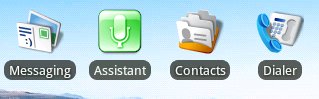
My widget manages the state of a Service running in the background. As
you click the widget it starts/stops/pauses/etc the service. I want it
to look like a Shortcut so that it fits into the Home Screen
seamlessly. Additionally, the icon and text change depending on the
state of the service. Is there a way to do that using a shortcut
without going with a widget? Otherwise, can you think of another way
to use the OS-level resources to render the same sort of thing?
Thanks!

Evan


On Nov 4, 4:59 pm, Romain Guy <[email protected]> wrote:
> Note that Home uses a custom view derived from TextView to create this
> effect. Also, if you want your widget to look like a shortcut, why
> provide a widget in the first place? It's very easy for applications
> to offer shortcuts and let Home take care of how it looks (what will
> happen to your widget with other Home screens? What if we decide to
> change the radius of the background behind the text? etc.)
>
>
>
>
>
> On Wed, Nov 4, 2009 at 1:55 PM, Evan Ruff <[email protected]> wrote:
> > Susan,
>
> > I've tweaked it a little bit more and here is where I'm at:
>
> >http://i243.photobucket.com/albums/ff2/gte619n/widgetLayout.png
>
> > Pixel for Pixel, the text is exactly the same. The location within the
> > bounding box is the same, as is the distance between the text and the
> > graphic. In order to do this, I used the XML Layout and an XML
> > drawable, no 9-patch was necessary.
>
> > Here's the code:
> > res/drawable/text_border.xml
> > <shape xmlns:android="http://schemas.android.com/apk/res/android";>
> >    <solid android:color="#AA111111"/>
> >    <padding android:left="5dp" android:right="5dp"
> > android:bottom="1dp" android:top="1dp" />
> >    <corners android:radius="8dp" />
> > </shape>
>
> > res/layout/widget.xml
> > <?xml version="1.0" encoding="utf-8"?>
> > <FrameLayout xmlns:android="http://schemas.android.com/apk/res/
> > android"
> >            android:layout_width="fill_parent"
> >            android:layout_height="fill_parent"
> >            android:layout_gravity="center"
> >        >
> >        <LinearLayout xmlns:android="http://schemas.android.com/apk/res/
> > android"
> >            android:orientation="vertical"
> >            android:layout_width="wrap_content"
> >            android:layout_height="wrap_content"
> >            android:layout_gravity="center"
> >            >
> >          <ImageView android:id="@+id/icon"
> >            android:layout_gravity="center"
> >            android:src="@drawable/icon_gray"
> >            android:layout_width="wrap_content"
> >            android:layout_height="wrap_content"
> >            android:paddingBottom="5px"
> >            android:paddingTop="5px"
> >          />
> >          <TextView android:id="@+id/message"
> >            android:layout_width="wrap_content"
> >            android:layout_height="wrap_content"
> >            android:background="@drawable/text_border"
> >            android:textColor="#FFFFFFFF"
> >            android:layout_gravity="center"
> >            android:text="Assistant"
> >            android:textSize="13px"
> >        />
> >        </LinearLayout>
> > </FrameLayout>
>
> > Hope this helps!
>
> > E
>
> > On Nov 4, 4:28 pm, Susan <[email protected]> wrote:
> >> Evan,
>
> >> You may find this post helpful as well. Not exactly right, but closer
> >> than what I have...
>
> >>http://www.anddev.org/viewtopic.php?p=28996#28996
>
> >> On Nov 3, 11:39 pm, Susan <[email protected]> wrote:
>
> >> > Evan,
>
> >> > I am also struggling with this same problem. It's mystifying because
> >> > so many widgets seem to have this look and yet I find it hard to
> >> > believe that all the developers painstakingly did it by hand.
>
> >> > Can you post a screenshot of what you have? In what way is yours just
> >> > a couple of pixels off?
>
> >> > Also, did you make that text_border file yourself? (I assume it is a
> >> > ninepatch...?) I scanned the SDK for *.9.png and found several
> >> > ninepatches that were similar but none that looked exactly right.
> >> > (Here's an example of how mine looks with the Toast
> >> > ninepatch:http://screencast.com/t/zEyDZr8fnI) It sure seems like if we
> >> > found the
> >> > right ninepatch image we'd just have to add the faint shadow to
> >> > thetextand then we'd be home free.
>
> >> > On Oct 29, 10:40 pm, Evan Ruff <[email protected]> wrote:
>
> >> > > Hey Guys,
>
> >> > > I was hoping someone could help me with a home screenwidgetI'm
> >> > > trying tolayout. Basically, I'm trying tolayoutmywidgetso it
> >> > > matched a standard home screen application shortcut perfectly.
> >> > > Basically, at this point, I'm about ~2px off and it's driving me
> >> > > crazy! Has anyone gotten this to match up juuuuust right? Should I be
> >> > > able to find thislayoutin the source somewhere? Any clues would be
> >> > > much appreciated. Here's mylayoutthus far:
>
> >> > > drawable/text_border.xml - For the black background around thetext:
> >> > > <shape xmlns:android="http://schemas.android.com/apk/res/android";>
> >> > >     <solid android:color="#99000000"/>
> >> > >     <padding android:left="5dp" android:right="5dp"
> >> > > android:bottom="1dp" android:top="1dp" />
> >> > >     <corners android:radius="7dp" />
> >> > > </shape>
>
> >> > >layout/widget.xml - Thewidgetitself:
> >> > > <?xml version="1.0" encoding="utf-8"?>
> >> > > <FrameLayout xmlns:android="http://schemas.android.com/apk/res/
> >> > > android"
> >> > >             android:layout_width="fill_parent"
> >> > >             android:layout_height="fill_parent"
> >> > >             android:layout_gravity="center"
> >> > >         >
> >> > >         <LinearLayout
> >> > > xmlns:android="http://schemas.android.com/apk/res/
> >> > > android"
> >> > >             android:orientation="vertical"
> >> > >             android:layout_width="wrap_content"
> >> > >             android:layout_height="wrap_content"
> >> > >             android:layout_gravity="center"
> >> > >             >
> >> > >           <ImageView android:id="@+id/icon"
> >> > >             android:layout_gravity="center"
> >> > >             android:src="@drawable/icon_gray"
> >> > >             android:layout_width="wrap_content"
> >> > >             android:layout_height="wrap_content"
> >> > >             android:paddingBottom="5px"
> >> > >             android:paddingTop="5px"
> >> > >           />
> >> > >           <TextView android:id="@+id/message"
> >> > >             android:layout_width="wrap_content"
> >> > >             android:layout_height="wrap_content"
> >> > >             android:background="@drawable/text_border"
> >> > >             android:textColor="#FFFFFFFF"
> >> > >             android:layout_gravity="center"
> >> > >             android:text="Assistant"
> >> > >             android:textSize="12px"
> >> > >         />
> >> > >         </LinearLayout>
> >> > > </FrameLayout>
>
> >> > > Thanks for any help tuning this badboy.
>
> >> > > Thanks!
>
> >> > > Evan
>
> > --
> > You received this message because you are subscribed to the Google
> > Groups "Android Developers" group.
> > To post to this group, send email to [email protected]
> > To unsubscribe from this group, send email to
> > [email protected]
> > For more options, visit this group at
> >http://groups.google.com/group/android-developers?hl=en
>
> --
> Romain Guy
> Android framework engineer
> [email protected]
>
> Note: please don't send private questions to me, as I don't have time
> to provide private support.  All such questions should be posted on
> public forums, where I and others can see and answer them

--
You received this message because you are subscribed to the Google
Groups "Android Developers" group.
To post to this group, send email to [email protected]
To unsubscribe from this group, send email to
[email protected]
For more options, visit this group at
http://groups.google.com/group/android-developers?hl=en