Hi,
I just decided to try and develop for the Android 2.0 OS, in hopes
that i could get a Motorola Droid and use my new app.  But ran into a
problem with setting up Eclipse. I installed Eclipse Galileo, at this
link:
http://www.eclipse.org/downloads/download.php?file=/technology/epp/downloads/release/galileo/SR1/eclipse-java-galileo-SR1-win32.zip
Then i went threw the box on this page:
http://developer.android.com/sdk/eclipse-adt.html
got though the box on the page perfectly fine.  So i go to the part
below it saying:
Now modify your Eclipse preferences to point to the Android SDK
directory:
1.Select Window > Preferences... to open the Preferences panel (Mac OS
X: Eclipse > Preferences).
2.Select Android from the left panel.
3.For the SDK Location in the main panel, click Browse... and locate
your downloaded SDK directory.
4.Click Apply, then OK.

Steps 1 and 2 ... easy, step 3 is where i things stop working :(
finding browse isnt the hard part its selecting a file that it likes.
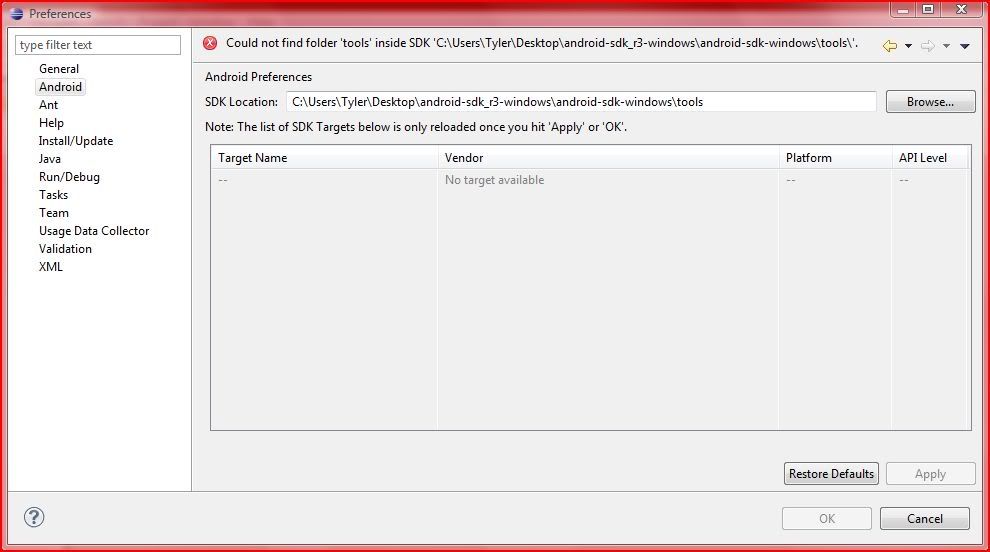
here is a screenshot of what is happening
http://i562.photobucket.com/albums/ss69/TyGamer/Eclipseandroidsdkscreenshot.jpg

What im doing is: The location of the Android SDK has not been setup.
Please go to Preferences > Android and set it up

But if you cant see what the screenshot says or your too lazy to open
it. It basicly says: Could not find folder 'tools' inside SDK 'C:\Users
\Tyler\Desktop\android-sdk_r3-windows\android-sdk-windows\tools\'.

Any sugestions???
Details about what im using:
Intel Processor computer running Microsoft Windows Vista 32-bit (was
preinstalled) and is keep up to date with any updates microsoft sends.
Internet Explorer 8
Computer is always connected to Internet.
Eclipse Galileo (latest software just downloaded on 11-9-09)
Android SDK Downloaded the windows (11-9-09)
Both Eclipse and Android SDK were both saved to my desktop and the
folder were extracted to my desktop as well.
I didnt change and file names, everything is as it was downloaded
besides what instructions on developer.android.com website for
installation.
Please Respond. Any Questions, Comments or Concerns or things you dont
understand, just feel free to reply with anything that might help me
or other members solve my problem.

~Tyler~

PS: Sorry you had to read so much :)

--

You received this message because you are subscribed to the Google Groups
"Android Discuss" group.
To post to this group, send email to [email protected].
To unsubscribe from this group, send email to
[email protected].
For more options, visit this group at
http://groups.google.com/group/android-discuss?hl=.