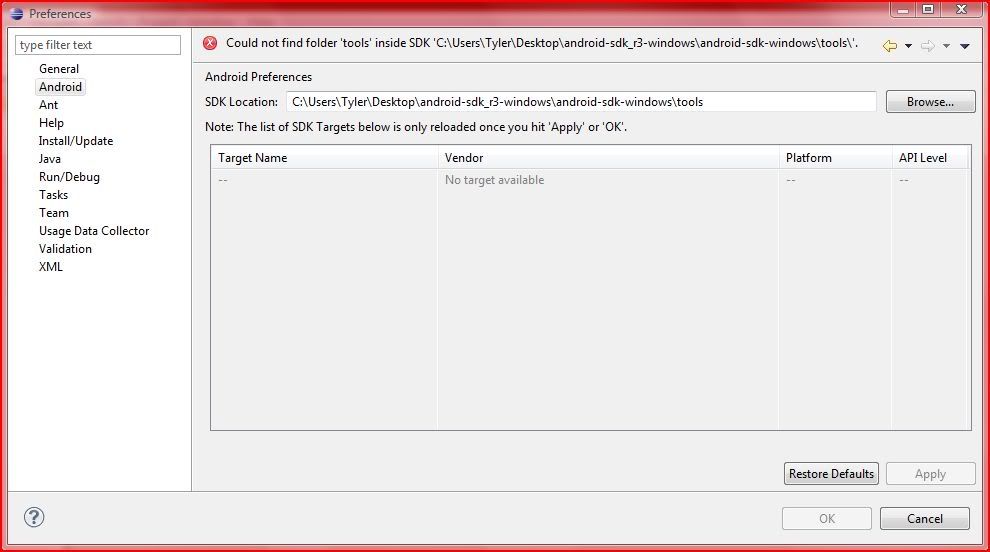
The error message "could not find '*tools*' inside '<random path>/*tools*'
should be a big hint.
The preferences ask for the SDK folder, not the tools folder inside the SDK.

Xav

On Mon, Nov 9, 2009 at 5:50 PM, TyGamer <[email protected]> wrote:
> Hi,
> I just decided to try and develop for the Android 2.0 OS, in hopes
> that i could get a Motorola Droid and use my new app.  But ran into a
> problem with setting up Eclipse. I installed Eclipse Galileo, at this
> link:
>
http://www.eclipse.org/downloads/download.php?file=/technology/epp/downloads/release/galileo/SR1/eclipse-java-galileo-SR1-win32.zip
> Then i went threw the box on this page:
http://developer.android.com/sdk/eclipse-adt.html
> got though the box on the page perfectly fine.  So i go to the part
> below it saying:
> Now modify your Eclipse preferences to point to the Android SDK
> directory:
>
> 1.Select Window > Preferences... to open the Preferences panel (Mac OS
> X: Eclipse > Preferences).
> 2.Select Android from the left panel.
> 3.For the SDK Location in the main panel, click Browse... and locate
> your downloaded SDK directory.
> 4.Click Apply, then OK.
>
> Steps 1 and 2 ... easy, step 3 is where i things stop working :(
> finding browse isnt the hard part its selecting a file that it likes.
> here is a screenshot of what is happening
>
http://i562.photobucket.com/albums/ss69/TyGamer/Eclipseandroidsdkscreenshot.jpg
>
> What im doing is: The location of the Android SDK has not been setup.
> Please go to Preferences > Android and set it up
>
> But if you cant see what the screenshot says or your too lazy to open
> it. It basicly says: Could not find folder 'tools' inside SDK 'C:\Users
> \Tyler\Desktop\android-sdk_r3-windows\android-sdk-windows\tools\'.
>
> Any sugestions???
> Details about what im using:
> Intel Processor computer running Microsoft Windows Vista 32-bit (was
> preinstalled) and is keep up to date with any updates microsoft sends.
> Internet Explorer 8
> Computer is always connected to Internet.
> Eclipse Galileo (latest software just downloaded on 11-9-09)
> Android SDK Downloaded the windows (11-9-09)
> Both Eclipse and Android SDK were both saved to my desktop and the
> folder were extracted to my desktop as well.
> I didnt change and file names, everything is as it was downloaded
> besides what instructions on developer.android.com website for
> installation.
> Please Respond. Any Questions, Comments or Concerns or things you dont
> understand, just feel free to reply with anything that might help me
> or other members solve my problem.
>
> ~Tyler~
>
> PS: Sorry you had to read so much :)
>
> --
>
> You received this message because you are subscribed to the Google Groups
"Android Discuss" group.
> To post to this group, send email to [email protected].
> To unsubscribe from this group, send email to
[email protected]<android-discuss%[email protected]>
.
> For more options, visit this group at
http://groups.google.com/group/android-discuss?hl=.
>
>
>


--
Xavier Ducrohet
Android SDK Tech Lead
Google Inc.

Please do not send me questions directly. Thanks!

--

You received this message because you are subscribed to the Google Groups
"Android Discuss" group.
To post to this group, send email to [email protected].
To unsubscribe from this group, send email to
[email protected].
For more options, visit this group at
http://groups.google.com/group/android-discuss?hl=.