The first link is now available as
http://keldix.com/keld/DKUUG160.pdf
Hope that your virus software does not complain about that too.

What was the complaint on the dkuug.dk site?

best regards
keld

On Mon, Feb 11, 2013 at 01:34:20PM +0100, Per Tunedal wrote:
> Thank you!
> Unfortunately my antivirus tells me that I shouldn't visit the first
> link, because the site is known to contain malicious software :-(
> Per
>
> On Mon, Feb 11, 2013, at 12:36, Jacob Nordfalk wrote:
>
>   You can also read about the steps en sv-da here
>   [1]http://www.dkuug.dk/wp-content/themes/dkuug/arkiv/DKUUG160.pdf
>   or see these videos here:
>   [2]http://ftp.klid.dk/ftp/video/2010-06-10-apertium/
>
> 2013/2/11 Kevin Brubeck Unhammer <[3][email protected]>
>
> Per Tunedal <[4][email protected]>
> writes:
> > Hi,
> >
> > On Mon, Feb 11, 2013, at 9:17, Kevin Brubeck Unhammer wrote:
> >> Per Tunedal <[5][email protected]>
> >> writes:
> >>
> >> > Hi,
> >> > the Apertium for dummies-page is outdated. I would like the same
> >> > information, but updated.
> >>
> >> Hmm, if it's that confusing, maybe we should delete the wiki page.
> Each
> >> language pair is slightly different, so it's impossible to make an
> >> illustration that's true for all pairs.
> >
> > No, that's not the main problem. My problem is that I don't
> understand
> > what the commands stands for. I cannot recognize e.g. the tagger, the
> > lexical transfer  etc.
> > I simply don't know what happens in each step shown by
> Apertium-Viewer.
>
>
>   Every other line there shows the command that is run, and its
>   arguments.
>   /usr/bin/lt-proc is the morphological analysis (or generation, when
>   it
>   has a -g), /usr/bin/apertium-tagger is the tagger. Most commands you
>   can
>   search for on the wiki, or try typing into your terminal with
>   --help:
>   $ lt-proc --help
>   lt-proc: process a stream with a letter transducer
>   USAGE: lt-proc [ -a | -b | -c | -d | -e | -g | -n | -p | -s | -t |
>   -v | -h -z -w ] fst_file [input_file [output_file]]
>   Options:
>     -a, --analysis:         morphological analysis (default behavior)
>     -b, --bilingual:        lexical transfer
>     -c, --case-sensitive:   use the literal case of the incoming
>   characters
>     -d, --debugged-gen      morph. generation with all the stuff
>     -e, --decompose-nouns:  Try to decompound unknown words
>     -g, --generation:       morphological generation
>     -l, --tagged-gen:       morphological generation keeping lexical
>   forms
>     -m, --tagged-nm-gen:    same as -l but without unknown word marks
>     -n, --non-marked-gen    morph. generation without unknown word
>   marks
>     -o, --surf-bilingual:   lexical transfer with surface forms
>     -p, --post-generation:  post-generation
>     -s, --sao:              SAO annotation system input processing
>     -t, --transliteration:  apply transliteration dictionary
>     -v, --version:          version
>     -z, --null-flush:       flush output on the null character
>     -w, --dictionary-case:  use dictionary case instead of surface
>   case
>     -h, --help:             show this help
>
> >> > Apparently, Apertium-Viewer displays the steps
> >> > actually performed and in the actual order. I simply would like to
> have
> >> > them deciphered.
> >>
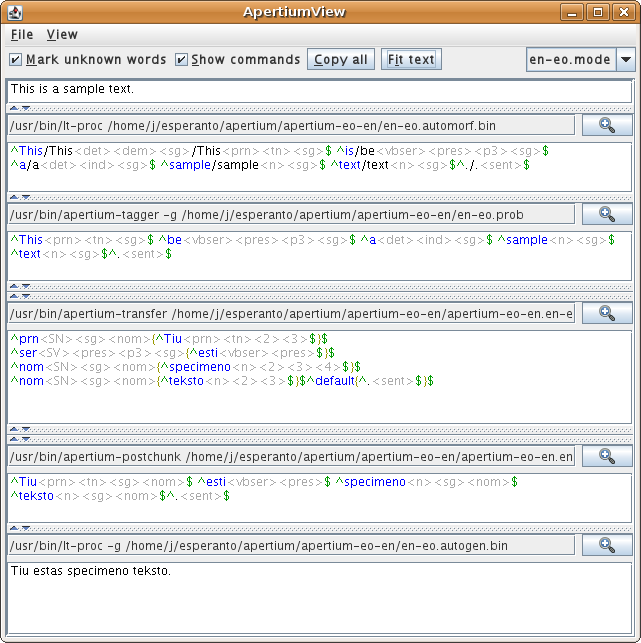
> >> Using
> >>
> [6]http://wiki.apertium.org/w/images/2/25/Screenshot-jApertiumView.png
> as
> >> an example, the _first_ line
> >>
> >>     "This is a sample text"
> >>
> >> is the input text to the command in the _second_ line,
> >>
> >>     /usr/bin/lt-proc ???/en-eo.automorf.bin
> >>
> >> and the _third_ line
> >>
> >>     ^This/This<det>??? ?????????
> >>
> >> is the output of that command. This output, is used as input to the
> next
> >> command (fourth line). You can run the same commands in your
> terminal;
> >> the same input should give the same output. Try it.
> >>
> >> > And further, I would like to know where and how a lexical
> selection
> >> > module would influence the translation.
> >>
> >> see illustration:
> >> [7]http://article.gmane.org/gmane.comp.nlp.apertium/2715
> >
> > Francis writes:
> > "The lexical selection is done in the aptly-named "lexical selection"
> > stage, which sits between lexical transfer (which outputs all the
> > possible translations of each word) and structural transfer"
> >
> > But most alternative translations are already discarded by the
> tagger,
> > aren't they? In the very first step.
>
>
>   No, that's alternative morphological analyses.
>   Plain lt-proc (morphological analysis) gives one or more analyses:
>       ^bank/bank<n><m><sg><ind>/bank<vblex><imp>$
>   apertium-tagger chooses one _analysis_:
>       ^bank/bank<vblex><imp>$
>   lt-proc -b (lexical transfer) adds one or more translations (and
>   retains
>   the original one):
>       ^bank<vblex><imp>/beat<vblex><imp>/knock<vblex><imp>$
>   lrx-proc (lexical selection) chooses one _translation_ from these:
>       ^bank<vblex><imp>/knock<vblex><imp>$
>   and then apertium-transfer moves words around or whatever.
>   Of course, if bank<n> were chosen by the tagger, that would also
>   lead to
>   a different translation, but it's a choice of a different sort (is
>   it a
>   noun or is it a verb, rather than what translation does that
>   particular
>   verb have).
>   --
>   Kevin Brubeck Unhammer
>   GPG: 0x766AC60C
>
> -----------------------------------------------------------------------
> -------
> Free Next-Gen Firewall Hardware Offer
> Buy your Sophos next-gen firewall before the end March 2013
> and get the hardware for free! Learn more.
> [8]http://p.sf.net/sfu/sophos-d2d-feb
> _______________________________________________
> Apertium-stuff mailing list
> [9][email protected]
> [10]https://lists.sourceforge.net/lists/listinfo/apertium-stuff
>
>   --
>   [11]Jacob Nordfalk
>
> [12]javabog.dk
>
> Androidudvikler og -underviser på [13]DTU og [14]Lund&Bendsen
>
> -----------------------------------------------------------------------
> -------
>
> Free Next-Gen Firewall Hardware Offer
>
> Buy your Sophos next-gen firewall before the end March 2013
>
> and get the hardware for free! Learn more.
>
> [15]http://p.sf.net/sfu/sophos-d2d-feb
>
> _______________________________________________
>
> Apertium-stuff mailing list
>
> [16][email protected]
>
> [17]https://lists.sourceforge.net/lists/listinfo/apertium-stuff
>
> References
>
> 1. http://www.dkuug.dk/wp-content/themes/dkuug/arkiv/DKUUG160.pdf
> 2. http://ftp.klid.dk/ftp/video/2010-06-10-apertium/
> 3. mailto:[email protected]
> 4. mailto:[email protected]
> 5. mailto:[email protected]
> 6. http://wiki.apertium.org/w/images/2/25/Screenshot-jApertiumView.png
> 7. http://article.gmane.org/gmane.comp.nlp.apertium/2715
> 8. http://p.sf.net/sfu/sophos-d2d-feb
> 9. mailto:[email protected]
>   10. https://lists.sourceforge.net/lists/listinfo/apertium-stuff
>   11. http://profiles.google.com/jacob.nordfalk
>   12. http://javabog.dk/
>   13. http://cv.ihk.dk/diplomuddannelser/itd/vf/MAU
>   14. https://www.lundogbendsen.dk/undervisning/beskrivelse/LB1809/
>   15. http://p.sf.net/sfu/sophos-d2d-feb
>   16. mailto:[email protected]
>   17. https://lists.sourceforge.net/lists/listinfo/apertium-stuff

> ------------------------------------------------------------------------------
> Free Next-Gen Firewall Hardware Offer
> Buy your Sophos next-gen firewall before the end March 2013
> and get the hardware for free! Learn more.
> http://p.sf.net/sfu/sophos-d2d-feb
> _______________________________________________
> Apertium-stuff mailing list
> [email protected]
> https://lists.sourceforge.net/lists/listinfo/apertium-stuff


------------------------------------------------------------------------------
Free Next-Gen Firewall Hardware Offer
Buy your Sophos next-gen firewall before the end March 2013
and get the hardware for free! Learn more.
http://p.sf.net/sfu/sophos-d2d-feb
_______________________________________________
Apertium-stuff mailing list
[email protected]
https://lists.sourceforge.net/lists/listinfo/apertium-stuff