No, the site should come up within 10 sec or less.
Are there any javascript errors or files failing to load?
Director of Web Development - Farallon Geographics, Inc. - 971.227.3173


On Wed, Aug 6, 2014 at 3:15 PM, Azadeh Vafadari <[email protected]>
wrote:

> Me again Alexei,
> the pop up initializing window is still running (2:45min). Is this normal?
> Thanks.
> Azadeh
>
>
> On Wednesday, August 6, 2014 4:32:09 PM UTC-4, Azadeh Vafadari wrote:
>
>> oops! my bad! fixed it. It looks like it's happening. I see initializing
>> window on the local server. Will let you know how it goes. fingers crossed!
>> Thanks 1000 Alexei
>>
>> On Wednesday, August 6, 2014 4:03:27 PM UTC-4, Alexei Peters wrote:
>>
>> That's just ElasticSearch running, as it should be.
>>
>>
>> Director of Web Development - Farallon Geographics, Inc. - 971.227.3173
>>
>>
>> On Wed, Aug 6, 2014 at 12:52 PM, Azadeh Vafadari <[email protected]>
>> wrote:
>>
>> I just noticed that one of me two command window when running the
>> "runserver" has Mcroy, henry hank in it! like the message on ElasticSearch
>> console:
>> could this be the problem? I have no idea what am I talking about!!
>>
>> [2014-08-06 14:19:59,173][INFO ][node                     ] [McCoy, Henry
>> "Hank"
>> ] version[0.90.3], pid[7332], build[5c38d60/2013-08-06T13:18:31Z]
>> [2014-08-06 14:19:59,189][INFO ][node                     ] [McCoy, Henry
>> "Hank"
>> ] initializing ...
>> [2014-08-06 14:19:59,189][INFO ][plugins                  ] [McCoy, Henry
>> "Hank"
>> ] loaded [], sites [head]
>> [2014-08-06 14:20:01,704][INFO ][node                     ] [McCoy, Henry
>> "Hank"
>> ] initialized
>> [2014-08-06 14:20:01,704][INFO ][node                     ] [McCoy, Henry
>> "Hank"
>> ] starting ...
>> [2014-08-06 14:20:01,892][INFO ][transport                ] [McCoy, Henry
>> "Hank"
>> ] bound_address {inet[/0:0:0:0:0:0:0:0:9300]}, publish_address {inet[/
>> 192.168.1.
>> 6:9300]}
>> [2014-08-06 14:20:05,113][INFO ][cluster.service          ] [McCoy, Henry
>> "Hank"
>> ] new_master [McCoy, Henry "Hank"][5pjQKBiUTRCmAT3Nd18YvQ][inet[/
>> 192.168.1.6:930
>> 0]], reason: zen-disco-join (elected_as_master)
>> [2014-08-06 14:20:05,207][INFO ][discovery                ] [McCoy, Henry
>> "Hank"
>> ] elasticsearch/5pjQKBiUTRCmAT3Nd18YvQ
>> [2014-08-06 14:20:05,285][INFO ][gateway                  ] [McCoy, Henry
>> "Hank"
>> ] recovered [0] indices into cluster_state
>> [2014-08-06 14:20:05,332][INFO ][http                     ] [McCoy, Henry
>> "Hank"
>> ] bound_address {inet[/0:0:0:0:0:0:0:0:9200]}, publish_address {inet[/
>> 192.168.1.
>> 6:9200]}
>> [2014-08-06 14:20:05,332][INFO ][node                     ] [McCoy, Henry
>> "Hank"
>> ] started
>>
>>
>>
>> On Wednesday, August 6, 2014 3:47:10 PM UTC-4, Azadeh Vafadari wrote:
>>
>> Hi Alexei,
>>
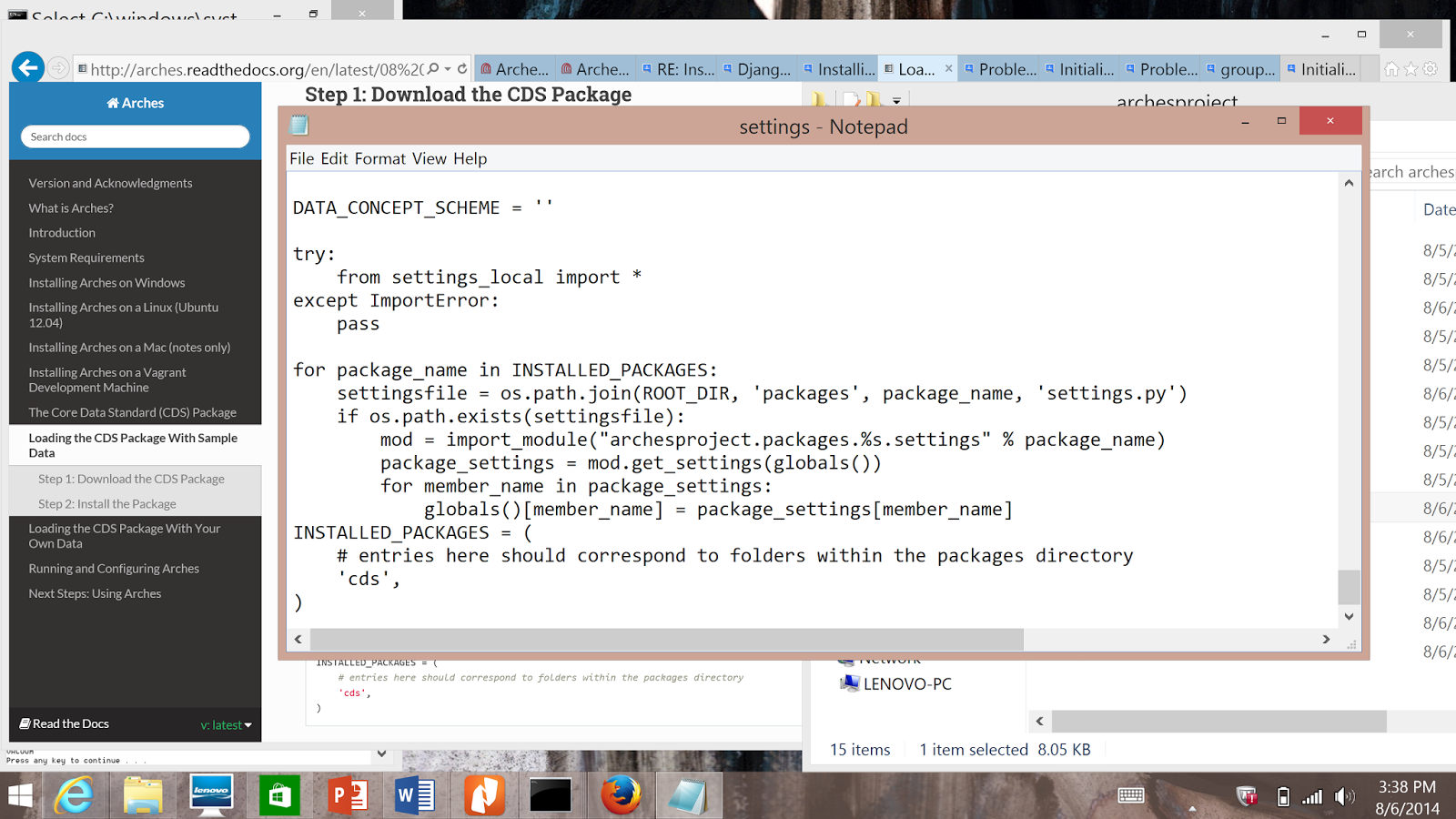
>> I followed the installation guide and I did add this, as you are
>> saying, to the settings.py (image below) -- I created a cds folder under
>> archesproject/packages as instructed and copied the cds package there.
>> Sorry I'm taking up your time...
>>
>>
>> <https://lh3.googleusercontent.com/-WZRkhAWCbjU/U-KGCzxpBbI/AAAAAAAAABs/dV3GfHm2HTk/s1600/dettings.py_screenshot.png>
>>
>>
>> On Wednesday, August 6, 2014 3:28:45 PM UTC-4, Alexei Peters wrote:
>>
>> Hi Azadeh,
>> Make sure in your settings.py file you have something like this:
>>
>> INSTALLED_PACKAGES = (
>>     # entries here should correspond to folders within the packages
>> directory
>>     'cds',
>> )
>>
>> Make sure whatever name you use ('cds' in the above example) that it
>> corresponds to the folder name of the cds package that you downloaded to
>> the packages folder.
>>
>> If that wasn't there, add it and then rerun, "install_arches_db.bat" and
>> "install_packages.bat".
>>
>> Hope that helps!
>> Cheers,
>> Alexei
>>
>>
>> Director of Web Development - Farallon Geographics, Inc. - 971.227.3173
>>
>>
>> On Wed, Aug 6, 2014 at 11:48 AM, Azadeh Vafadari <[email protected]>
>> wrote:
>>
>>
>> when I rerun "install_arches_db" after asking twice the password this is
>> what I see. Is this ok?
>>
>> INSERT 0 1
>> INSERT 0 1
>> INSERT 0 1
>> INSERT 0 1
>> INSERT 0 1
>> INSERT 0 1
>> INSERT 0 1
>> INSERT 0 1
>> INSERT 0 1
>> INSERT 0 1
>> INSERT 0 1
>> INSERT 0 1
>> INSERT 0 1
>> INSERT 0 1
>> INSERT 0 1
>> INSERT 0 1
>> INSERT 0 1
>> INSERT 0 1
>> INSERT 0 1
>> INSERT 0 1
>> INSERT 0 1
>> INSERT 0 1
>> INSERT 0 1
>> INSERT 0 1
>> INSERT 0 1
>> INSERT 0 1
>> INSERT 0 1
>> INSERT 0 1
>> INSERT 0 1
>> INSERT 0 1
>> INSERT 0 1
>> INSERT 0 1
>> INSERT 0 1
>> INSERT 0 1
>> INSERT 0 1
>> INSERT 0 1
>> INSERT 0 1
>> INSERT 0 1
>> INSERT 0 1
>> INSERT 0 1
>> INSERT 0 1
>> INSERT 0 1
>> INSERT 0 1
>> INSERT 0 1
>> INSERT 0 1
>> INSERT 0 1
>> INSERT 0 1
>> INSERT 0 1
>> INSERT 0 1
>> INSERT 0 1
>> INSERT 0 1
>> INSERT 0 1
>> INSERT 0 1
>> INSERT 0 1
>> INSERT 0 1
>> INSERT 0 1
>> INSERT 0 1
>> INSERT 0 1
>> INSERT 0 1
>> INSERT 0 1
>> INSERT 0 1
>> INSERT 0 1
>> INSERT 0 1
>> INSERT 0 1
>> INSERT 0 1
>> INSERT 0 1
>> INSERT 0 1
>> INSERT 0 1
>> INSERT 0 1
>> INSERT 0 1
>> INSERT 0 1
>> INSERT 0 1
>> INSERT 0 1
>> INSERT 0 1
>> INSERT 0 1
>> INSERT 0 1
>> INSERT 0 1
>> INSERT 0 1
>> INSERT 0 1
>> INSERT 0 1
>> INSERT 0 1
>> INSERT 0 1
>> INSERT 0 1
>> INSERT 0 1
>> INSERT 0 1
>> INSERT 0 1
>> INSERT 0 1
>> INSERT 0 1
>> INSERT 0 1
>> INSERT 0 1
>> INSERT 0 1
>> INSERT 0 1
>> INSERT 0 1
>> INSERT 0 1
>> INSERT 0 1
>> INSERT 0 1
>> INSERT 0 1
>> INSERT 0 1
>> INSERT 0 1
>> INSERT 0 1
>> INSERT 0 1
>> INSERT 0 1
>> INSERT 0 1
>> INSERT 0 1
>> INSERT 0 1
>> INSERT 0 1
>> INSERT 0 1
>> INSERT 0 1
>> INSERT 0 1
>> INSERT 0 1
>> INSERT 0 1
>> INSERT 0 1
>> INSERT 0 1
>> INSERT 0 1
>> INSERT 0 1
>> INSERT 0 1
>> INSERT 0 1
>> INSERT 0 1
>> INSERT 0 1
>> INSERT 0 1
>> INSERT 0 1
>> INSERT 0 1
>> INSERT 0 1
>> INSERT 0 1
>> INSERT 0 1
>> INSERT 0 1
>> INSERT 0 1
>> INSERT 0 1
>> INSERT 0 1
>> INSERT 0 1
>> INSERT 0 1
>> INSERT 0 1
>> INSERT 0 1
>> INSERT 0 1
>> INSERT 0 1
>> INSERT 0 1
>> INSERT 0 1
>> INSERT 0 1
>> INSERT 0 1
>> INSERT 0 1
>> INSERT 0 1
>> INSERT 0 1
>> INSERT 0 1
>> INSERT 0 1
>> INSERT 0 1
>> INSERT 0 1
>> INSERT 0 1
>> INSERT 0 1
>> INSERT 0 1
>> INSERT 0 1
>> INSERT 0 1
>> INSERT 0 1
>> INSERT 0 1
>> INSERT 0 1
>> INSERT 0 1
>> INSERT 0 1
>> INSERT 0 1
>> INSERT 0 1
>> INSERT 0 1
>> INSERT 0 1
>> INSERT 0 1
>> INSERT 0 1
>> INSERT 0 1
>> INSERT 0 1
>> INSERT 0 1
>> INSERT 0 1
>> INSERT 0 1
>> INSERT 0 1
>> INSERT 0 1
>> INSERT 0 1
>> INSERT 0 1
>> INSERT 0 1
>> INSERT 0 1
>> INSERT 0 1
>> INSERT 0 1
>> INSERT 0 1
>> INSERT 0 1
>> INSERT 0 1
>> INSERT 0 1
>> INSERT 0 1
>> INSERT 0 1
>> INSERT 0 1
>> INSERT 0 1
>> INSERT 0 1
>> INSERT 0 1
>> INSERT 0 1
>> INSERT 0 1
>> INSERT 0 1
>> INSERT 0 1
>> INSERT 0 1
>> INSERT 0 1
>> INSERT 0 1
>> INSERT 0 1
>> INSERT 0 1
>> INSERT 0 1
>> INSERT 0 1
>> INSERT 0 1
>> INSERT 0 1
>> INSERT 0 1
>> INSERT 0 1
>> INSERT 0 1
>> INSERT 0 1
>> INSERT 0 1
>> INSERT 0 1
>> INSERT 0 1
>> INSERT 0 1
>> INSERT 0 1
>> INSERT 0 1
>> INSERT 0 1
>> INSERT 0 1
>> INSERT 0 1
>> INSERT 0 1
>> INSERT 0 1
>> INSERT 0 1
>> INSERT 0 1
>> INSERT 0 1
>> INSERT 0 1
>> INSERT 0 1
>> INSERT 0 1
>> SET
>> SET
>> SET
>> SET
>> SET
>> SET
>>  setval
>> --------
>>       5
>> (1 row)
>>
>> SET
>> SET
>> SET
>> SET
>> SET
>> SET
>> SET
>>  setval
>> --------
>>       1
>> (1 row)
>>
>>  setval
>> --------
>>       1
>> (1 row)
>>
>>  setval
>> --------
>>       1
>> (1 row)
>>
>>  setval
>> --------
>>      24
>> (1 row)
>>
>>  setval
>> --------
>>       1
>> (1 row)
>>
>>  setval
>> --------
>>       1
>> (1 row)
>>
>>  setval
>> --------
>>       1
>> (1 row)
>>
>>  setval
>> --------
>>       1
>> (1 row)
>>
>>  setval
>> --------
>>       8
>> (1 row)
>>
>>  setval
>> --------
>>       1
>> (1 row)
>>
>> VACUUM
>>
>> Press any key to continue . . .
>> On Wednesday, August 6, 2014 1:40:15 PM UTC-4, Alexei Peters wrote:
>>
>> Hi Azadeh,
>> Nice to hear from you! Hope you're doing well.
>>
>> It looks like you've run the "install_packages.bat" file more then once.
>>  You always have to run "install_arches_db.bat" first.
>> If you want to run again "install_packages.bat" again, first run
>> "install_arches_db.bat".
>>
>> To confirm that the data is loaded, you can go to the ElasticSeach
>> console at http://localhost:9200/_plugin/head/
>> You should see something similar to the attached screenshot.  Confirm the
>> number docs under "maplayers" and "entities".
>>
>> Hopefully this helps.  If, after checking these few items, and rerunning
>> "install_arches_db.bat" and "install_packages.bat", you still run into
>> issues, please let me know.
>>
>> Cheers,
>> Alexei
>>
>>
>>
>>
>>
>> Director of Web Development - Farallon Geographics, Inc. - 971.227.3173
>>
>>
>> On Wed, Aug 6, 2014 at 9:29 AM, Azadeh Vafadari <[email protected]>
>> wrote:
>>
>>
>> Oh, just tried it on Firefox and it works perfectly! But it doesn't seem
>> that there are any data in it. I can not see anything on the map and search
>> doesn't return anything. Is there a way to check and see if the data is
>> there. And if not how can I upload the data? thanks very much
>>
>> On Wednesday, August 6, 2014 12:18:42 PM UTC-4, Azadeh Vafadari wrote:
>>
>> Hello all,
>>
>> (Special hi to Dennis, Adam, and Alexei! It's been such a long
>> time....hope all is well and we get to see each other soon!)
>>
>> So I finally started to install Arches on my laptop yesterday. I had few
>> problems along the way but thanks to your posts here I was able to
>> install Arches on my  windows 8.1 x64. I'd thought I successfully
>> downloaded and installed the CDS package with the test data as well. But
>> when I go to the local server at http://localhost:8000/Arches/index.htm
>> on IE, I can see the map but I can't zoom in or out. When I click on the
>> basemaps, search or map layers, I get a white empty column (image is
>> attached). I was able to go to Django admin console. All seems to work
>> there. I created an account for my self as an editor. But still when I go
>> back to the GUI as Azadeh, I can see an activity has been added "add/edit
>> resource", but still I can't do or see any sites.  Can anyone help me
>> understand what the issue might be and what should I do to fix it?? Thanks
>> very much.
>>
>>
>> <https://lh4.googleusercontent.com/-clz1d_v5a2Y/U-JU--Z2HaI/AAAAAAAAABE/pg_Az82DhK4/s1600/Arches_screenshot.png>
>> After I run install_packages.bat this is what I'm getting the command
>> window (after asking me the password):
>>
>> C:\arches-web\arches-arches-6127ba016596\archesproject\build>cd
>> C:\arches-web\ar
>>
>> ches-arches-6127ba016596\archesproject\build\..
>>
>>
>>
>> C:\arches-web\arches-arches-6127ba016596\archesproject>call
>> "virtualenv/ENV/Scri
>>
>> pts/activate.bat"
>>
>> operation: install
>>
>> Password for user postgres: postgis
>>
>>
>>
>> psql:C:/arches-web/arches-arches-6127ba016596/archesproject/packages/cds/
>> sql/pre
>>
>> _deployment.sql:151: ERROR:  duplicate key value violates unique
>> constraint "pk_
>>
>> resource_groups"
>>
>> DETAIL:  Key (groupid)=(1) already exists.
>>
>> CONTEXT:  COPY resource_groups, line 1
>>
>> psql:C:/arches-web/arches-arches-6127ba016596/archesproject/packages/cds/
>> sql/pre
>>
>> _deployment.sql:190: ERROR:  duplicate key value violates unique
>> constraint "pk_
>>
>> forms"
>>
>> DETAIL:  Key (formid)=(1) already exists.
>>
>> CONTEXT:  COPY forms, line 1
>>
>> psql:C:/arches-web/arches-arches-6127ba016596/archesproject/packages/cds/
>> sql/pre
>>
>> _deployment.sql:457: ERROR:  duplicate key value violates unique
>> constraint "uni
>>
>> que_i18n"
>>
>> DETAIL:  Key (key, value, languageid, widgetname)=(tab_name, Location,
>> en-us, Ar
>>
>> ches.forms.Location) already exists.
>>
>> CONTEXT:  COPY i18n, line 1: "tab_name  Location        en-us
>> Arches.forms.Loc
>>
>> ation"
>>
>> .Traceback (most recent call last):
>>
>>   File "../manage.py", line 28, in <module>
>>
>>     execute_from_command_line(sys.argv)
>>
>>   File "C:\arches-web\arches-arches-6127ba016596\archesproject\virt
>> ualenv\ENV\li
>>
>> b\site-packages\django\core\management\__init__.py", line 399, in
>> execute_from_c
>>
>> ommand_line
>>
>>     utility.execute()
>>
>>   File "C:\arches-web\arches-arches-6127ba016596\archesproject\virt
>> ualenv\ENV\li
>>
>> b\site-packages\django\core\management\__init__.py", line 392, in execute
>>
>>     self.fetch_command(subcommand).run_from_argv(self.argv)
>>
>>   File "C:\arches-web\arches-arches-6127ba016596\archesproject\virt
>> ualenv\ENV\li
>>
>> b\site-packages\django\core\management\base.py", line 242, in
>> run_from_argv
>>
>>     self.execute(*args, **options.__dict__)
>>
>>   File "C:\arches-web\arches-arches-6127ba016596\archesproject\virt
>> ualenv\ENV\li
>>
>> b\site-packages\django\core\management\base.py", line 285, in execute
>>
>>     output = self.handle(*args, **options)
>>
>>   File "C:\arches-web\arches-arches-6127ba016596\archesproject\buil
>> d\management\
>>
>> commands\packages.py", line 41, in handle
>>
>>     self.load_package(package)
>>
>>   File "C:\arches-web\arches-arches-6127ba016596\archesproject\buil
>> d\management\
>>
>> commands\packages.py", line 46, in load_package
>>
>>     install(settings.ROOT_DIR)
>>
>>   File "C:\arches-web\arches-arches-6127ba016596\archesproject\pack
>> ages\cds\setu
>>
>> p.py", line 45, in install
>>
>>     concepts.load_concepts(package_settings.ROOT_DIR)
>>
>>   File "C:\arches-web\arches-arches-6127ba016596\archesproject\pack
>> ages\cds\inst
>>
>> all\concepts.py", line 18, in load_concepts
>>
>>     load_concepts_from_nodes_and_edges(os.path.join(packagepath,
>> 'source_data',
>>
>> 'concepts'), 'concept_schema_nodes.csv','concept_schema_edges.csv')
>>
>>   File "C:\arches-web\arches-arches-6127ba016596\archesproject\pack
>> ages\cds\inst
>>
>> all\concepts.py", line 122, in load_concepts_from_nodes_and_edges
>>
>>     insert_concept(concept_node["CONCEPTSCHEMENAME"],
>> concept_node["LABEL"], '',
>>
>>  'en-us', concept_node["ID"])
>>
>>   File "C:\arches-web\arches-arches-6127ba016596\archesproject\pack
>> ages\cds\inst
>>
>> all\concepts.py", line 168, in insert_concept
>>
>>     """ % (conceptschemename,label.replace("'","''"),note,languageid,l
>> egacyid))
>>
>>   File "C:\arches-web\arches-arches-6127ba016596\archesproject\virt
>> ualenv\ENV\li
>>
>> b\site-packages\django\db\backends\util.py", line 69, in execute
>>
>>     return super(CursorDebugWrapper, self).execute(sql, params)
>>
>>   File "C:\arches-web\arches-arches-6127ba016596\archesproject\virt
>> ualenv\ENV\li
>>
>> b\site-packages\django\db\backends\util.py", line 53, in execute
>>
>>     return self.cursor.execute(sql, params)
>> <font color="#000000" face="Times New Roman" siz
>>
>> ...
>
>  --
> -- To post, send email to [email protected]. To unsubscribe,
> send email to [email protected]. For more
> information, visit https://groups.google.com/d/forum/archesproject?hl=en
> ---
> You received this message because you are subscribed to the Google Groups
> "Arches Project" group.
> To unsubscribe from this group and stop receiving emails from it, send an
> email to [email protected].
> For more options, visit https://groups.google.com/d/optout.
>

--
-- To post, send email to [email protected]. To unsubscribe, send
email to [email protected]. For more information,
visit https://groups.google.com/d/forum/archesproject?hl=en
---
You received this message because you are subscribed to the Google Groups
"Arches Project" group.
To unsubscribe from this group and stop receiving emails from it, send an email
to [email protected].
For more options, visit https://groups.google.com/d/optout.