Hi Azadeh,
Try rerunning "install_arches_db.bat" and "install_packages.bat", but
before you do that make sure that you are running "runserver.bat".  I'm
guessing that your're not running the runserver.bat file before running the
install files.
Try that.
Cheers,
Alexei
Director of Web Development - Farallon Geographics, Inc. - 971.227.3173


On Wed, Aug 6, 2014 at 3:50 PM, Azadeh Vafadari <[email protected]>
wrote:

>
> <https://lh3.googleusercontent.com/-tNiIqYWyP5o/U-KxHUI39dI/AAAAAAAAACA/GbzMq8V5Ef8/s1600/ElasticSearch_screenshot_2.png>
> I went on ElasticSearch console, this is what I see
>
>
>
> On Wednesday, August 6, 2014 6:43:07 PM UTC-4, Azadeh Vafadari wrote:
>
>> on the command window after I ran the install_packages I got the last
>> line error message
>>
>>
>> C:\arches-web\arches-arches-6127ba016596\archesproject\build>cd
>> C:\arches-web\ar
>> ches-arches-6127ba016596\archesproject\build\..
>> C:\arches-web\arches-arches-6127ba016596\archesproject>call
>> "virtualenv/ENV/Scri
>> pts/activate.bat"
>> operation: install
>> Password for user postgres: postgis
>> ...||Password for user postgres: postgis
>> ABSOLUTE DATING METHOD AUTHORITY DOCUMENT.CSV
>> ADMINISTRATIVE SUBDIVISION AUTHORITY DOCUMENT.CSV
>> ADMINISTRATIVE SUBDIVISION AUTHORITY DOCUMENT.VALUES.CSV
>> ADMINISTRATIVE SUBDIVISION TYPE AUTHORITY DOCUMENT.CSV
>> ARCHAEOLOGICAL COMPONENT TYPE AUTHORITY DOCUMENT.CSV
>> ARCHAEOLOGICAL HERITAGE (ARTIFACT) TYPE AUTHORITY DOCUMENT.CSV
>> ARCHAEOLOGICAL HERITAGE (SITE) TYPE AUTHORITY DOCUMENT.CSV
>> ARCHAEOLOGICAL TECHNIQUE AUTHORITY DOCUMENT.CSV
>> ARCHES RESOURCE CROSS-REFERENCE RELATIONSHIP TYPE AUTHORITY DOCUMENT.CSV
>> ARCHES RESOURCE CROSS-REFERENCE RELATIONSHIP TYPE AUTHORITY
>> DOCUMENT.VALUES.CSV
>> ARCHITECTURAL COMPONENT TYPE AUTHORITY DOCUMENT.CSV
>> ARCHITECTURAL HERITAGE TYPE AUTHORITY DOCUMENT.CSV
>> ARCHITECTURAL TECHNIQUE AUTHORITY DOCUMENT.CSV
>> CONDITION AUTHORITY DOCUMENT.CSV
>> CONDITION AUTHORITY DOCUMENT.VALUES.CSV
>> CULTURAL PERIOD AUTHORITY DOCUMENT.CSV
>> CULTURAL PERIOD AUTHORITY DOCUMENT.VALUES.CSV
>> DESIGNATION AND PROTECTION TYPE AUTHORITY DOCUMENT.CSV
>> DOCUMENT COMPONENT TYPE AUTHORITY DOCUMENT.CSV
>> DOCUMENT TECHNIQUE AUTHORITY DOCUMENT.CSV
>> DOCUMENT TYPE AUTHORITY DOCUMENT.CSV
>> EXTERNAL XREF TYPE AUTHORITY DOCUMENT.CSV
>> GEOMETRY QUALIFIER AUTHORITY DOCUMENT.CSV
>> HISTORICAL EVENT TYPE AUTHORITY DOCUMENT.CSV
>> IMAGE COMPONENT TYPE AUTHORITY DOCUMENT.CSV
>> IMAGE MATERIAL AUTHORITY DOCUMENT.CSV
>> IMAGE TECHNIQUE AUTHORITY DOCUMENT.CSV
>> IMAGE TYPE AUTHORITY DOCUMENT.CSV
>> INVESTIGATION TYPE AUTHORITY DOCUMENT.CSV
>> LANDSCAPE COMPONENT TYPE AUTHORITY DOCUMENT.CSV
>> LANDSCAPE HERITAGE TYPE AUTHORITY DOCUMENT.CSV
>> LANDSCAPE TECHNIQUE AUTHORITY DOCUMENT.CSV
>> MANAGEMENT TYPE AUTHORITY DOCUMENT.CSV
>> MARITIME COMPONENT TYPE AUTHORITY DOCUMENT.CSV
>> MARITIME HERITAGE TYPE AUTHORITY DOCUMENT.CSV
>> MARITIME TECHNIQUE AUTHORITY DOCUMENT.CSV
>> MATERIAL AUTHORITY DOCUMENT.CSV
>> MEASUREMENT TYPE AUTHORITY DOCUMENT.CSV
>> NAME TYPE AUTHORITY DOCUMENT.CSV
>> ORGANIZATION TYPE AUTHORITY DOCUMENT.CSV
>> PERSON TYPE AUTHORITY DOCUMENT.CSV
>> SCIENTIFIC DATING METHOD AUTHORITY DOCUMENT.CSV
>> SUBJECT AUTHORITY DOCUMENT.CSV
>> TITLE AUTHORITY DOCUMENT.CSV
>> TYPE OF DESIGNATION OR PROTECTION AUTHORITY DOCUMENT.CSV
>> TYPE OF DESIGNATION OR PROTECTION AUTHORITY DOCUMENT.VALUES.CSV
>> UNIT OF MEASUREMENT AUTHORITY DOCUMENT.CSV
>> UNIT OF MEASUREMENT AUTHORITY DOCUMENT.VALUES.CSV
>> Password for user postgres: postgis
>> delete: concept
>> deleting index by path: concept
>> Traceback (most recent call last):
>>   File "../manage.py", line 28, in <module>
>>     execute_from_command_line(sys.argv)
>>   File "C:\arches-web\arches-arches-6127ba016596\archesproject\
>> virtualenv\ENV\li
>> b\site-packages\django\core\management\__init__.py", line 399, in
>> execute_from_c
>> ommand_line
>>     utility.execute()
>>   File "C:\arches-web\arches-arches-6127ba016596\archesproject\
>> virtualenv\ENV\li
>> b\site-packages\django\core\management\__init__.py", line 392, in execute
>>     self.fetch_command(subcommand).run_from_argv(self.argv)
>>   File "C:\arches-web\arches-arches-6127ba016596\archesproject\
>> virtualenv\ENV\li
>> b\site-packages\django\core\management\base.py", line 242, in
>> run_from_argv
>>     self.execute(*args, **options.__dict__)
>>   File "C:\arches-web\arches-arches-6127ba016596\archesproject\
>> virtualenv\ENV\li
>> b\site-packages\django\core\management\base.py", line 285, in execute
>>     output = self.handle(*args, **options)
>>   File "C:\arches-web\arches-arches-6127ba016596\archesproject\
>> build\management\
>> commands\packages.py", line 41, in handle
>>     self.load_package(package)
>>   File "C:\arches-web\arches-arches-6127ba016596\archesproject\
>> build\management\
>> commands\packages.py", line 46, in load_package
>>     install(settings.ROOT_DIR)
>>   File "C:\arches-web\arches-arches-6127ba016596\archesproject\
>> packages\cds\setu
>> p.py", line 66, in install
>>     index.Command().handle('index', delete='concept', index='', load='')
>>   File "C:\arches-web\arches-arches-6127ba016596\archesproject\
>> build\management\
>> commands\index.py", line 55, in handle
>>     self.delete_index(options['delete'])
>>   File "C:\arches-web\arches-arches-6127ba016596\archesproject\
>> build\management\
>> commands\index.py", line 168, in delete_index
>>     se.delete(index=index, force=True)
>>   File "C:\arches-web\arches-arches-6127ba016596\archesproject\
>> arches\Search\sea
>> rch.py", line 46, in delete
>>     return self.conn.delete(path)
>>   File "C:\arches-web\arches-arches-6127ba016596\archesproject\
>> virtualenv\ENV\li
>> b\site-packages\rawes\elastic.py", line 63, in delete
>>     return self.request('delete', path, **kwargs)
>>   File "C:\arches-web\arches-arches-6127ba016596\archesproject\
>> virtualenv\ENV\li
>> b\site-packages\rawes\elastic.py", line 82, in request
>>     return self.connection.request(method, new_path, **kwargs)
>>   File "C:\arches-web\arches-arches-6127ba016596\archesproject\
>> virtualenv\ENV\li
>> b\site-packages\rawes\http_connection.py", line 41, in request
>>     response = self.session.request(method, '%s/%s' % (self.url, path),
>> **kwargs
>> )
>>   File "C:\arches-web\arches-arches-6127ba016596\archesproject\
>> virtualenv\ENV\li
>> b\site-packages\requests\sessions.py", line 456, in request
>>     resp = self.send(prep, **send_kwargs)
>>   File "C:\arches-web\arches-arches-6127ba016596\archesproject\
>> virtualenv\ENV\li
>> b\site-packages\requests\sessions.py", line 559, in send
>>     r = adapter.send(request, **kwargs)
>>   File "C:\arches-web\arches-arches-6127ba016596\archesproject\
>> virtualenv\ENV\li
>> b\site-packages\requests\adapters.py", line 375, in send
>>     raise ConnectionError(e, request=request)
>> requests.exceptions.ConnectionError: HTTPConnectionPool(host='localhost',
>> port=9
>> 200): Max retries exceeded with url: /concept (Caused by <class
>> 'socket.error'>:
>>  [Errno 10061] No connection could be made because the target machine
>> actively r
>> efused it)
>> Press any key to continue . . .
>>
>> On Wednesday, August 6, 2014 6:26:50 PM UTC-4, Alexei Peters wrote:
>>
>> No, the site should come up within 10 sec or less.
>> Are there any javascript errors or files failing to load?
>>
>>
>>
>> Director of Web Development - Farallon Geographics, Inc. - 971.227.3173
>>
>>
>> On Wed, Aug 6, 2014 at 3:15 PM, Azadeh Vafadari <[email protected]>
>> wrote:
>>
>> Me again Alexei,
>> the pop up initializing window is still running (2:45min). Is this normal?
>> Thanks.
>> Azadeh
>>
>>
>> On Wednesday, August 6, 2014 4:32:09 PM UTC-4, Azadeh Vafadari wrote:
>>
>> oops! my bad! fixed it. It looks like it's happening. I see initializing
>> window on the local server. Will let you know how it goes. fingers crossed!
>> Thanks 1000 Alexei
>>
>> On Wednesday, August 6, 2014 4:03:27 PM UTC-4, Alexei Peters wrote:
>>
>> That's just ElasticSearch running, as it should be.
>>
>>
>> Director of Web Development - Farallon Geographics, Inc. - 971.227.3173
>>
>>
>> On Wed, Aug 6, 2014 at 12:52 PM, Azadeh Vafadari <[email protected]>
>> wrote:
>>
>> I just noticed that one of me two command window when running the
>> "runserver" has Mcroy, henry hank in it! like the message on ElasticSearch
>> console:
>> could this be the problem? I have no idea what am I talking about!!
>>
>> [2014-08-06 14:19:59,173][INFO ][node                     ] [McCoy, Henry
>> "Hank"
>> ] version[0.90.3], pid[7332], build[5c38d60/2013-08-06T13:18:31Z]
>> [2014-08-06 14:19:59,189][INFO ][node                     ] [McCoy, Henry
>> "Hank"
>> ] initializing ...
>> [2014-08-06 14:19:59,189][INFO ][plugins                  ] [McCoy, Henry
>> "Hank"
>> ] loaded [], sites [head]
>> [2014-08-06 14:20:01,704][INFO ][node                     ] [McCoy, Henry
>> "Hank"
>> ] initialized
>> [2014-08-06 14:20:01,704][INFO ][node                     ] [McCoy, Henry
>> "Hank"
>> ] starting ...
>> [2014-08-06 14:20:01,892][INFO ][transport                ] [McCoy, Henry
>> "Hank"
>> ] bound_address {inet[/0:0:0:0:0:0:0:0:9300]}, publish_address {inet[/
>> 192.168.1.
>> 6:9300]}
>> [2014-08-06 14:20:05,113][INFO ][cluster.service          ] [McCoy, Henry
>> "Hank"
>> ] new_master [McCoy, Henry "Hank"][5pjQKBiUTRCmAT3Nd18YvQ][inet[/
>> 192.168.1.6:930
>> 0]], reason: zen-disco-join (elected_as_master)
>> [2014-08-06 14:20:05,207][INFO ][discovery                ] [McCoy, Henry
>> "Hank"
>> ] elasticsearch/5pjQKBiUTRCmAT3Nd18YvQ
>> [2014-08-06 14:20:05,285][INFO ][gateway                  ] [McCoy, Henry
>> "Hank"
>> ] recovered [0] indices into cluster_state
>> [2014-08-06 14:20:05,332][INFO ][http                     ] [McCoy, Henry
>> "Hank"
>> ] bound_address {inet[/0:0:0:0:0:0:0:0:9200]}, publish_address {inet[/
>> 192.168.1.
>> 6:9200]}
>> [2014-08-06 14:20:05,332][INFO ][node                     ] [McCoy, Henry
>> "Hank"
>> ] started
>>
>>
>>
>> On Wednesday, August 6, 2014 3:47:10 PM UTC-4, Azadeh Vafadari wrote:
>>
>> Hi Alexei,
>>
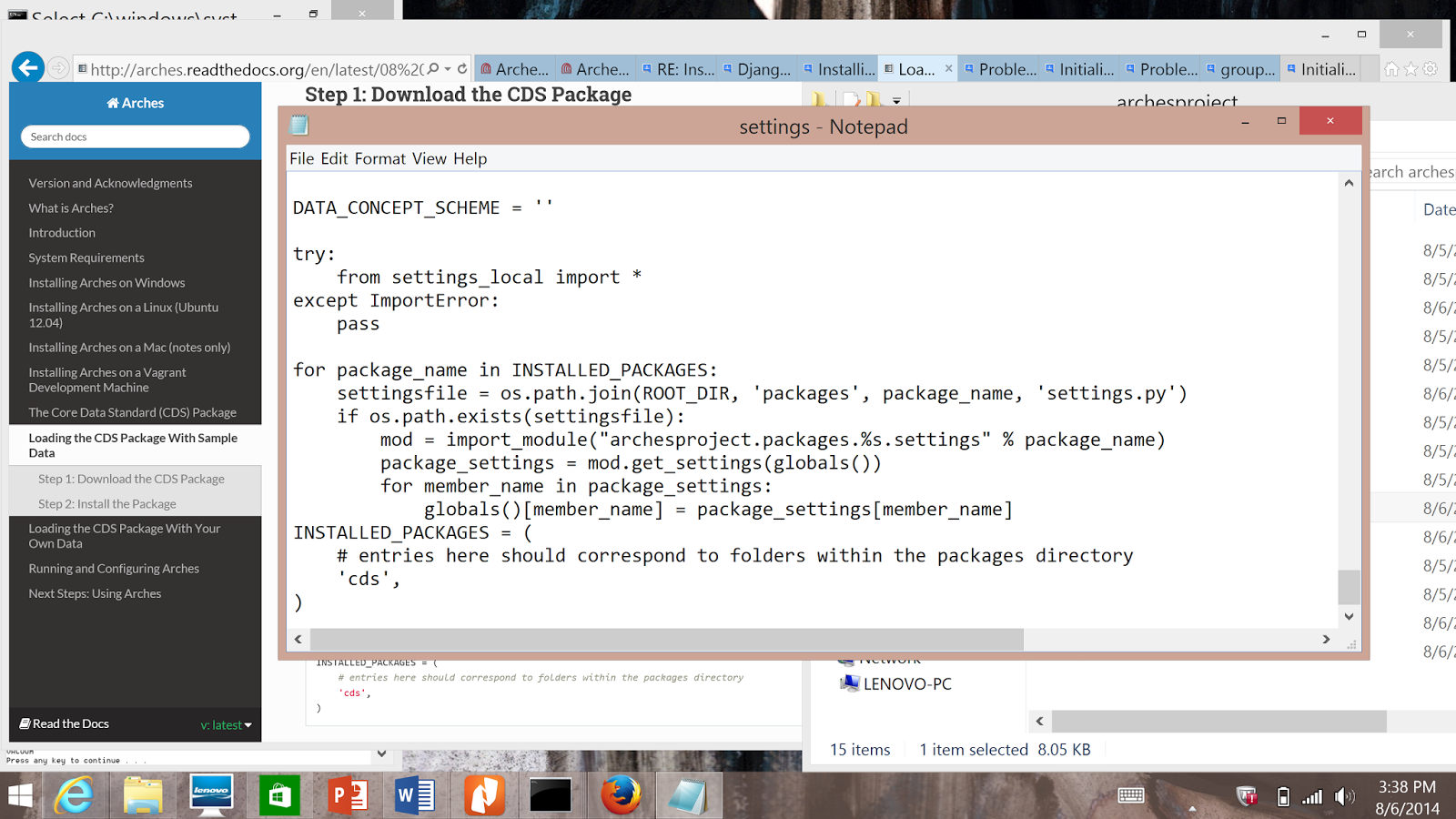
>> I followed the installation guide and I did add this, as you are
>> saying, to the settings.py (image below) -- I created a cds folder under
>> archesproject/packages as instructed and copied the cds package there.
>> Sorry I'm taking up your time...
>>
>>
>> <https://lh3.googleusercontent.com/-WZRkhAWCbjU/U-KGCzxpBbI/AAAAAAAAABs/dV3GfHm2HTk/s1600/dettings.py_screenshot.png>
>>
>>
>> On Wednesday, August 6, 2014 3:28:45 PM UTC-4, Alexei Peters wrote:
>>
>>  Hi Azadeh,
>> Make sure in your settings.py file you have something like this:
>>
>> INSTALLED_PACKAGES = (
>>     # entries here should correspond to folders within the packages
>> directory
>>     'cds',
>> )
>>
>> Make sure whatever name you use ('cds' in the above example) that it
>> corresponds to the folder name of the cds package that you downloaded to
>> the packages folder.
>>
>> If that wasn't there, add it and then rerun, "install_arches_db.bat" and
>> "install_packages.bat".
>>
>> Hope that helps!
>> Cheers,
>> Alexei
>>
>>
>> Director of Web Development - Farallon Geographics, Inc. - 971.227.3173
>>
>>
>> On Wed, Aug 6, 2014 at 11:48 AM, Azadeh Vafadari <[email protected]>
>> wrote:
>>
>>
>> when I rerun "install_arches_db" after asking twice the password this is
>> what I see. Is this ok?
>>
>> INSERT 0 1
>> INSERT 0 1
>> INSERT 0 1
>> INSERT 0 1
>> INSERT 0 1
>> INSERT 0 1
>> INSERT 0 1
>> INSERT 0 1
>> INSERT 0 1
>> INSERT 0 1
>> INSERT 0 1
>> INSERT 0 1
>> INSERT 0 1
>> INSERT 0 1
>> INSERT 0 1
>> INSERT 0 1
>> INSERT 0 1
>> INSERT 0 1
>> INSERT 0 1
>> INSERT 0 1
>> INSERT 0 1
>> INSERT 0 1
>> INSERT 0 1
>> INSERT 0 1
>> INSERT 0 1
>> INSERT 0 1
>> INSERT 0 1
>> INSERT 0 1
>> INSERT 0 1
>> INSERT 0 1
>> INSERT 0 1
>> INSERT 0 1
>> INSERT 0 1
>> INSERT 0 1
>> INSERT 0 1
>> INSERT 0 1
>> INSERT 0 1
>> INSERT 0 1
>> INSERT 0 1
>> INSERT 0 1
>> INSERT 0 1
>> INSERT 0 1
>> INSERT 0 1
>> INSERT 0 1
>> INSERT 0 1
>> INSERT 0 1
>> INSERT 0 1
>> INSERT 0 1
>> INSERT 0 1
>> INSERT 0 1
>> INSERT 0 1
>> INSERT 0 1
>> INSERT 0 1
>> INSERT 0 1
>> INSERT 0 1
>> INSERT 0 1
>> INSERT 0 1
>> INSERT 0 1
>> INSERT 0 1
>> INSERT 0 1
>> INSERT 0 1
>> INSERT 0 1
>> INSERT 0 1
>> INSERT 0 1
>> INSERT 0 1
>> INSERT 0 1
>> INSERT 0 1
>> INSERT 0 1
>> INSERT 0 1
>> INSERT 0 1
>> INSERT 0 1
>> INSERT 0 1
>> INSERT 0 1
>> INSERT 0 1
>> INSERT 0 1
>> INSERT 0 1
>> INSERT 0 1
>> INSERT 0 1
>> INSERT 0 1
>> INSERT 0 1
>> INSERT 0 1
>> INSERT 0 1
>> INSERT 0 1
>> INSERT 0 1
>> INSERT 0 1
>> INSERT 0 1
>> INSERT 0 1
>> INSERT 0 1
>> INSERT 0 1
>> INSERT 0 1
>> INSERT 0 1
>> INSERT 0 1
>> INSERT 0 1
>> INSERT 0 1
>> INSERT 0 1
>> INSERT 0 1
>> INSERT 0 1
>> INSERT 0 1
>> INSERT 0 1
>> INSERT 0 1
>> INSERT 0 1
>> INSERT 0 1
>> INSERT 0 1
>> INSERT 0 1
>> INSERT 0 1
>> INSERT 0 1
>> INSERT 0 1
>> INSERT 0 1
>> INSERT 0 1
>> INSERT 0 1
>> INSERT 0 1
>> INSERT 0 1
>> INSERT 0 1
>> INSERT 0 1
>> INSERT 0 1
>> INSERT 0 1
>> INSERT 0 1
>> INSERT 0 1
>> INSERT 0 1
>> INSERT 0 1
>> INSERT 0 1
>> INSERT 0 1
>> INSERT 0 1
>> INSERT 0 1
>> INSERT 0 1
>> INSERT 0 1
>> INSERT 0 1
>> INSERT 0 1
>> INSERT 0 1
>> INSERT 0 1
>> INSERT 0 1
>> INSERT 0 1
>> INSERT 0 1
>> INSERT 0 1
>> INSERT 0 1
>> INSERT 0 1
>> INSERT 0 1
>> INSERT 0 1
>> INSERT 0 1
>> INSERT 0 1
>> INSERT 0 1
>> INSERT 0 1
>> INSERT 0 1
>> INSERT 0 1
>> INSERT 0 1
>> INSERT 0 1
>> INSERT 0 1
>> INSERT 0 1
>> INSERT 0 1
>> INSERT 0 1
>> INSERT 0 1
>> INSERT 0 1
>> INSERT 0 1
>> INSERT 0 1
>> INSERT 0 1
>> INSERT 0 1
>> INSERT 0 1
>> INSERT 0 1
>> INSERT 0 1
>> INSERT 0 1
>> INSERT 0 1
>> INSERT 0 1
>> INSERT 0 1
>> INSERT 0 1
>> INSERT 0 1
>> INSERT 0 1
>> INSERT 0 1
>> INSERT 0 1
>> INSERT 0 1
>> INSERT 0 1
>> INSERT 0 1
>> INSERT 0 1
>> INSERT 0 1
>> INSERT 0 1
>> INSERT 0 1
>> INSERT 0 1
>> INSERT 0 1
>> INSERT 0 1
>> INSERT 0 1
>> INSERT 0 1
>> INSERT 0 1
>> INSERT 0 1
>> INSERT 0 1
>> INSERT 0 1
>> INSERT 0 1
>> INSERT 0 1
>> INSERT 0 1
>> INSERT 0 1
>> INSERT 0 1
>> INSERT 0 1
>> INSERT 0 1
>> INSERT 0 1
>> INSERT 0 1
>> INSERT 0 1
>> INSERT 0 1
>> INSERT 0 1
>> INSERT 0 1
>> INSERT 0 1
>> INSERT 0 1
>> INSERT 0 1
>> INSERT 0 1
>> INSERT 0 1
>> INSERT 0 1
>> INSERT 0 1
>> INSERT 0 1
>> INSERT 0 1
>> INSERT 0 1
>> INSERT 0 1
>> INSERT 0 1
>> INSERT 0 1
>> INSERT 0 1
>> INSERT 0 1
>> INSERT 0 1
>> INSERT 0 1
>> INSERT 0 1
>> INSERT 0 1
>> INSERT 0 1
>> INSERT 0 1
>> INSERT 0 1
>> SET
>> SET
>> SET
>> SET
>> SET
>> SET
>>  setval
>> --------
>>       5
>> (1 row)
>>
>> SET
>> SET
>> SET
>> SET
>> SET
>> SET
>> SET
>>  setval
>> --------
>>       1
>> (1 row)
>>
>>  setval
>> --------
>>       1
>> (1 row)
>>
>>  setval
>> --------
>>       1
>> (1 row)
>>
>>  setval
>> --------
>>      24
>> (1 row)
>>
>>  setval
>> --------
>>       1
>> (1 row)
>>
>>  setval
>> --------
>>       1
>> (1 row)
>>
>>  setval
>> --------
>>       1
>> (1 row)
>>
>>  setval
>> --------
>>       1
>> (1 row)
>>
>>  setval
>> --------
>>       8
>> (1 row)
>>
>>  setval
>> --------
>>       1
>> (1 row)
>>
>> VACUUM
>>
>> Press any key to continue . . .
>> On Wednesday, August 6, 2014 1:40:15 PM UTC-4, Alexei Peters wrote:
>>
>> Hi Azadeh,
>> Nice to hear from you! Hope you're doing well.
>>
>> It looks like you've run the "install_packages.bat" file more then once.
>>  You always have to run "install_arches_db.bat" first.
>> If you want to run again "install_packages.bat" again, first run
>> "install_arches_db.bat".
>>
>> To confirm that the data is loaded, you can go to the ElasticSeach
>> console at http://localhost:9200/_plugin/head/
>> You should see something similar to the attached screenshot.  Confirm the
>> number docs under "maplayers" and "entities".
>>
>> Hopefully this helps.  If, after checking these few items, and rerunning
>> "install_arches_db.bat" and "install_packages.bat", you still run into
>> issues, please let me know.
>>
>> Cheers,
>> Alexei
>>
>>
>>
>>
>>
>> Director of Web Development - Farallon Geographics, Inc. - 971.227.3173
>>
>>
>> On Wed, Aug 6, 2014 at 9:29 AM, Azadeh Vafadari <[email protected]>
>> wrote:
>>
>>
>> Oh, just tried it on Firefox and it works perfectly! But it doesn't seem
>> that there are any data in it. I can not see anything on the map and search
>> doesn't return anything. Is there a way to check and see if the data is
>> there. And if not how can I upload the data? thanks very much
>>
>> On Wednesday, August 6, 2014 12:18:42 PM UTC-4, Azadeh Vafadari wrote:
>>
>>  Hello all,
>>
>> (Special hi to Dennis, Adam, and Alexei! It's been such a long
>> time....hope all is well and we get to see each other soon!)
>>
>> So I finally started to install Arches on my laptop yesterday. I had few
>> problems along the way but thanks to your posts here I was able to
>> install Arches on my  windows 8.1 x64. I'd thought I successfully
>> downloaded and installed the CDS package with the test data as well. But
>> when I go to the local server at http://localhost:8000/Arches/index.htm
>> on IE, I can see the map but I can't zoom in or out. When I click on the
>> basemaps, search or map layers, I get a white empty column (image is
>> attached). I was able to go to Django admin console. All seems to work
>> there. I created an account for my self as an editor. But still when I go
>> back to the GUI as Azadeh, I can see an activity has been added "add/edit
>> resource", but still I can't do or see any sites.  Can anyone help me
>> understand what the issue might be and what should I do to fix it?? Thanks
>> very much.
>>
>>
>> <https://lh4.googleusercontent.com/-clz1d_v5a2Y/U-JU--Z2HaI/AAAAAAAAABE/pg_Az82DhK4/s1600/Arches_screenshot.png>
>> After I run install_packages.bat this is what I'm getting the command
>> window (after asking me the password):
>>
>> C:\arches-web\arches-arches-6127ba016596\archesproject\build>cd
>> C:\arches-web\ar
>>
>> ches-arches-6127ba016596\archesproject\build\..
>>
>>
>>
>> C:\arches-web\arches-arches-6127ba016596\archesproject>call
>> "virtualenv/ENV/Scri
>>
>> pts/activate.bat"
>>
>> operation: install
>>
>> Password for user postgres: postgis
>>
>>
>>
>> psql:C:/arches-web/arches-arches-6127ba016596/archesproject/packages/cds/
>> sql/pre
>>
>> _deployment.sql:151: ERROR:  duplicate key value violates unique
>> constraint "pk_
>>
>> resource_groups"
>>
>> DETAIL:  Key (groupid)=(1) already exists.
>>
>> CONTEXT:  COPY resource_groups, line 1
>>
>> psql:C:/arches-web/arches-arches-6127ba016596/archesproject/packages/cds/
>> sql/pre
>>
>> _deployment.sql:190: ERROR:  duplicate key value violates unique
>> constraint "pk_
>>
>> forms"
>>
>> DETAIL:  Key (formid)=(1) already exists.
>>
>> CONTEXT:  COPY forms, line 1
>>
>> psql:C:/arches-web/arches-arches-6127ba016596/archesproject/packages/cds/
>> sql/pre
>>
>> _deployment.sql:457: ERROR:  duplicate key value violates unique
>> constraint "uni
>>
>> que_i18n"
>>
>> DETAIL:  Key (key, value, languageid, widgetname)=(tab_name, Location,
>> en-us, Ar
>>
>> ches.forms.Location) already exists.
>>
>> CONTEXT:  COPY i18n, line 1: "tab_name  Location        en-us
>> Arches.forms.Loc
>>
>> ation"
>>
>> .Traceback (most recent call last):
>>
>>   File "../manage.py", line 28, in <module>
>>
>>     execute_from_command_line(sys.argv)
>>
>>   File "C:\arches-web\arches-arches-6127ba016596\archesproject\virt
>> ualenv\ENV\li
>>
>> b\site-packages\django\core\management\__init__.py", line 399, in
>> execute_from_c
>>
>> ommand_line
>>
>>     utility.execute()
>>
>>   File "C:\arches-web\arches-arches-6127ba016596\archesproject\virt
>> ualenv\ENV\li
>>
>> b\site-packages\django\core\management\__init__.py", line 392, in execute
>>
>>     self.fetch_command(subcommand).run_from_argv(self.argv)
>>
>>   File "C:\arches-web\arches-arches-6127ba016596\archesproject\virt
>> ualenv\ENV\li
>>
>> b\site-packages\django\core\management\base.py", line 242, in
>> run_from_argv
>>
>>     self.execute(*args, **options.__dict__)
>>
>>   File "C:\arches-web\arches-arches-6127ba016596\archesproject\virt
>> ualenv\ENV\li
>>
>> b\site-packages\django\core\management\base.py", line 285, in execute
>>
>>     output = self.handle(*args, **options)
>>
>> <span style='color: rgb(34, 34, 34); font-fa
>>
>> ...
>
>  --
> -- To post, send email to [email protected]. To unsubscribe,
> send email to [email protected]. For more
> information, visit https://groups.google.com/d/forum/archesproject?hl=en
> ---
> You received this message because you are subscribed to the Google Groups
> "Arches Project" group.
> To unsubscribe from this group and stop receiving emails from it, send an
> email to [email protected].
> For more options, visit https://groups.google.com/d/optout.
>

--
-- To post, send email to [email protected]. To unsubscribe, send
email to [email protected]. For more information,
visit https://groups.google.com/d/forum/archesproject?hl=en
---
You received this message because you are subscribed to the Google Groups
"Arches Project" group.
To unsubscribe from this group and stop receiving emails from it, send an email
to [email protected].
For more options, visit https://groups.google.com/d/optout.