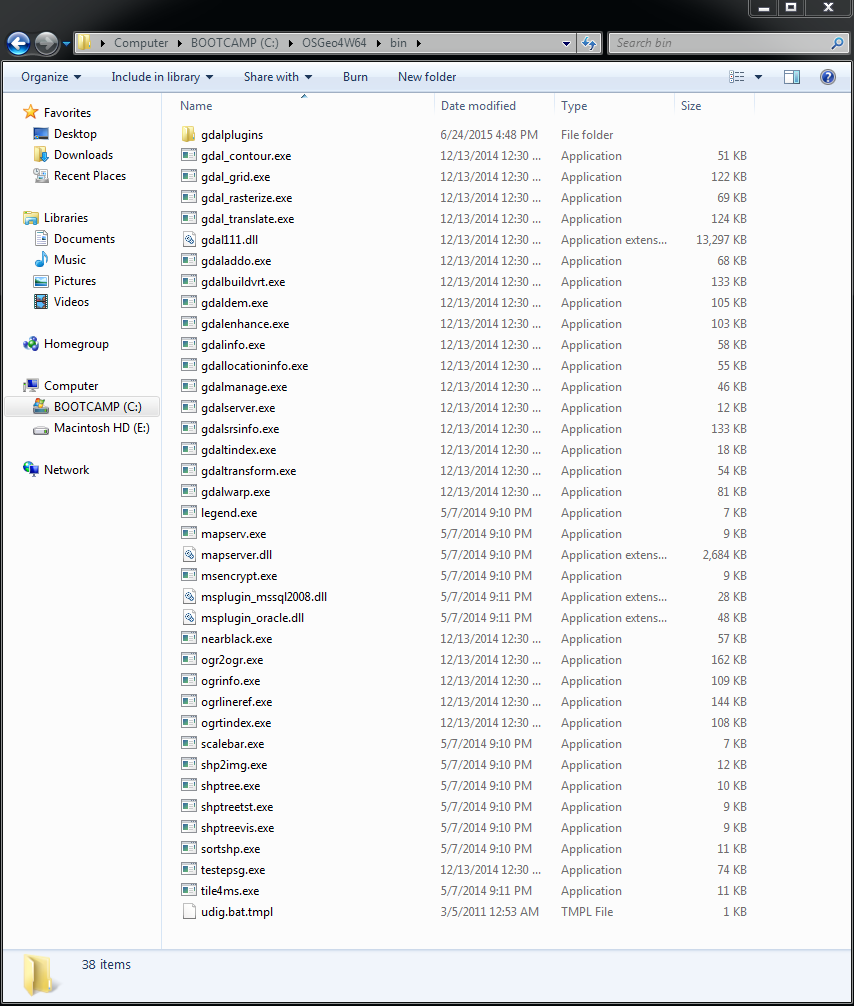
Yes, OSGeo4W64 and have added GDAL_LIBRARY_PATH setting to the settings.py
file. Have path to C:\OSGeo4W64\bin also.
Could anything be missing or corrupted in OSGeo4W64 (see below)?

<https://lh3.googleusercontent.com/-hrCS_B0AjzI/VZzymEzGcxI/AAAAAAAAATY/AdEt2SBXV1M/s1600/Capture.PNG>


On Wednesday, 8 July 2015 04:07:31 UTC+8, Alexei Peters wrote:
>
> It looks like it still can't find the proper GDAL libraries.  Did you use
> OSGeo4W?
> -Alexei
>
>
> Director of Web Development - Farallon Geographics, Inc. - 971.227.3173
>
> On Mon, Jul 6, 2015 at 3:34 AM, NHB Heritage <[email protected]>
> wrote:
>
>> Hi Alexei,
>>
>> Thank you for replying with the solution on the other thread. I have
>> followed to the T on the instructions given to install Arches and
>> Arches_HIP on Windows 7 machine (Boot Camp on iMac).
>>
>> However, I am still experiencing problem when installing ElasticSearch
>> (step #7 in installing Arches_HIP). Error messages below:
>>
>> (ENV) C:\Arches\my_hip_app>python manage.py packages -o
>> setup_elasticsearch
>> Traceback (most recent call last):
>>   File "manage.py", line 28, in <module>
>> execute_from_command_line(sys.argv)
>>   File
>> "C:\Arches\ENV\lib\site-packages\django\core\management\__init__.py", line
>> 399, in execute_from_command_line utility.execute()
>>   File
>> "C:\Arches\ENV\lib\site-packages\django\core\management\__init__.py", line
>> 392, in execute self.fetch_command(subcommand).run_from_argv(self.argv)
>>   File
>> "C:\Arches\ENV\lib\site-packages\django\core\management\__init__.py", line
>> 272, in fetch_command klass = load_command_class(app_name, subcommand)
>>   File
>> "C:\Arches\ENV\lib\site-packages\django\core\management\__init__.py", line
>> 75, in load_command_class module =
>> import_module('%s.management.commands.%s' % (app_name, name))
>>   File "C:\Arches\ENV\lib\site-packages\django\utils\importlib.py", line
>> 40, in import_module__import__(name)
>>   File
>> "C:\Arches\ENV\lib\site-packages\arches\management\commands\packages.py",
>> line 28, in <module> from
>> arches.app.utils.data_management.resources.importer import ResourceLoader
>>   File
>> "C:\Arches\ENV\lib\site-packages\arches\app\utils\data_management\resources\importer.py",
>>
>> line 7, in <module> from django.contrib.auth.models import User
>>   File "C:\Arches\ENV\lib\site-packages\django\contrib\auth\models.py",
>> line 48, in <module> class Permission(models.Model):
>>   File "C:\Arches\ENV\lib\site-packages\django\db\models\base.py", line
>> 96, in __new__new_class.add_to_class('_meta', Options(meta, **kwargs))
>>   File "C:\Arches\ENV\lib\site-packages\django\db\models\base.py", line
>> 264, in add_to_class value.contribute_to_class(cls, name)
>>   File "C:\Arches\ENV\lib\site-packages\django\db\models\options.py",
>> line 124, in contribute_to_class self.db_table =
>> truncate_name(self.db_table, connection.ops.max_name_length())
>>   File "C:\Arches\ENV\lib\site-packages\django\db\__init__.py", line 34,
>> in __getattr__return getattr(connections[DEFAULT_DB_ALIAS], item)
>>   File "C:\Arches\ENV\lib\site-packages\django\db\utils.py", line 198, in
>> __getitem__backend = load_backend(db['ENGINE'])
>>   File "C:\Arches\ENV\lib\site-packages\django\db\utils.py", line 113, in
>> load_backend return import_module('%s.base' % backend_name)
>>   File "C:\Arches\ENV\lib\site-packages\django\utils\importlib.py", line
>> 40, in import_module__import__(name)
>>   File
>> "C:\Arches\ENV\lib\site-packages\django\contrib\gis\db\backends\postgis\base.py",
>>
>> line 4, in <module> from
>> django.contrib.gis.db.backends.postgis.introspection import
>> PostGISIntrospection
>>   File
>> "C:\Arches\ENV\lib\site-packages\django\contrib\gis\db\backends\postgis\introspection.py",
>>
>> line 2, in <module> from django.contrib.gis.gdal import OGRGeomType
>>   File
>> "C:\Arches\ENV\lib\site-packages\django\contrib\gis\gdal\__init__.py", line
>> 41, in <module> from django.contrib.gis.gdal.driver import Driver
>>   File
>> "C:\Arches\ENV\lib\site-packages\django\contrib\gis\gdal\driver.py", line
>> 5, in <module> from django.contrib.gis.gdal.prototypes import ds as capi
>>   File
>> "C:\Arches\ENV\lib\site-packages\django\contrib\gis\gdal\prototypes\ds.py",
>> line 8, in <module> from django.contrib.gis.gdal.libgdal import lgdal
>>   File
>> "C:\Arches\ENV\lib\site-packages\django\contrib\gis\gdal\libgdal.py", line
>> 47, in <module> lgdal = CDLL(lib_path)
>>   File "C:\Python27\Lib\ctypes\__init__.py", line 365, in
>> __init__self._handle = _dlopen(self._name, mode) WindowsError: [Error 193]
>> %1 is not a valid Win32 application
>>
>> Even though installation for Arches was successful, I also encountered
>> the error messages below:
>>
>>   Requirement already up-to-date: setuptools in
>> c:\arches\env\lib\site-packages
>>   Could not open requirements file: [Errno 2] No such file or directory:
>> 'C:\\Arches\\ENV\\Lib\\site-packages\\arches\\install\\requirements.txt'
>>   error:
>> C:\Arches\ENV\Lib\site-packages\arches\install\django_overrides\base.py:
>> No such file or directory
>>
>>   ----------------------------------------
>>   Failed building wheel for arches
>>   Failed to build arches
>>
>>  --
>> -- To post, send email to [email protected]. To
>> unsubscribe, send email to [email protected].
>> For more information, visit
>> https://groups.google.com/d/forum/archesproject?hl=en
>> ---
>> You received this message because you are subscribed to the Google Groups
>> "Arches Project" group.
>> To unsubscribe from this group and stop receiving emails from it, send an
>> email to [email protected].
>> For more options, visit https://groups.google.com/d/optout.
>>
>
>

--
-- To post, send email to [email protected]. To unsubscribe, send
email to [email protected]. For more information,
visit https://groups.google.com/d/forum/archesproject?hl=en
---
You received this message because you are subscribed to the Google Groups
"Arches Project" group.
To unsubscribe from this group and stop receiving emails from it, send an email
to [email protected].
For more options, visit https://groups.google.com/d/optout.