Ah apologies, my bad! Forgot to activate the virtual environment before
running the database installation (as this was a new command window).
All is fine now with the installation! Cheers!

Best,
Chun

On Tuesday, 11 August 2015 15:36:10 UTC+8, NHB Heritage wrote:
>
> Thanks so much, Alexei!
>
> I think the installation is finally reaching its final lap to completion!
>
> Here's the error when I keyed "python manage.py packages -o install" to
> install the “arches_my_hip_app” database.
>
> Traceback (most recent call last):
>   File "manage.py", line 22, in <module>
>     from django.core.management import execute_from_command_line
> ImportError: No module named django.core.management
>
>
> On Saturday, 25 July 2015 03:21:20 UTC+8, Alexei Peters wrote:
>>
>> Hi Chun,
>> If I remember correctly, when you install OSGeo4W there are check boxes
>> for installing UDIG and GRASS and maybe a few other things that are checked
>> by default.  The only thing you need to install is GDAL.
>> Hopefully this helps.
>> Cheers,
>> Alexei
>>
>>
>> Director of Web Development - Farallon Geographics, Inc. - 971.227.3173
>>
>> On Fri, Jul 24, 2015 at 2:41 AM, NHB Heritage <[email protected]>
>> wrote:
>>
>>> Hi Alexei,
>>>
>>> Yes, I'm on a 64bit machine. I realized the main issue is the mobile
>>> data network for installing OSGeo4W is causing the problem. As such, the
>>> files are either incomplete or corrupted.
>>>
>>> May I ask what are the components to download for OSGeo4W minimally to
>>> ensure Arches can install/run?
>>>
>>> Best,
>>> Chun
>>>
>>> On Saturday, 11 July 2015 01:01:56 UTC+8, Alexei Peters wrote:
>>>>
>>>> And I'm assuming that you're on a 64bit machine right?
>>>>
>>>> If that's the case, you might just try re-installing OSGeo4W.  Looking
>>>> at the error message it appears that Windows doesn't think the .dll you're
>>>> referencing is valid.
>>>> Looking at the file listing in the C:/OSGeo4W64/bin directory it looks
>>>> like you have an older version of the files then I do.  It's a bit of a
>>>> long shot, but worth the try.
>>>>
>>>> If that doesn't work, you might just try re-installing arches and
>>>> arches-hip.
>>>> Let me know if any of this helps.
>>>> Cheers,
>>>> Alexei
>>>>
>>>>
>>>> Director of Web Development - Farallon Geographics, Inc. - 971.227.3173
>>>>
>>>> On Fri, Jul 10, 2015 at 5:08 AM, NHB Heritage <[email protected]>
>>>> wrote:
>>>>
>>>>> Oh yes!
>>>>>
>>>>>
>>>>> <https://lh3.googleusercontent.com/-oHhfLl9hpTw/VZ5DHBHc23I/AAAAAAAAATw/2NktQuZWesA/s1600/Capture2.PNG>
>>>>>
>>>>>
>>>>> On Thursday, 9 July 2015 00:40:23 UTC+8, Alexei Peters wrote:
>>>>>>
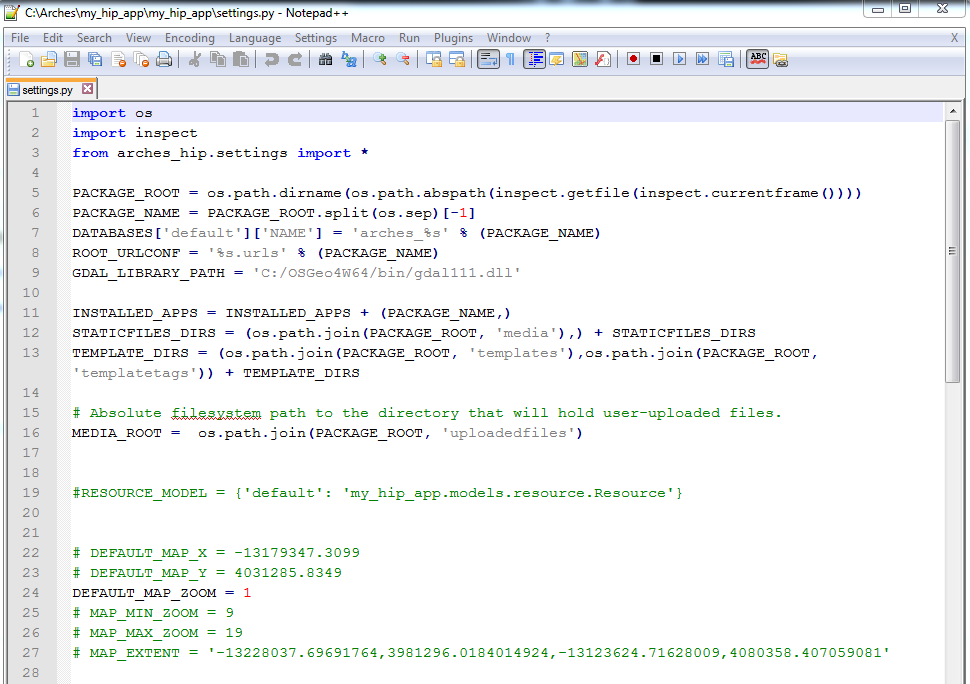
>>>>>> So just to be clear, your GDAL_LIBRARY_PATH setting looks like this
>>>>>> in your settings.py file:
>>>>>>
>>>>>> GDAL_LIBRARY_PATH = 'C:/OSGeo4W64/bin/gdal111.dll'  #<--- Note the
>>>>>> forward slashes!
>>>>>>
>>>>>> -Alexei
>>>>>>
>>>>>>
>>>>>>
>>>>>>
>>>>>> Director of Web Development - Farallon Geographics, Inc. -
>>>>>> 971.227.3173
>>>>>>
>>>>>>
>>>>>> --
>>>>> -- To post, send email to [email protected]. To
>>>>> unsubscribe, send email to [email protected].
>>>>> For more information, visit
>>>>> https://groups.google.com/d/forum/archesproject?hl=en
>>>>> ---
>>>>> You received this message because you are subscribed to the Google
>>>>> Groups "Arches Project" group.
>>>>> To unsubscribe from this group and stop receiving emails from it, send
>>>>> an email to [email protected].
>>>>> For more options, visit https://groups.google.com/d/optout.
>>>>>
>>>>
>>>>
>>

--
-- To post, send email to [email protected]. To unsubscribe, send
email to [email protected]. For more information,
visit https://groups.google.com/d/forum/archesproject?hl=en
---
You received this message because you are subscribed to the Google Groups
"Arches Project" group.
To unsubscribe from this group and stop receiving emails from it, send an email
to [email protected].
For more options, visit https://groups.google.com/d/optout.