Hi Jorge,
What Brain said in his previous email is exactly right.  You're very close
now.  The only think I might add is that you "*may*" have to adjust some
settings (like database connection info) in your
c:\Arches-Projects\gis_hip_app\gis_hip_app\settings.py
file "*before*" you runserver.
Thanks for giving back to the community Brian!
Let us know if you run into any more issues Jorge.
Cheers,
Alexei
Director of Web Development - Farallon Geographics, Inc. - 971.227.3173

On Fri, Jul 10, 2015 at 2:29 AM, Bryan Alvey <[email protected]>
wrote:

> Hi Jorge,
>
> I have managed to get it running.  Here's what I did;
>
>
> If you've already installed the arches_hip package, to get it running in a
> Windows environment you need *two *command windows open.
>
> In the first is the elasticsearch. Open a command window  and from the
> command line type:
>
>
>
> *c:\Arches-Projects\gis_hip_app\gis_hip_app\elasticsearch\elasticsearch-1.4.1\bin\elasticsearch*
> That should start the elastic search. Then, leaving that command window
> open, open up a NEW command window:
>
> 1. change to your hip-app directory
>
>
>
> *cd C:\Arches-Projects\gis_hip_app\ *
> 2. Activate the virtual environment from that directory:
>
>
>
> *C:\Arches-Projects\gis_hip_app\>C:\Arches-Projects\ENV\Scripts\activate*
> 3. So now you have the virtual environment running and you are still in
> your gis_hip_app directory.  Manage.py is located in that directory. Then
> you run the command line:
>
>
>
>
> *(ENV) C:\Arches-Projects\gis_hip_app > python manage.py runserver *
> If you have installed your hip package correctly, everything should run.
>
> 4. *Leave that command window open too.*
>
> What I did next after that was to alter the values in
> c:\Arches-Projects\gis_hip_app\gis_hip_app\settings.py to point to the
> right area before running the *http://localhost:8000/
> <http://localhost:8000/> *command in the browser..
>
> I hope that helps...
>
> Bryan
>
>
> On 9 July 2015 at 20:04, Jorge García Fernández <
> [email protected]> wrote:
>
>> Hi all,
>> M name is Jorge. We got installed Arches and Arches-HIP on our Collegue[s
>> server.
>> It seems to be well installed. All folders and roots are as published in
>> Arches guide.
>> I was trying to run arches-HIP but I couldnt go beyond the third step. I
>> appreciate your help.
>>
>> I run ElasticSearch  successfully, but once I tried to create my
>> database, the first problem pop up... there is no "manage.py" in ENV
>> folder, but in ENV\Scripts
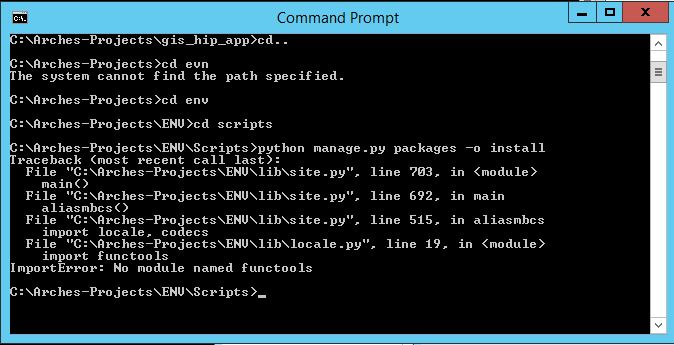
>> I typed the secuence "python manage.py packages -o install" and the
>> result was: "no module named functools" (u can see it in the following
>> screeshot)
>>
>>
>> <https://lh3.googleusercontent.com/-6SlePPGZADk/VZ7DCF4FqSI/AAAAAAAAA2k/CFMkYlS01m0/s1600/Capture.JPG>
>>
>> My first question is> why manage.py is not in ENV folder?
>> and, is this missing "functools" an ARCHES or Python problem?.
>>
>> The same problem happens when runserver action is commanded to manage.py
>> , which I think is the main step in order to run Arches-HIP :(
>>
>> Of course, after missing that, no browser windows is displaying nothing
>> at localhost:8000
>>
>> Thank you very much for your help!!
>>
>> Jorge
>>
>>
>>
>>
>>
>>  --
>> -- To post, send email to [email protected]. To
>> unsubscribe, send email to [email protected].
>> For more information, visit
>> https://groups.google.com/d/forum/archesproject?hl=en
>> ---
>> You received this message because you are subscribed to the Google Groups
>> "Arches Project" group.
>> To unsubscribe from this group and stop receiving emails from it, send an
>> email to [email protected].
>> For more options, visit https://groups.google.com/d/optout.
>>
>
>  --
> -- To post, send email to [email protected]. To unsubscribe,
> send email to [email protected]. For more
> information, visit https://groups.google.com/d/forum/archesproject?hl=en
> ---
> You received this message because you are subscribed to the Google Groups
> "Arches Project" group.
> To unsubscribe from this group and stop receiving emails from it, send an
> email to [email protected].
> For more options, visit https://groups.google.com/d/optout.
>

--
-- To post, send email to [email protected]. To unsubscribe, send
email to [email protected]. For more information,
visit https://groups.google.com/d/forum/archesproject?hl=en
---
You received this message because you are subscribed to the Google Groups
"Arches Project" group.
To unsubscribe from this group and stop receiving emails from it, send an email
to [email protected].
For more options, visit https://groups.google.com/d/optout.