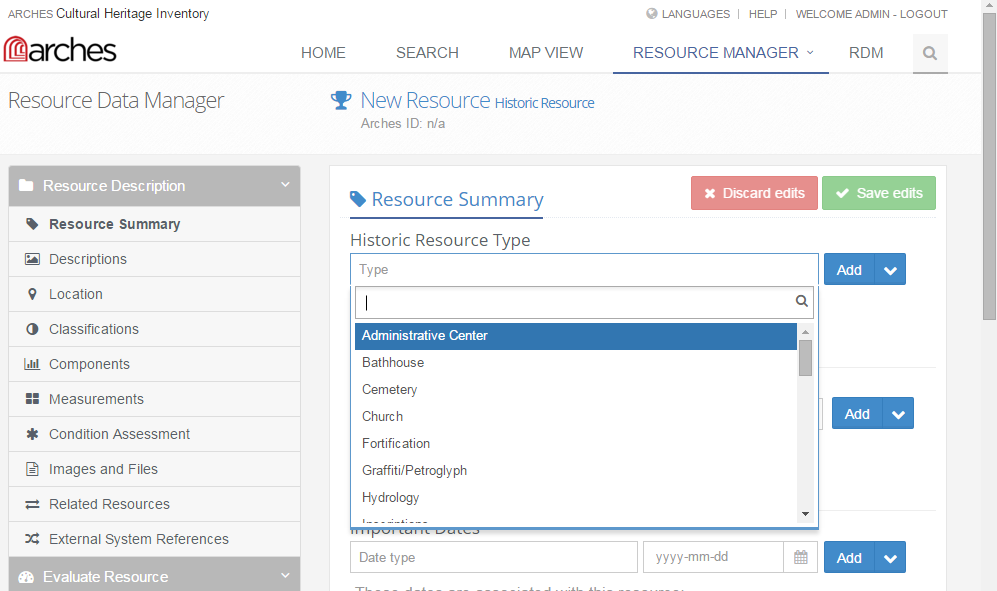
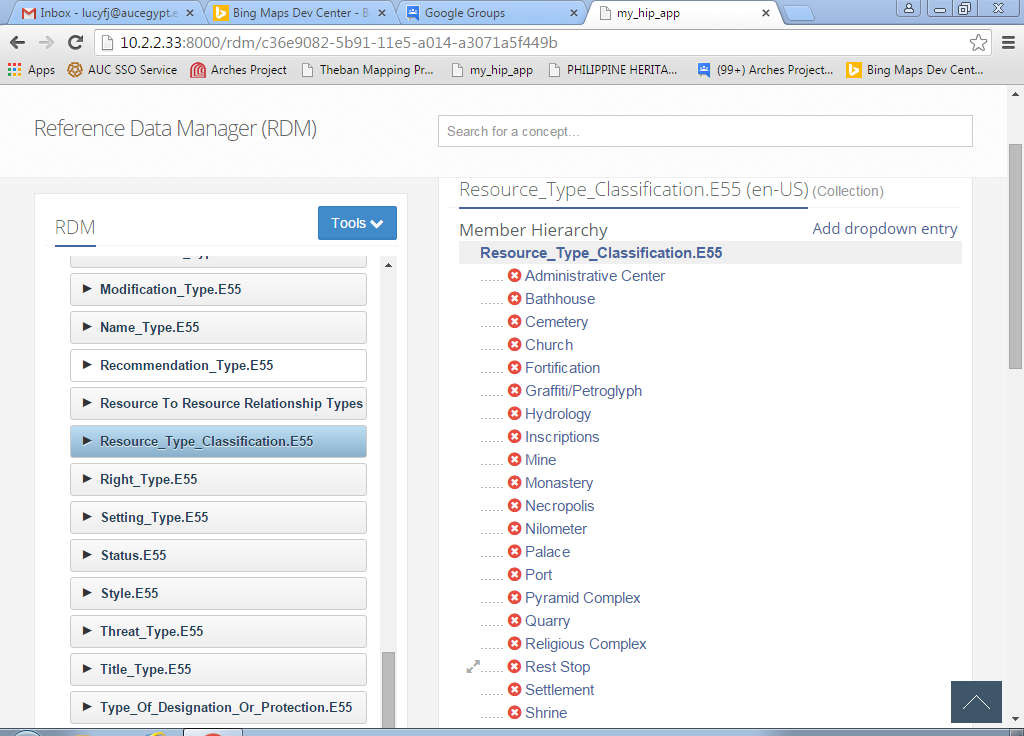
Hi Lucy, the main problem is that there are some semantic inconsistencies
between different pieces of the HIP.  I just checked these out, and here
are the "lineages" in question.  Keep in mind that the labels in the RDM
are based directly on the resource graph entity names:
1)
In the resource graph:
  HERITAGE_RESOURCE.E18 > *RESOURCE_TYPE_CLASSIFICATION.E55
> RESOURCE_CLASSIFICATION_AUTHORITY_DOCUMENT.E32*
In the RDM:
  Arches > *Resource Classification*
  Dropdown Lists > *Resource_Type_Classification.E55*
In the forms:
  Resource Summary Form > *Historic Resource Type*

2)
In the resource graph:
  HERITAGE_RESOURCE.E18 > PRODUCTION.E12 > PHASE_TYPE_ASSIGNMENT.E17 >
*HERITAGE_RESOURCE_TYPE.E55
> HERITAGE_RESOURCE_TYPE_AUTHORITY_DOCUMENT.E32*
In the RDM:
  Arches > *Heritage Resource Type*
  Dropdown Lists > *Heritage_Resource_Type.E55*
In the forms:
  Classifications Form > *Classification Summary (type)*

So I'd say that techincally nothing is wrong, you just found a place where,
between the graphs and the forms, some terminology is being used in a
confusing manner.  If you end up digging into the forms, you could change
the names above the dropdowns with no trouble. It's definitely worth taking
note for future iterations of the HIP package.

Adam


On Wednesday, October 28, 2015 at 3:03:55 AM UTC-5, Lucy FJ wrote:
>
>
> <https://lh3.googleusercontent.com/-74ZFRrRukpw/VjCBQbg1IrI/AAAAAAAAAA0/3eoQP4cp83w/s1600/RMHistResTypeDropDownList.PNG>
>
>
> <https://lh3.googleusercontent.com/-kqelhTSe-dg/VjB_5EDbA0I/AAAAAAAAAAo/suhEZ1ldkN4/s1600/RDMResourceTypeClassification.PNG>
>
>
> <https://lh3.googleusercontent.com/-lZFEa6MIz7c/VjB_plOJ-hI/AAAAAAAAAAg/bhswcrFqtJ8/s1600/RDMHeritageResourceType.PNG>
>
>
> <https://lh3.googleusercontent.com/-D4pw67uU-sQ/VjB_cK_aotI/AAAAAAAAAAY/ZAfy_zwzw00/s1600/RMClassDropDownList.PNG>
> Dear All,
>
> I thought I'd start a new topic on this so as not to be confused with the
> other question I raised and has now been resolved.
>
>  I am only using the Reference DM to change the authority files because I
> am a user and we don't have a full time IT staff member assigned to our
> project yet so can't change the files directly.
> I used the Arches HIP sample files as a basis and added our concepts for
> the heritage resource type and deleted the sample ones. I did the same for
> the resource classification types. I then added the appropriate concepts to
> the drop down lists for each. When I tried inputting a resource using the
> Resource Data manager, I found that the resource classification drop down
> list was where I expected the heritage resource list and vice versa. The
> concepts were the ones I had input. I have checked, double checked and
> triple checked my inputs and they are correct.
> I am attaching copies of the screen shots.
>
>   Has anyone come across this problem before?
>
> Thank you for any help on this issue!
>
> Lucy
>
>
> <https://lh3.googleusercontent.com/-74ZFRrRukpw/VjCBQbg1IrI/AAAAAAAAAA0/3eoQP4cp83w/s1600/RMHistResTypeDropDownList.PNG>
>
>

--
-- To post, send email to [email protected]. To unsubscribe, send
email to [email protected]. For more information,
visit https://groups.google.com/d/forum/archesproject?hl=en
---
You received this message because you are subscribed to the Google Groups
"Arches Project" group.
To unsubscribe from this group and stop receiving emails from it, send an email
to [email protected].
For more options, visit https://groups.google.com/d/optout.