OK, so to summarize:
- My target micro-controller attiny2313 clock is lower than 1.5 MHz
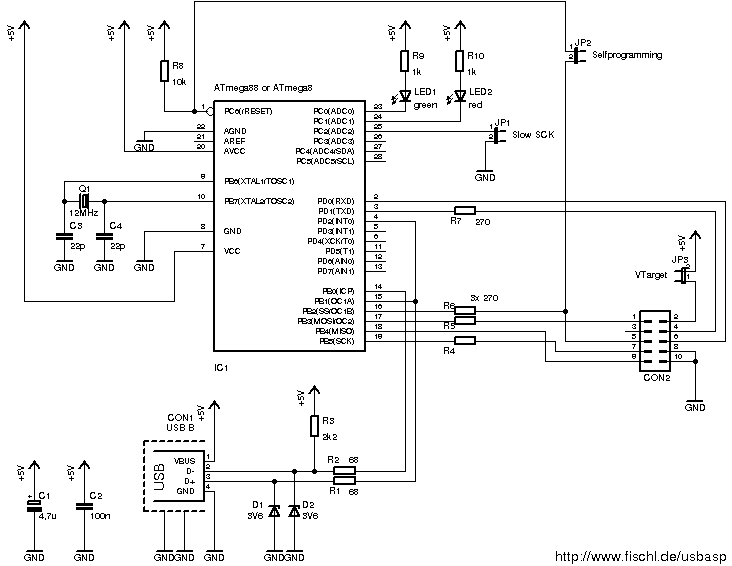
- So, I need to put a jumper (J3) between the pin 25 of the usbasp programmer
internal micro-controller atmega8 and the GND (pin 3, pin 5 or pin 21).
We can verify this information in the README file[1] and in the schematic
image[2] of the usbasp programmer.

I have opened the usbasp to see how I can set the jumper of the usbasp.

As you can see in the attached image, this is very little and I don't know how
to wire the pin 25 to the GND correctly.

Can you give me an advice on how I can wire the pin25 and the GND easily ?

[1] http://www.fischl.de/usbasp/Readme.txt
[2] http://www.fischl.de/usbasp/bilder/usbasp_circuit.png


On Mon, 05 Aug 2013 10:11:07 -0400
Ormund Williams <[email protected]> wrote:

> On Mon, 2013-08-05 at 08:23 +0200, YuGiOhJCJ Mailing-List wrote:
> > I have 3 questions (A, B and C).
> >
> > A) Thank you for the image.
> > I can see on your image that I am using the cable correctly.
> > Indeed, I put the coloured part at the top, so the pin 1 and 2 are at the
> > top.
> > But I can see on your image that we see the back of the connector (the part
> > without the holes where we plug the pins).
> > That's not what I am doing.
> > Indeed, I am watching the connector in front of me, so the pin 1 and 2 are
> > reversed when I am using it.
> > You can watch in the attached usbasp_connector_2_small.png file what I am
> > doing.
> > Am I wrong ?
> >
> That was wrong, and may have caused damage.
>
> > B) Using your way to do (taking the connector from the back instead of from
> > the front), I can use avrdude 5.11.1:
> > ---
> > $ sudo avrdude -p t2313 -c usbasp -U flash:w:main.hex
> >
> > avrdude: warning: cannot set sck period. please check for usbasp firmware
> > update.
> > avrdude: error: programm enable: target doesn't answer. 1
> > avrdude: initialization failed, rc=-1
> >          Double check connections and try again, or use -F to override
> >          this check.
> >
> >
> > avrdude done.  Thank you.
> > ---
> >
> > Using your way to do (taking the connector from the back instead of from
> > the front), I can use avrdude 5.2:
> > ---
> > $ sudo avrdude -p t2313 -c usbasp -U flash:w:main.hex
> >
> > avrdude: error: programm enable: target doesn't answer. 1
> > avrdude: AVR device initialized and ready to accept instructions
> >
> > Reading | ################################################## | 100% 0.00s
> >
> > avrdude: Device signature = 0xffffff
> > avrdude: Yikes!  Invalid device signature.
> >          Double check connections and try again, or use -F to override
> >          this check.
> >
> >
> > avrdude done.  Thank you.
> > ---
> >
> > So you can see the avrdude device signature has changed: 0xffffff (instead
> > of 0x000000).
> > Do you understand why ?
> > You can watch in the attached usbasp_microcontrolleur.png file what I am
> > doing.
> >
> When you had it reversed the MISO pin9 was grounded so all data will
> come back as zeros.
>
> > C) You say that there is a problem about the SCK frequency.
> > Instead of open the usbasp to resolve this problem, what do you think about
> > changing the internal RC oscillator of my attiny2313 ?
> > Indeed, if I put a component between the XTAL2 and XTAL1 pins (pins 4 and
> > 5) of my attiny2313 it may resolve the problem.
> > This solution should avoid to open the programmer.
> >
> You cant change the frequency like that the internal RC oscillator is
> not connected to any pins you must set the correct fuses and to do that
> you need to program the chip.
>
> I don't think you have a choice but to open the programmer or get a
> different one.
>
>
> Regards
>
> --
> Ormund
>
>
> _______________________________________________
> AVR-chat mailing list
> [email protected]
> https://lists.nongnu.org/mailman/listinfo/avr-chat

_______________________________________________
AVR-chat mailing list
[email protected]
https://lists.nongnu.org/mailman/listinfo/avr-chat