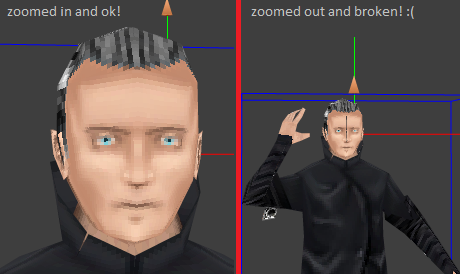
try use power of 2 sizes, like 256x512, 64x256, 1024x512 etc
this artefact is often due to roundings.
also keep in mind that there is a native mipmapping mechanism into the player
working at best using this ratios.
another possible case is in case of triangle next to each other not sharing
exactly  the same vertexes
you could try fix in your edit program or use the Grid and then Weld class.

and finally another quick fix is to bleed the texture.
this means on the map where the half face pixel line is, just photoshop one
extra pixel row/col
or run similar bleeding code as found in Prebaker class. You offer this way one
pixel rounding buffer...

Fabrice


On Feb 11, 2010, at 10:05 AM, Micheal MacLean wrote:

> Hello away3d devs,
>
> I am loading an animated md2 with a .png texture that I have exported
> from 3DS Max 2009 into an away3D project (just something bare-bones to
> test). The md2 animation works perfectly and the texture SEEMS to be
> ok, but at certain distances the front of the texture seems to break.
>
> Thinking that maybe it was a problem with away3D library, I tried it
> with away3Dlite but still had the same problem. As one last effort, I
> tried it in preFab and sure enough, same thing there too...
>
> http://i737.photobucket.com/albums/xx11/mrmmaclean/random/md2TextureProblem.png
>
> The model looks fine in Max and even looks fine when I open it with
> MisfitModel3D (good for naming the animations anyways!).
>
> Any thoughts?
>
> Thank you for the wonderful libraries and I hope you can shed some
> light on my problem!
>
> -Micheal MacLean
>