Script 'mail_helper' called by obssrc
Hello community,

here is the log from the commit of package python-qtconsole for
openSUSE:Factory checked in at 2021-10-13 18:06:06
++++++++++++++++++++++++++++++++++++++++++++++++++++++++++++++++++++++++
Comparing /work/SRC/openSUSE:Factory/python-qtconsole (Old)
 and      /work/SRC/openSUSE:Factory/.python-qtconsole.new.2443 (New)
++++++++++++++++++++++++++++++++++++++++++++++++++++++++++++++++++++++++
Package is "python-qtconsole"
Wed Oct 13 18:06:06 2021 rev:18 rq:924561 version:5.1.1
Changes:
--------
--- /work/SRC/openSUSE:Factory/python-qtconsole/python-qtconsole.changes
2021-05-11 23:04:27.996873871 +0200
+++
/work/SRC/openSUSE:Factory/.python-qtconsole.new.2443/python-qtconsole.changes
2021-10-13 18:10:00.863644002 +0200
@@ -1,0 +2,7 @@
+Sun Oct 10 19:13:58 UTC 2021 - Ben Greiner <[email protected]>
+
+- Update to version 5.1.1
+ * Improve handling of different keyboard combinations.
+ * Move cursor to the beginning of buffer if on the same line.
+
+-------------------------------------------------------------------
Old:
----
qtconsole-5.1.0.tar.gz
New:
----
qtconsole-5.1.1.tar.gz
++++++++++++++++++++++++++++++++++++++++++++++++++++++++++++++++++++++++
Other differences:
------------------
++++++ python-qtconsole.spec ++++++
--- /var/tmp/diff_new_pack.rVvLwG/_old 2021-10-13 18:10:01.547645075 +0200
+++ /var/tmp/diff_new_pack.rVvLwG/_new 2021-10-13 18:10:01.551645081 +0200
@@ -19,7 +19,7 @@
%{?!python_module:%define python_module() python-%{**} python3-%{**}}
%define skip_python2 1
Name: python-qtconsole
-Version: 5.1.0
+Version: 5.1.1
Release: 0
Summary: Jupyter Qt console
License: BSD-3-Clause
++++++ qtconsole-5.1.0.tar.gz -> qtconsole-5.1.1.tar.gz ++++++
diff -urN '--exclude=CVS' '--exclude=.cvsignore' '--exclude=.svn'
'--exclude=.svnignore' old/qtconsole-5.1.0/PKG-INFO new/qtconsole-5.1.1/PKG-INFO
--- old/qtconsole-5.1.0/PKG-INFO 2021-05-02 19:54:49.339788200 +0200
+++ new/qtconsole-5.1.1/PKG-INFO 2021-06-29 19:20:59.933856500 +0200
@@ -1,88 +1,12 @@
Metadata-Version: 2.1
Name: qtconsole
-Version: 5.1.0
+Version: 5.1.1
Summary: Jupyter Qt console
Home-page: http://jupyter.org
Author: Jupyter Development Team
Author-email: [email protected]
Maintainer: Spyder Development Team
License: BSD
-Description: # Jupyter QtConsole
-
- 
- 
- 
- [](https://coveralls.io/github/jupyter/qtconsole?branch=master)
- [](https://qtconsole.readthedocs.io/en/stable/)
- [](https://groups.google.com/forum/#!forum/jupyter)
-
- A rich Qt-based console for working with Jupyter kernels,
- supporting rich media output, session export, and more.
-
- The Qtconsole is a very lightweight application that largely feels
like a terminal, but
- provides a number of enhancements only possible in a GUI, such as
inline
- figures, proper multiline editing with syntax highlighting, graphical
calltips,
- and more.
-
-
-
- ## Install Qtconsole
- The Qtconsole requires Python bindings for Qt, such as
[PyQt5](http://www.riverbankcomputing.com/software/pyqt/intro),
- [PyQt4](https://www.riverbankcomputing.com/software/pyqt/download),
- or [PySide](http://pyside.github.io/docs/pyside).
-
- Although [pip](https://pypi.python.org/pypi/pip) and
- [conda](http://conda.pydata.org/docs) may be used to install the
Qtconsole, conda
- is simpler to use since it automatically installs PyQt5. Alternatively,
- the Qtconsole installation with pip needs additional steps since pip
doesn't install
- the Qt requirement.
-
- ### Install using conda
- To install:
-
- conda install qtconsole
-
- **Note:** If the Qtconsole is installed using conda, it will
**automatically**
- install the Qt requirement as well.
-
- ### Install using pip
- To install:
-
- pip install qtconsole
-
- **Note:** Make sure that Qt is installed. Unfortunately, Qt is not
- installed when using pip. The next section gives instructions on doing
it.
-
- ### Installing Qt (if needed)
- You can install PyQt5 with pip using the following command:
-
- pip install pyqt5
-
- or with a system package manager on Linux. For Windows, PyQt binary
packages may be
- used.
-
- **Note:** Additional information about using a system package manager
may be
- found in the [qtconsole
documentation](https://qtconsole.readthedocs.io).
-
- More installation instructions for PyQt can be found in the [PyQt5
documentation](http://pyqt.sourceforge.net/Docs/PyQt5/installation.html) and
[PyQt4 documentation](http://pyqt.sourceforge.net/Docs/PyQt4/installation.html)
-
- Source packages for Windows/Linux/MacOS can be found here:
[PyQt5](https://www.riverbankcomputing.com/software/pyqt/download5) and
[PyQt4](https://riverbankcomputing.com/software/pyqt/download).
-
-
- ## Usage
- To run the Qtconsole:
-
- jupyter qtconsole
-
- ## Resources
- - [Project Jupyter website](https://jupyter.org)
- - Documentation for the Qtconsole
- * [latest version](https://qtconsole.readthedocs.io/en/latest/)
[[PDF](https://media.readthedocs.org/pdf/qtconsole/latest/qtconsole.pdf)]
- * [stable version](https://qtconsole.readthedocs.io/en/stable/)
[[PDF](https://media.readthedocs.org/pdf/qtconsole/stable/qtconsole.pdf)]
- - [Documentation for Project
Jupyter](https://jupyter.readthedocs.io/en/latest/index.html)
[[PDF](https://media.readthedocs.org/pdf/jupyter/latest/jupyter.pdf)]
- - [Issues](https://github.com/jupyter/qtconsole/issues)
- - [Technical support - Jupyter Google
Group](https://groups.google.com/forum/#!forum/jupyter)
-
Keywords: Interactive,Interpreter,Shell
Platform: Linux
Platform: Mac OS X
@@ -101,3 +25,82 @@
Description-Content-Type: text/markdown
Provides-Extra: test
Provides-Extra: doc
+License-File: LICENSE
+
+# Jupyter QtConsole
+
+
+
+
+[](https://coveralls.io/github/jupyter/qtconsole?branch=master)
+[](https://qtconsole.readthedocs.io/en/stable/)
+[](https://groups.google.com/forum/#!forum/jupyter)
+
+A rich Qt-based console for working with Jupyter kernels,
+supporting rich media output, session export, and more.
+
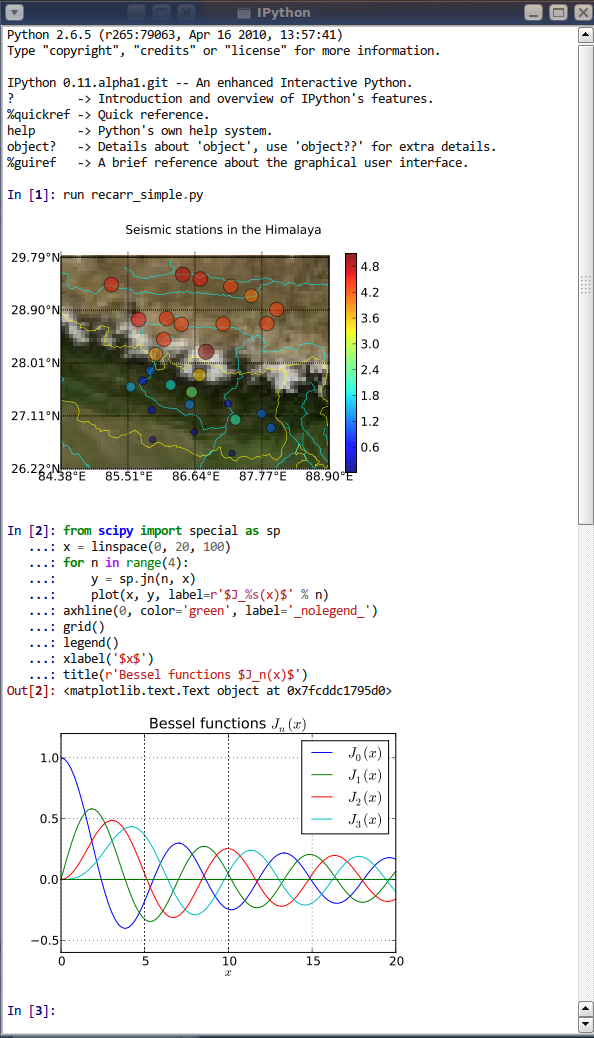
+The Qtconsole is a very lightweight application that largely feels like a
terminal, but
+provides a number of enhancements only possible in a GUI, such as inline
+figures, proper multiline editing with syntax highlighting, graphical calltips,
+and more.
+
+
+
+## Install Qtconsole
+The Qtconsole requires Python bindings for Qt, such as
[PyQt5](http://www.riverbankcomputing.com/software/pyqt/intro),
+[PyQt4](https://www.riverbankcomputing.com/software/pyqt/download),
+or [PySide](http://pyside.github.io/docs/pyside).
+
+Although [pip](https://pypi.python.org/pypi/pip) and
+[conda](http://conda.pydata.org/docs) may be used to install the Qtconsole,
conda
+is simpler to use since it automatically installs PyQt5. Alternatively,
+the Qtconsole installation with pip needs additional steps since pip doesn't
install
+the Qt requirement.
+
+### Install using conda
+To install:
+
+ conda install qtconsole
+
+**Note:** If the Qtconsole is installed using conda, it will **automatically**
+install the Qt requirement as well.
+
+### Install using pip
+To install:
+
+ pip install qtconsole
+
+**Note:** Make sure that Qt is installed. Unfortunately, Qt is not
+installed when using pip. The next section gives instructions on doing it.
+
+### Installing Qt (if needed)
+You can install PyQt5 with pip using the following command:
+
+ pip install pyqt5
+
+or with a system package manager on Linux. For Windows, PyQt binary packages
may be
+used.
+
+**Note:** Additional information about using a system package manager may be
+found in the [qtconsole documentation](https://qtconsole.readthedocs.io).
+
+More installation instructions for PyQt can be found in the [PyQt5
documentation](http://pyqt.sourceforge.net/Docs/PyQt5/installation.html) and
[PyQt4 documentation](http://pyqt.sourceforge.net/Docs/PyQt4/installation.html)
+
+Source packages for Windows/Linux/MacOS can be found here:
[PyQt5](https://www.riverbankcomputing.com/software/pyqt/download5) and
[PyQt4](https://riverbankcomputing.com/software/pyqt/download).
+
+
+## Usage
+To run the Qtconsole:
+
+ jupyter qtconsole
+
+## Resources
+- [Project Jupyter website](https://jupyter.org)
+- Documentation for the Qtconsole
+ * [latest version](https://qtconsole.readthedocs.io/en/latest/)
[[PDF](https://media.readthedocs.org/pdf/qtconsole/latest/qtconsole.pdf)]
+ * [stable version](https://qtconsole.readthedocs.io/en/stable/)
[[PDF](https://media.readthedocs.org/pdf/qtconsole/stable/qtconsole.pdf)]
+- [Documentation for Project
Jupyter](https://jupyter.readthedocs.io/en/latest/index.html)
[[PDF](https://media.readthedocs.org/pdf/jupyter/latest/jupyter.pdf)]
+- [Issues](https://github.com/jupyter/qtconsole/issues)
+- [Technical support - Jupyter Google
Group](https://groups.google.com/forum/#!forum/jupyter)
+
+
diff -urN '--exclude=CVS' '--exclude=.cvsignore' '--exclude=.svn'
'--exclude=.svnignore' old/qtconsole-5.1.0/docs/source/changelog.rst
new/qtconsole-5.1.1/docs/source/changelog.rst
--- old/qtconsole-5.1.0/docs/source/changelog.rst 2021-05-02
19:52:38.000000000 +0200
+++ new/qtconsole-5.1.1/docs/source/changelog.rst 2021-06-29
18:22:04.000000000 +0200
@@ -8,6 +8,14 @@
5.1
~~~
+5.1.1
+-----
+
+`5.1.1 on GitHub <https://github.com/jupyter/qtconsole/milestones/5.1.1>`__
+
+* Improve handling of different keyboard combinations.
+* Move cursor to the beginning of buffer if on the same line.
+
5.1.0
-----
diff -urN '--exclude=CVS' '--exclude=.cvsignore' '--exclude=.svn'
'--exclude=.svnignore' old/qtconsole-5.1.0/qtconsole/_version.py
new/qtconsole-5.1.1/qtconsole/_version.py
--- old/qtconsole-5.1.0/qtconsole/_version.py 2021-05-02 19:54:08.000000000
+0200
+++ new/qtconsole-5.1.1/qtconsole/_version.py 2021-06-29 19:19:46.000000000
+0200
@@ -1,2 +1,2 @@
-version_info = (5, 1, 0)
+version_info = (5, 1, 1)
__version__ = '.'.join(map(str, version_info))
diff -urN '--exclude=CVS' '--exclude=.cvsignore' '--exclude=.svn'
'--exclude=.svnignore' old/qtconsole-5.1.0/qtconsole/console_widget.py
new/qtconsole-5.1.1/qtconsole/console_widget.py
--- old/qtconsole-5.1.0/qtconsole/console_widget.py 2021-05-02
19:44:56.000000000 +0200
+++ new/qtconsole-5.1.1/qtconsole/console_widget.py 2021-06-28
18:18:20.000000000 +0200
@@ -1228,6 +1228,21 @@
alt_down = event.modifiers() & QtCore.Qt.AltModifier
shift_down = event.modifiers() & QtCore.Qt.ShiftModifier
+ cmd_down = (
+ sys.platform == "darwin" and
+ self._control_key_down(event.modifiers(), include_command=True)
+ )
+ if cmd_down:
+ if key == QtCore.Qt.Key_Left:
+ key = QtCore.Qt.Key_Home
+ elif key == QtCore.Qt.Key_Right:
+ key = QtCore.Qt.Key_End
+ elif key == QtCore.Qt.Key_Up:
+ ctrl_down = True
+ key = QtCore.Qt.Key_Home
+ elif key == QtCore.Qt.Key_Down:
+ ctrl_down = True
+ key = QtCore.Qt.Key_End
#------ Special modifier logic
-----------------------------------------
if key in (QtCore.Qt.Key_Return, QtCore.Qt.Key_Enter):
@@ -1363,7 +1378,6 @@
elif key == QtCore.Qt.Key_Up:
self._control.verticalScrollBar().setValue(0)
-
#------ Alt modifier
---------------------------------------------------
elif alt_down:
@@ -1415,14 +1429,14 @@
self._keyboard_quit()
intercepted = True
- elif key == QtCore.Qt.Key_Up:
+ elif key == QtCore.Qt.Key_Up and not shift_down:
if self._reading or not self._up_pressed(shift_down):
intercepted = True
else:
prompt_line = self._get_prompt_cursor().blockNumber()
intercepted = cursor.blockNumber() <= prompt_line
- elif key == QtCore.Qt.Key_Down:
+ elif key == QtCore.Qt.Key_Down and not shift_down:
if self._reading or not self._down_pressed(shift_down):
intercepted = True
else:
@@ -1439,7 +1453,7 @@
self._indent(dedent=True)
intercepted = True
- elif key == QtCore.Qt.Key_Left:
+ elif key == QtCore.Qt.Key_Left and not shift_down:
# Move to the previous line
line, col = cursor.blockNumber(), cursor.columnNumber()
@@ -1455,7 +1469,7 @@
else:
intercepted = not self._in_buffer(position - 1)
- elif key == QtCore.Qt.Key_Right:
+ elif key == QtCore.Qt.Key_Right and not shift_down:
#original_block_number = cursor.blockNumber()
if position == self._get_line_end_pos():
cursor.movePosition(QtGui.QTextCursor.NextBlock,
mode=anchormode)
@@ -1552,7 +1566,9 @@
# position is still valid due to text truncation).
if not (self._control_key_down(event.modifiers(), include_command=True)
or key in (QtCore.Qt.Key_PageUp, QtCore.Qt.Key_PageDown)
- or (self._executing and not self._reading)):
+ or (self._executing and not self._reading)
+ or (event.text() == "" and not
+ (not shift_down and key in (QtCore.Qt.Key_Up,
QtCore.Qt.Key_Down)))):
self._keep_cursor_in_buffer()
return intercepted
@@ -2191,13 +2207,13 @@
cursor.endEditBlock()
def _in_buffer(self, position):
- """
- Returns whether the specified position is inside the editing region.
+ """
+ Returns whether the specified position is inside the editing region.
"""
return position == self._move_position_in_buffer(position)
def _move_position_in_buffer(self, position):
- """
+ """
Return the next position in buffer.
"""
cursor = self._control.textCursor()
@@ -2222,9 +2238,17 @@
"""
cursor = self._control.textCursor()
endpos = cursor.selectionEnd()
+
if endpos < self._prompt_pos:
- # Cursor is not in buffer, move to the end
- cursor.movePosition(QtGui.QTextCursor.End)
+ cursor.setPosition(endpos)
+ line = cursor.blockNumber()
+ prompt_line = self._get_prompt_cursor().blockNumber()
+ if line == prompt_line:
+ # Cursor is on prompt line, move to start of buffer
+ cursor.setPosition(self._prompt_pos)
+ else:
+ # Cursor is not in buffer, move to the end
+ cursor.movePosition(QtGui.QTextCursor.End)
self._control.setTextCursor(cursor)
return True
diff -urN '--exclude=CVS' '--exclude=.cvsignore' '--exclude=.svn'
'--exclude=.svnignore' old/qtconsole-5.1.0/qtconsole.egg-info/PKG-INFO
new/qtconsole-5.1.1/qtconsole.egg-info/PKG-INFO
--- old/qtconsole-5.1.0/qtconsole.egg-info/PKG-INFO 2021-05-02
19:54:48.000000000 +0200
+++ new/qtconsole-5.1.1/qtconsole.egg-info/PKG-INFO 2021-06-29
19:20:57.000000000 +0200
@@ -1,88 +1,12 @@
Metadata-Version: 2.1
Name: qtconsole
-Version: 5.1.0
+Version: 5.1.1
Summary: Jupyter Qt console
Home-page: http://jupyter.org
Author: Jupyter Development Team
Author-email: [email protected]
Maintainer: Spyder Development Team
License: BSD
-Description: # Jupyter QtConsole
-
- 
- 
- 
- [](https://coveralls.io/github/jupyter/qtconsole?branch=master)
- [](https://qtconsole.readthedocs.io/en/stable/)
- [](https://groups.google.com/forum/#!forum/jupyter)
-
- A rich Qt-based console for working with Jupyter kernels,
- supporting rich media output, session export, and more.
-
- The Qtconsole is a very lightweight application that largely feels
like a terminal, but
- provides a number of enhancements only possible in a GUI, such as
inline
- figures, proper multiline editing with syntax highlighting, graphical
calltips,
- and more.
-
-

-
- ## Install Qtconsole
- The Qtconsole requires Python bindings for Qt, such as
[PyQt5](http://www.riverbankcomputing.com/software/pyqt/intro),
- [PyQt4](https://www.riverbankcomputing.com/software/pyqt/download),
- or [PySide](http://pyside.github.io/docs/pyside).
-
- Although [pip](https://pypi.python.org/pypi/pip) and
- [conda](http://conda.pydata.org/docs) may be used to install the
Qtconsole, conda
- is simpler to use since it automatically installs PyQt5. Alternatively,
- the Qtconsole installation with pip needs additional steps since pip
doesn't install
- the Qt requirement.
-
- ### Install using conda
- To install:
-
- conda install qtconsole
-
- **Note:** If the Qtconsole is installed using conda, it will
**automatically**
- install the Qt requirement as well.
-
- ### Install using pip
- To install:
-
- pip install qtconsole
-
- **Note:** Make sure that Qt is installed. Unfortunately, Qt is not
- installed when using pip. The next section gives instructions on doing
it.
-
- ### Installing Qt (if needed)
- You can install PyQt5 with pip using the following command:
-
- pip install pyqt5
-
- or with a system package manager on Linux. For Windows, PyQt binary
packages may be
- used.
-
- **Note:** Additional information about using a system package manager
may be
- found in the [qtconsole
documentation](https://qtconsole.readthedocs.io).
-
- More installation instructions for PyQt can be found in the [PyQt5
documentation](http://pyqt.sourceforge.net/Docs/PyQt5/installation.html) and
[PyQt4 documentation](http://pyqt.sourceforge.net/Docs/PyQt4/installation.html)
-
- Source packages for Windows/Linux/MacOS can be found here:
[PyQt5](https://www.riverbankcomputing.com/software/pyqt/download5) and
[PyQt4](https://riverbankcomputing.com/software/pyqt/download).
-
-
- ## Usage
- To run the Qtconsole:
-
- jupyter qtconsole
-
- ## Resources
- - [Project Jupyter website](https://jupyter.org)
- - Documentation for the Qtconsole
- * [latest version](https://qtconsole.readthedocs.io/en/latest/)
[[PDF](https://media.readthedocs.org/pdf/qtconsole/latest/qtconsole.pdf)]
- * [stable version](https://qtconsole.readthedocs.io/en/stable/)
[[PDF](https://media.readthedocs.org/pdf/qtconsole/stable/qtconsole.pdf)]
- - [Documentation for Project
Jupyter](https://jupyter.readthedocs.io/en/latest/index.html)
[[PDF](https://media.readthedocs.org/pdf/jupyter/latest/jupyter.pdf)]
- - [Issues](https://github.com/jupyter/qtconsole/issues)
- - [Technical support - Jupyter Google
Group](https://groups.google.com/forum/#!forum/jupyter)
-
Keywords: Interactive,Interpreter,Shell
Platform: Linux
Platform: Mac OS X
@@ -101,3 +25,82 @@
Description-Content-Type: text/markdown
Provides-Extra: test
Provides-Extra: doc
+License-File: LICENSE
+
+# Jupyter QtConsole
+
+
+
+
+[](https://coveralls.io/github/jupyter/qtconsole?branch=master)
+[](https://qtconsole.readthedocs.io/en/stable/)
+[](https://groups.google.com/forum/#!forum/jupyter)
+
+A rich Qt-based console for working with Jupyter kernels,
+supporting rich media output, session export, and more.
+
+The Qtconsole is a very lightweight application that largely feels like a
terminal, but
+provides a number of enhancements only possible in a GUI, such as inline
+figures, proper multiline editing with syntax highlighting, graphical calltips,
+and more.
+
+
+
+## Install Qtconsole
+The Qtconsole requires Python bindings for Qt, such as
[PyQt5](http://www.riverbankcomputing.com/software/pyqt/intro),
+[PyQt4](https://www.riverbankcomputing.com/software/pyqt/download),
+or [PySide](http://pyside.github.io/docs/pyside).
+
+Although [pip](https://pypi.python.org/pypi/pip) and
+[conda](http://conda.pydata.org/docs) may be used to install the Qtconsole,
conda
+is simpler to use since it automatically installs PyQt5. Alternatively,
+the Qtconsole installation with pip needs additional steps since pip doesn't
install
+the Qt requirement.
+
+### Install using conda
+To install:
+
+ conda install qtconsole
+
+**Note:** If the Qtconsole is installed using conda, it will **automatically**
+install the Qt requirement as well.
+
+### Install using pip
+To install:
+
+ pip install qtconsole
+
+**Note:** Make sure that Qt is installed. Unfortunately, Qt is not
+installed when using pip. The next section gives instructions on doing it.
+
+### Installing Qt (if needed)
+You can install PyQt5 with pip using the following command:
+
+ pip install pyqt5
+
+or with a system package manager on Linux. For Windows, PyQt binary packages
may be
+used.
+
+**Note:** Additional information about using a system package manager may be
+found in the [qtconsole documentation](https://qtconsole.readthedocs.io).
+
+More installation instructions for PyQt can be found in the [PyQt5
documentation](http://pyqt.sourceforge.net/Docs/PyQt5/installation.html) and
[PyQt4 documentation](http://pyqt.sourceforge.net/Docs/PyQt4/installation.html)
+
+Source packages for Windows/Linux/MacOS can be found here:
[PyQt5](https://www.riverbankcomputing.com/software/pyqt/download5) and
[PyQt4](https://riverbankcomputing.com/software/pyqt/download).
+
+
+## Usage
+To run the Qtconsole:
+
+ jupyter qtconsole
+
+## Resources
+- [Project Jupyter website](https://jupyter.org)
+- Documentation for the Qtconsole
+ * [latest version](https://qtconsole.readthedocs.io/en/latest/)
[[PDF](https://media.readthedocs.org/pdf/qtconsole/latest/qtconsole.pdf)]
+ * [stable version](https://qtconsole.readthedocs.io/en/stable/)
[[PDF](https://media.readthedocs.org/pdf/qtconsole/stable/qtconsole.pdf)]
+- [Documentation for Project
Jupyter](https://jupyter.readthedocs.io/en/latest/index.html)
[[PDF](https://media.readthedocs.org/pdf/jupyter/latest/jupyter.pdf)]
+- [Issues](https://github.com/jupyter/qtconsole/issues)
+- [Technical support - Jupyter Google
Group](https://groups.google.com/forum/#!forum/jupyter)
+
+






