nxsbi commented on issue #4612:
URL: https://github.com/apache/cloudstack/issues/4612#issuecomment-946318555
Writing this as an update as I wen through a Console SSL certificate update on CloudStack 4.15. In general do the steps listed at http://docs.cloudstack.apache.org/en/latest/adminguide/systemvm.html#changing-the-console-proxy-ssl-certificate-and-domain. Once you get the certificate issued, in my case, when I downloaded the certificate, it downloaded 3 files. One was named same as my domain - this is the actual certificate file. Out of the other two files one is the ROOT certificate and one is the INTERMEDIATE certificate - I dont know how you can tell what is what but in my case the files were named "AAA_Certificate_Services" this was the ROOT, and "USERTrust_RSA_Certification_Authority" this was the intermediate. Go to your cloudstack install, Infrastructure, and click on the SSL Certificates button In the steps above you created the private key, copy paste that into the PKCS#8 field Find the root certificate, and copy paste that into the Root Certificate Paste the Service certificate text into the certificate you received in the file The DNS Domain Suffix will be consoleproxy.yoursite.com - without the *. in front - replace the consoleproxy with the actual name you use and yoursite with your actual site that you used while creating the certificate. If you used just yoursite.com in the certificate, use that - in short this is same as the site you used for certificate Hope this clarifies any doubts 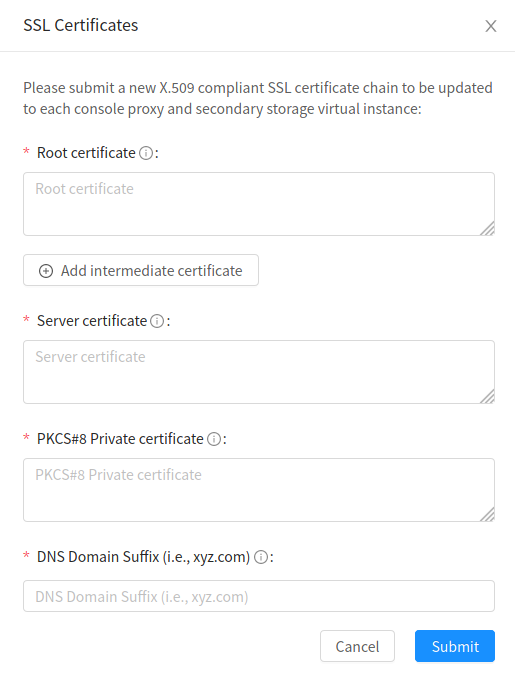 -- This is an automated message from the Apache Git Service. To respond to the message, please log on to GitHub and use the URL above to go to the specific comment. To unsubscribe, e-mail: [email protected] For queries about this service, please contact Infrastructure at: [email protected]

