ernjvr opened a new pull request #2782: add ipaddress input field to 'Add network to VM' form URL: https://github.com/apache/cloudstack/pull/2782 ## Description <!--- Describe your changes in detail --> On the 'NICs' tab, when a user clicks the 'Add network to VM' button to add a network to a VM, the 'Add network to VM' popup screen does not have an IP Address input field to allow a user to define a specific IP Address for a NIC. A user can specify the IP address for the first NIC when creating a VM instance, but cannot do that for subsequent NICs when adding a network to a VM. <!-- For new features, provide link to FS, dev ML discussion etc. --> <!-- In case of bug fix, the expected and actual behaviours, steps to reproduce. --> To Reproduce: Go to the 'Instances' screen by clicking the 'Instances' tab on the lefthand side. On the 'Instances' screen click on a specific VM instance name. This will open the 'Details' tab for the specific VM instance. Click on the 'NICs' tab and then click on the 'Add network to VM' button to add a network to a VM. The 'Add network to VM' popup screen will display. Actual Behaviour: The 'Add network to VM' popup screen does not have an IP Address input field to allow a user to define a specific IP Address for a NIC. Expected behaviour: The 'Add network to VM' popup screen must have an IP Address input field to allow a user to define a specific IP Address for a NIC. Since the addNicToVirtualMachine API's ipaddress field is not required, the IP Address input field is also not a required field. The IP Address input field must be validated for a valid IPv4 formatted value if the user enters anything into the field. The valid user-specified IPv4 IP Address value must be allocated to the NIC if it is within the acceptable IP range for the chosen Network. ## Types of changes <!--- What types of changes does your code introduce? Put an `x` in all the boxes that apply: --> - [ ] Breaking change (fix or feature that would cause existing functionality to change) - [ ] New feature (non-breaking change which adds functionality) - [x] Bug fix (non-breaking change which fixes an issue) - [ ] Enhancement (improves an existing feature and functionality) - [ ] Cleanup (Code refactoring and cleanup, that may add test cases) ## GitHub Issue/PRs <!-- If this PR is to fix an issue or another PR on GH, uncomment the section and provide the id of issue/PR --> <!-- When "Fixes: #<id>" is specified, the issue/PR will automatically be closed when this PR gets merged --> <!-- For addressing multiple issues/PRs, use multiple "Fixes: #<id>" --> <!-- Fixes: # --> ## Screenshots (if appropriate): 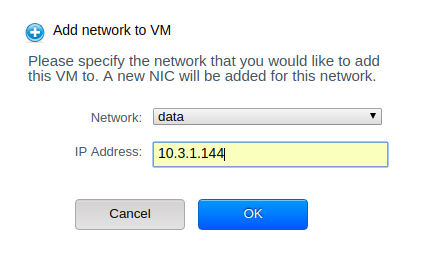 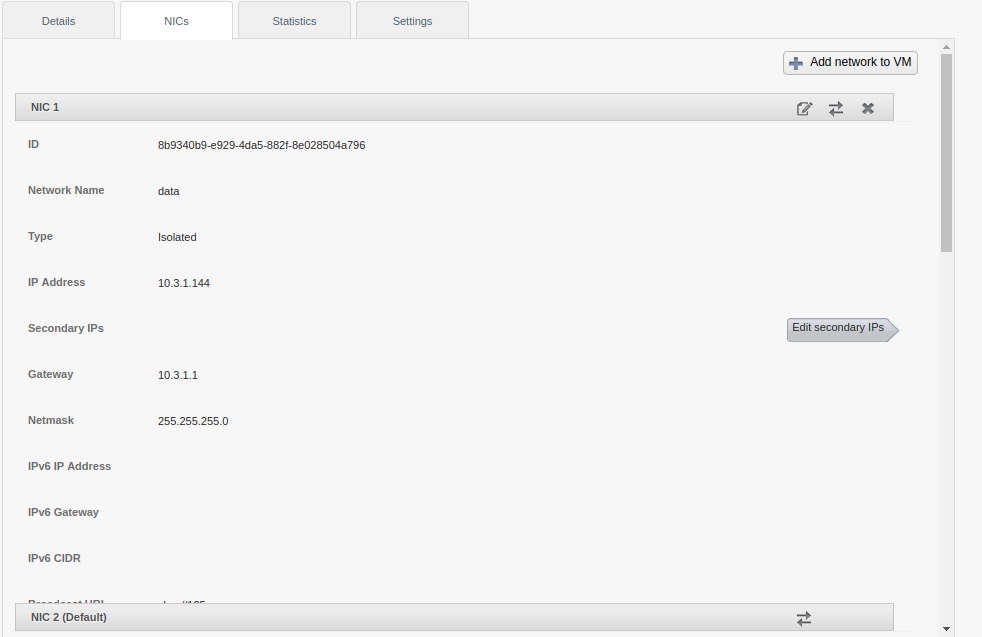 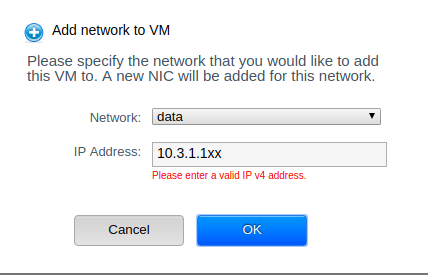 ## How Has This Been Tested? Manually (See screenshots) <!-- Please describe in detail how you tested your changes. --> Go to the 'Instances' screen by clicking the 'Instances' tab on the lefthand side. On the 'Instances' screen click on a specific VM instance name. This will open the 'Details' tab for the specific VM instance. Click on the 'NICs' tab and then click on the 'Add network to VM' button to add a network to a VM. The 'Add network to VM' popup screen will display. The 'Add network to VM' popup screen now has an IP Address input field to allow a user to define a specific IP Address for a NIC. Since the addNicToVirtualMachine API's ipaddress field is not required, the IP Address input field is also not a required field. The IP Address input field is validated for a valid IPv4 formatted value if the user enters anything into the field. The valid user-specified IPv4 IP Address value is allocated to the NIC since it is within the acceptable IP range for the chosen Network. <!-- Include details of your testing environment, and the tests you ran to --> Environment: CloudStack version 4.11, KVM hypervisor. <!-- see how your change affects other areas of the code, etc. --> ## Checklist: <!--- Go over all the following points, and put an `x` in all the boxes that apply. --> <!--- If you're unsure about any of these, don't hesitate to ask. We're here to help! --> - [x] I have read the [CONTRIBUTING](https://github.com/apache/cloudstack/blob/master/CONTRIBUTING.md) document. - [x] My code follows the code style of this project. - [ ] My change requires a change to the documentation. - [ ] I have updated the documentation accordingly. Testing - [ ] I have added tests to cover my changes. - [ ] All relevant new and existing integration tests have passed. - [ ] A full integration testsuite with all test that can run on my environment has passed.
----------------------------------------------------------------
This is an automated message from the Apache Git Service.
To respond to the message, please log on GitHub and use the
URL above to go to the specific comment.

For queries about this service, please contact Infrastructure at:
[email protected]


With regards,
Apache Git Services



