rhtyd opened a new issue #3031: VMware basic zone VR fails to start and get private IP URL: https://github.com/apache/cloudstack/issues/3031 VMware basic zone does not support host-level firewall (SG), but there could be a use-case to have a basic zone setup with no isolation. Currently, the VR for the default basic zone guest network VR fails to start (gets stuck in Starting state for a long time) due to incorrect `eth1` IP/netmask. Screenshot from 4.9 VR: 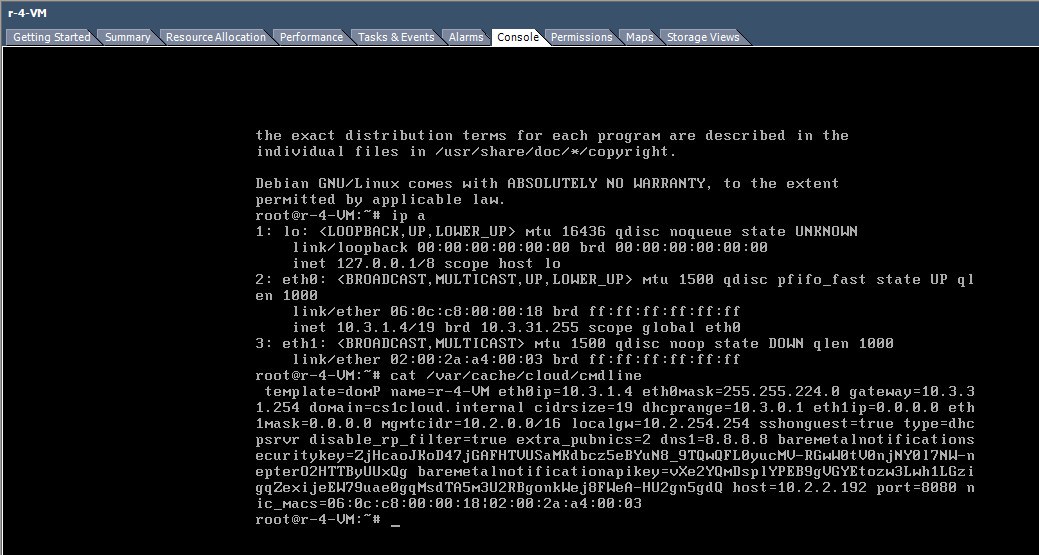 ##### ISSUE TYPE <!-- Pick one below and delete the rest --> * Bug Report ##### COMPONENT NAME <!-- Categorize the issue, e.g. API, VR, VPN, UI, etc. --> ~~~ VR, Basic Zone, VMware ~~~ ##### CLOUDSTACK VERSION ~~~ Found in 4.9, 4.11, master ~~~ ##### CONFIGURATION Basic zone with VMware 5.5u3, 6.5 ##### SUMMARY <!-- Explain the problem/feature briefly --> ##### STEPS TO REPRODUCE <!-- For bugs, show exactly how to reproduce the problem, using a minimal test-case. Use Screenshots if accurate. For new features, show how the feature would be used. --> <!-- Paste example playbooks or commands between quotes below --> ~~~ - Deploy basic zone in VMware - Deploy a guest VM - Guest network VR will be stuck - The /var/cache/cloud/cmdline will have 0.0.0.0 as eth1 ip/netmask ~~~ ##### EXPECTED RESULTS <!-- What did you expect to happen when running the steps above? --> ~~~ While SG does not work for VMware+basic zone, VR should start and get a private IP (eth1) ~~~ ##### ACTUAL RESULTS <!-- What actually happened? --> <!-- Paste verbatim command output between quotes below --> ~~~ VR stuck in starting state, guest VM eventually fails to start. VR's eth1 does not get a valid IP. ~~~
----------------------------------------------------------------
This is an automated message from the Apache Git Service.
To respond to the message, please log on to GitHub and use the
URL above to go to the specific comment.

For queries about this service, please contact Infrastructure at:
[email protected]


With regards,
Apache Git Services

