This is an automated email from the ASF dual-hosted git repository.

rohit pushed a commit to branch master
in repository https://gitbox.apache.org/repos/asf/cloudstack-documentation.git
The following commit(s) were added to refs/heads/master by this push:
     new 359c747  Primate removal: legacy UI deprecation note and usage update
(#171)
359c747 is described below

commit 359c747292c03b6152406a989595c8347ceaf36b
Author: Rohit Yadav <[email protected]>
AuthorDate: Wed Dec 9 17:50:06 2020 +0530

    Primate removal: legacy UI deprecation note and usage update (#171)

    * ui: make the UI simpler, remove references on setting up primate or the
word primate

    Signed-off-by: Rohit Yadav <[email protected]>

    * ui: remove primate explicit docs, update note on legacy UI deprecation

    Signed-off-by: Rohit Yadav <[email protected]>

    * add newline

    Signed-off-by: Rohit Yadav <[email protected]>

    * Removing 'primate'

    Co-authored-by: davidjumani <[email protected]>
---
 source/adminguide/projects.rst             |   4 +-
 source/adminguide/ui.rst                   | 193 +++++++++++---------
 source/installguide/index.rst              |  10 --
 source/installguide/primate.rst            | 271 -----------------------------
 source/releasenotes/about.rst              |  21 +--
 source/upgrading/upgrade/upgrade-4.14.rst  |  12 --
 source/upgrading/upgrade/upgrade_notes.rst |  19 +-
 7 files changed, 134 insertions(+), 396 deletions(-)

diff --git a/source/adminguide/projects.rst b/source/adminguide/projects.rst
index 38dce29..899521f 100644
--- a/source/adminguide/projects.rst
+++ b/source/adminguide/projects.rst
@@ -301,7 +301,7 @@ feature is enabled in the cloud as described in `“Setting
 Up Invitations” <#setting-up-invitations>`_. If the invitations feature is
 not turned on, use the procedure in Adding Project Members From the UI.

-#. Log in to the CloudStack Primate UI.
+#. Log in to the CloudStack UI.

 #. In the left navigation, click Projects.

@@ -353,7 +353,7 @@ Accepting a Membership Invitation
 If you have received an invitation to join a CloudStack project, and you
 want to accept the invitation, follow these steps:

-#. Log in to the CloudStack’s Primate UI.
+#. Log in to the CloudStack’s UI.

 #. In the left navigation, click Projects.

diff --git a/source/adminguide/ui.rst b/source/adminguide/ui.rst
index bc0cb5a..b47e53c 100644
--- a/source/adminguide/ui.rst
+++ b/source/adminguide/ui.rst
@@ -21,9 +21,14 @@ Log In to the UI
 CloudStack provides a web-based UI that can be used by both
 administrators and end users. The appropriate version of the UI is
 displayed depending on the credentials used to log in. The UI is
-available in popular browsers including IE7, IE8, IE9, Firefox 3.5+,
-Firefox 4, Safari 4, and Safari 5. The URL is: (substitute your own
-management server IP address)
+available in all modern popular browsers including Chrome, Firefox, Edge and
+Safari. The UI uses API auto-discovery to discover APIs allowed for a logged-in
+user and creates navigation and views based on that, and requires the
following:
+
+- API discovery (listApis) enabled for all roles that must use the UI
+- Modern browsers that are `ES5-compliant
<https://github.com/vuejs/vue#browser-compatibility>`_
+
+The URL is: (substitute your own management server IP address)

 .. parsed-literal::

@@ -65,6 +70,11 @@ the UI can provide a project-oriented view.
 Root Administrator's UI Overview
 ~~~~~~~~~~~~~~~~~~~~~~~~~~~~~~~~

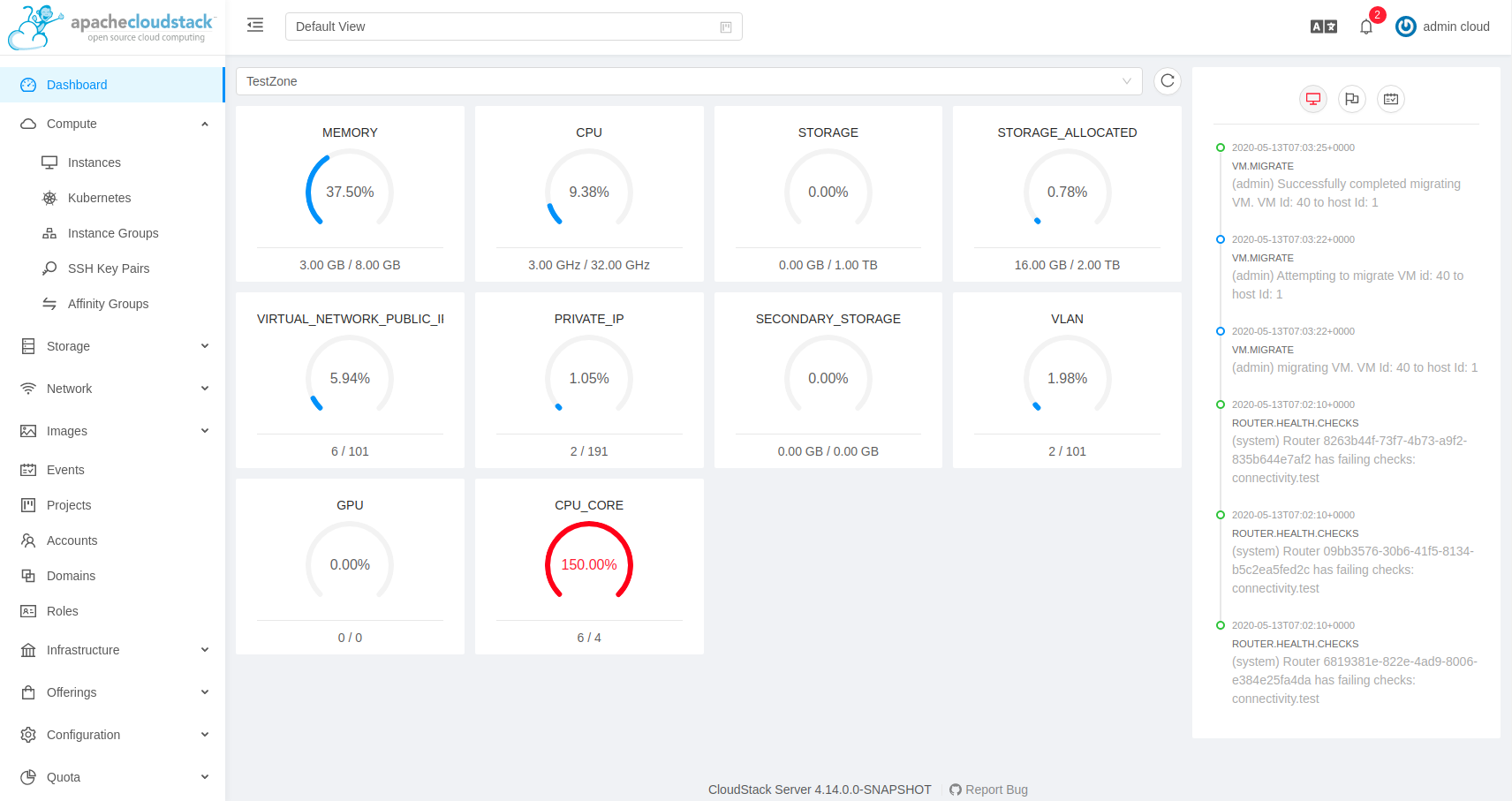
+.. image::
https://raw.githubusercontent.com/apache/cloudstack-primate/master/docs/screenshot-dashboard.png
+   :width: 800px
+   :alt: alternate text
+   :align: left
+
 The CloudStack UI helps the CloudStack administrator provision, view,
 and manage the cloud infrastructure, domains, user accounts, projects,
 and configuration settings. The first time you start the UI after a
@@ -168,94 +178,121 @@ new, unique value.

 #. Type the new password, and click OK.

+Basic UI Customization
+~~~~~~~~~~~~~~~~~~~~~~

-Modifying the UI
-----------------
-
-Root Administrators can modify some aspect of the UI, like:
-
-   -  Changing the keyboard names/labels (in the "Add Instance" wizard only)
-   -  Changing the text and the title in the "About" dialog box
-   -  Changing the Help link
-   -  Changing the application title on the browser tab
-   -  Hiding some columns in the Instance Metrics and Volume Metrics
tables/views
-
-This can be done by editing the file
"/usr/share/cloudstack-management/webapp/config.js" on your management
server(s).
-After the file change, you do need to clear your browser cache. Hiding columns
in Instance Metrics and Volume Metrics tables/views is only applicable to end
users - i.e. those are always visible to Root Administrators.
-
-This is the default config.js content (comments ommitted for brevity):
-
-.. code:: javascript
-
-   cloudStackOptions = {
-      aboutText: "label.app.name", // This is the text shown in the 'About' box
-      aboutTitle: "label.about.app", // This is the Application 'Title' shown
in the 'About' box
-      docTitle: "label.app.name", // This is the Application 'Title' shown on
browser tab.
-      helpURL: "http://docs.cloudstack.apache.org/";, // This is the URL that
opens when users click Help
-      keyboardOptions: {
-         "us": "label.standard.us.keyboard",
-         "uk": "label.uk.keyboard",
-         "fr": "label.french.azerty.keyboard",
-         "jp": "label.japanese.keyboard",
-         "sc": "label.simplified.chinese.keyboard"
-      },
-      hiddenFields: { // Fields to be hidden only for users in the tables below
-         "metrics.instances": [], // Options - "name", "state", "ipaddress",
"zonename", "cpuused", "memused", "network", "disk"
-         "metrics.volumes": [] // Options - "name", "state", "vmname",
"sizegb", "physicalsize", "utilization", "storagetype", "storage"
-      }
-   };
-
-Example of a changed config.js file is given bellow, as well as the apropriate
screenshots which reflect (most of) those changes. Make sure that you are
logged in as end user account.
-
-.. code:: javascript
-
-   cloudStackOptions = {
-      aboutText: "Custom About text!", // This is the text shown in the
'About' box
-      aboutTitle: "Custom About Title!", // This is the Application 'Title'
shown in the 'About' box
-      docTitle: "MyCloud", // This is the Application 'Title' shown on browser
tab.
-      helpURL: "http://help.mycloud.com/";, // This is the URL that opens when
users click Help
-      keyboardOptions: {
-         "us": "US",
-         "uk": "UK",
-         "fr": "FR",
-         "jp": "JP",
-         "sc": "CN"
-      },
-      hiddenFields: { // Fields to be hidden only for users in the tables below
-         "metrics.instances": ["zonename"], // Options - "name", "state",
"ipaddress", "zonename", "cpuused", "memused", "network", "disk"
-         "metrics.volumes": ["utilization"] // Options - "name", "state",
"vmname", "sizegb", "physicalsize", "utilization", "storagetype", "storage"
-      }
-   };
-
-|about-cloudstack-customized.JPG|
-
-Notice custom title and text
+Users can now customize the CloudStack's user interface by means of a
configuration file at /usr/share/cloudstack-management/webapp/config.json which
can be used to modify the theme, logos, etc. to align to one's requirement.

+To change the logo, login banner, error page icon, etc. the following details
can be edited in config.json:

-|add-instance-keyboards-customized.JPG|
+.. parsed-literal::

-Notice short keyboard names (based on country code)
+    "logo": "assets/logo.svg",
+    "banner": "assets/banner.svg",
+    "error": {
+        "404": "assets/404.png",
+        "403": "assets/403.png",
+        "500": "assets/500.png"
+    }

+where,

-|instance-metrics-customized-view.JPG|
+- logo: changes the logo top-left side image.
+- banner: changes the login banner image.
+- error.404: changes the image of error Page not found.
+- error.403: changes the image of error Forbidden.
+- error.500: changes the image of error Internal Server Error.

-Notice "Zone" column is hidden
+Customization of themes is also possible, such as, modifying banner width,
general color, etc. This can be done by editing the "theme" section of the
config.json file:

+.. parsed-literal::

-|volume-metrics-customized-view.JPG|
+    "theme": {
+        "@logo-background-color": "#ffffff",
+        "@project-nav-text-color": "#001529",
+        "@navigation-text-color": "rgba(255, 255, 255, 0.65)",
+        "@navigation-background-color": "#ffffff",
+        "@navigation-text-color": "rgba(0, 0, 0, 0.65)",
+        "@primary-color": "#1890ff",
+        "@link-color": "#1890ff",
+        "@link-hover-color": "#40a9ff",
+        "@loading-color": "#1890ff",
+        "@processing-color": "#1890ff",
+        "@success-color": "#52c41a",
+        "@warning-color": "#faad14",
+        "@error-color": "#f5222d",
+        "@font-size-base": "14px",
+        "@heading-color": "rgba(0, 0, 0, 0.85)",
+        "@text-color": "rgba(0, 0, 0, 0.65)",
+        "@text-color-secondary": "rgba(0, 0, 0, 0.45)",
+        "@disabled-color": "rgba(0, 0, 0, 0.25)",
+        "@border-color-base": "#d9d9d9",
+        "@border-radius-base": "4px",
+        "@box-shadow-base": "0 2px 8px rgba(0, 0, 0, 0.15)",
+        "@logo-width": "256px",
+        "@logo-height": "64px",
+        "@banner-width": "700px",
+        "@banner-height": "110px",
+        "@error-width": "256px",
+        "@error-height": "256px"
+    }
+
+where,
+
+- @logo-background-color changes the logo background color.
+- @project-nav-background-color changes the navigation menu background color
of the project.
+- @project-nav-text-color changes the navigation menu background color of the
project view.
+- @navigation-background-color changes the navigation menu background color.
+- @navigation-text-color changes the navigation text color.
+- @primary-color: changes the major background color of the page (background
button, icon hover, etc).
+- @link-color changes the link color.
+- @link-hover-color changes the link hover color.
+- @loading-color changes the message loading color and page loading bar at the
top page.
+- @success-color: changes success state color.
+- @processing-color: changes processing state color. Exp: progress status.
+- @warning-color: changes warning state color.
+- @error-color: changes error state color.
+- @heading-color: changes table header color.
+- @text-color: change in major text color.
+- @text-color-secondary: change of secondary text color (breadcrumb icon).
+- @disabled-color: disable state color (disabled button, switch, etc).
+- @border-color-base: change in major border color.
+- @logo-width: change the width of the logo top-left side.
+- @logo-height: change the height of the logo top-left side.
+- @banner-width: changes the width of the login banner.
+- @banner-height: changes the height of the login banner.
+- @error-width: changes the width of the error image.
+- @error-height: changes the height of the error image.
+
+Some assorted primary theme colours:
+
+- Blue: #1890FF
+- Red: #F5222D
+- Yellow: #FAAD14
+- Cyan: #13C2C2
+- Green: #52C41A
+- Purple: #722ED1
+
+Advanced Customisation
+~~~~~~~~~~~~~~~~~~~~~~

-Notice "Utilisation" column is hidden
+The advanced UI customisation is possible only by changing JavaScript based
config
+files which define rules for sections, names, icons, actions and components
and by
+building the UI from the source available on `github.com/apache/cloudstack
+<https://github.com/apache/cloudstack>`_ repository. Advanced customisation may
+require some experience in JavaScript and VueJS, a development and
customisation
+guide in the source repository.

+Known Limitations
+~~~~~~~~~~~~~~~~~

+The following features are no longer supported or available:

+- Deployment of a basic zone is not supported. However, existing basic zones
will continue to be supported as well as all the actions and views of various
resources within the existing basic zone.
+- Support for S3 based secondary storage.
+- NFS secondary staging storage list/resource view and add/update actions.
+- SSL certificate for Guest network LB rule.
+- Regions.

 .. |change-password.png| image:: /_static/images/change-password.png
    :alt: button to change a user's password
-.. |volume-metrics-customized-view.JPG| image::
/_static/images/volume-metrics-customized-view.JPG
-   :alt: Notice missing "Utilisation" column
-.. |instance-metrics-customized-view.JPG| image::
/_static/images/instance-metrics-customized-view.JPG
-   :alt: Notice missing "Zone" column
-.. |about-cloudstack-customized.JPG| image::
/_static/images/about-cloudstack-customized.JPG
-   :alt: Notice custom title and text
-.. |add-instance-keyboards-customized.JPG| image::
/_static/images/add-instance-keyboards-customized.JPG
-   :alt: Notice short keyboard names (based on country code)
diff --git a/source/installguide/index.rst b/source/installguide/index.rst
index 63dc803..01d9012 100644
--- a/source/installguide/index.rst
+++ b/source/installguide/index.rst
@@ -47,16 +47,6 @@ General Installation
    management-server/index


-.. _primate:
-
-Primate Installation
---------------------
-.. toctree::
-   :maxdepth: 2
-
-   primate
-
-
 .. _configuration:

 Configuration
diff --git a/source/installguide/primate.rst b/source/installguide/primate.rst
deleted file mode 100644
index 6c750e6..0000000
--- a/source/installguide/primate.rst
+++ /dev/null
@@ -1,271 +0,0 @@
-.. Licensed to the Apache Software Foundation (ASF) under one
-   or more contributor license agreements.  See the NOTICE file
-   distributed with this work for additional information
-   regarding copyright ownership.  The ASF licenses this file
-   to you under the Apache License, Version 2.0 (the
-   "License"); you may not use this file except in compliance
-   with the License.  You may obtain a copy of the License at
-   http://www.apache.org/licenses/LICENSE-2.0
-   Unless required by applicable law or agreed to in writing,
-   software distributed under the License is distributed on an
-   "AS IS" BASIS, WITHOUT WARRANTIES OR CONDITIONS OF ANY
-   KIND, either express or implied.  See the License for the
-   specific language governing permissions and limitations
-   under the License.
-
-Primate Guide
-=============
-
-What is Primate?
-~~~~~~~~~~~~~~~~
-
-Apache CloudStack Primate is a modern role-based progressive UI based on Vue.js
-and Ant Design for Apache CloudStack.
-
-.. image::
https://raw.githubusercontent.com/apache/cloudstack-primate/master/docs/screenshot-dashboard.png
-   :width: 800px
-   :alt: alternate text
-   :align: left
-
-Primate GA was released with CloudStack 4.15, where the legacy UI is
deprecated,
-and will be removed in an eventual major CloudStack release.
-Each release of Apache CloudStack comes with its own release of Primate as
well.
-
-`User participation in the community mailing lists
-<http://cloudstack.apache.org/mailing-lists.html>`_ is encouraged. Users may
-also log issues on Github https://github.com/apache/cloudstack-primate/issues
-
-Requirements
-~~~~~~~~~~~~
-
-Primate uses API auto-discovery to discover APIs allowed for a logged-in user
-and creates navigation and views based on that, and requires the following:
-
-- Apache CloudStack 4.15 or later
-- API discovery (listApis) enabled
-- Modern browsers that are `ES5-compliant
<https://github.com/vuejs/vue#browser-compatibility>`_
-
-In theory Primate can work with any older version of CloudStack that supports
-API discovery. However, several Primate list views require API pagination
support,
-some of which are available starting Apache CloudStack 4.15 as well as several
other
-API improvements which may not be available prior to Apache CloudStack 4.15.
-
-Installation on CentOS
-~~~~~~~~~~~~~~~~~~~~~~
-
-Users running management server (4.15 or above) can directly install Primate:
-
-.. parsed-literal::
-
-    yum install cloudstack-primate
-
-Note: there is no need to restart management server post-installation, and
-after installation the UI can be accessed on
-management-server-host:8080/client/primate using any modern browser.
-
-To install the latest release of Primate on CentOS, setup the
-following Primate repository:
-
-.. parsed-literal::
-
-    rpm --import https://download.cloudstack.org/primate/release.asc
-    cat << EOF > /etc/yum.repos.d/cloudstack-primate.repo
-    [cloudstack-primate]
-    name=cloudstack
-    baseurl=https://download.cloudstack.org/primate/centos/
-    enabled=1
-    gpgcheck=1
-    gpgkey=https://download.cloudstack.org/primate/release.asc
-    EOF
-
-Next, install Primate:
-
-.. parsed-literal::
-
-    yum install cloudstack-primate
-
-
-Installation on Ubuntu
-~~~~~~~~~~~~~~~~~~~~~~
-
-Users running management server (4.15 or above) can directly install Primate
-
-.. parsed-literal::
-
-    apt-get update
-    apt-get install cloudstack-primate
-
-
-To install the latest release of Primate on Ubuntu, setup the
-following Primate repository:
-
-.. parsed-literal::
-
-    apt-key adv --keyserver keys.gnupg.net --recv-keys BDF0E176584DF93F
-    echo deb https://download.cloudstack.org/primate/debian / >
/etc/apt/sources.list.d/cloudstack-primate.list
-
-Next, install Primate:
-
-.. parsed-literal::
-
-    apt-get update
-    apt-get install cloudstack-primate
-
-Note: there is no need to restart management server post-installation, and
-after installation the UI can be accessed on
-management-server-host:8080/client/primate using any modern browser.
-
-Using Archive
-~~~~~~~~~~~~~
-
-Primate archives are tarballs of single-page app builds. They can be simply
-downloaded and extracted to the management server webapp directory or hosted
-with a custom webserver.
-
-Users can download the builds from
https://download.cloudstack.org/primate/archive/
-
-Using Docker
-~~~~~~~~~~~~
-
-Users can use docker builds of Primate from
https://hub.docker.com/r/apache/cloudstack-primate
-
-For example:
-
-.. parsed-literal::
-
-    docker pull apache/cloudstack-primate:latest
-    docker run -ti --rm -p 8080:80 -v $(pwd)/nginx:/etc/nginx/conf.d:ro
apache/cloudstack-primate:latest
-
-Example nginx config:
-
-.. parsed-literal::
-
-    server {
-        listen       80;
-        server_name  localhost;
-        location / {
-            root   /usr/share/nginx/html;
-            index  index.html;
-        }
-        location /client/ {
-            # http://127.0.0.1:8080 should be replaced your CloudStack
management
-            # Server's actual URI
-            proxy_pass   http://127.0.0.1:8080;
-        }
-    }
-
-Basic Customization in CloudStack Primate
-~~~~~~~~~~~~~~~~~~~~~~~~~~~~~~~~~~~~~~~~~
-Users can now customize the CloudStack's user interface by means of a
configuration file at
/usr/share/cloudstack-management/webapp/primate/config.json which can be used
to modify the theme, logos, etc. to align to one's requirement.
-
-To change the logo, login banner, error page icon, etc. the following details
can be edited in config.json:
-
-.. parsed-literal::
-
-    "logo": "assets/logo.svg",
-    "banner": "assets/banner.svg",
-    "error": {
-        "404": "assets/404.png",
-        "403": "assets/403.png",
-        "500": "assets/500.png"
-    }
-
-where,
-
-- logo: changes the logo top-left side image.
-- banner: changes the login banner image.
-- error.404: changes the image of error Page not found.
-- error.403: changes the image of error Forbidden.
-- error.500: changes the image of error Internal Server Error.
-
-Customization of themes is also possible, such as, modifying banner width,
general color, etc. This can be done by editing the "theme" section of the
config.json file:
-
-.. parsed-literal::
-
-    "theme": {
-        "@logo-background-color": "#ffffff",
-        "@project-nav-text-color": "#001529",
-        "@navigation-text-color": "rgba(255, 255, 255, 0.65)",
-        "@navigation-background-color": "#ffffff",
-        "@navigation-text-color": "rgba(0, 0, 0, 0.65)",
-        "@primary-color": "#1890ff",
-        "@link-color": "#1890ff",
-        "@link-hover-color": "#40a9ff",
-        "@loading-color": "#1890ff",
-        "@processing-color": "#1890ff",
-        "@success-color": "#52c41a",
-        "@warning-color": "#faad14",
-        "@error-color": "#f5222d",
-        "@font-size-base": "14px",
-        "@heading-color": "rgba(0, 0, 0, 0.85)",
-        "@text-color": "rgba(0, 0, 0, 0.65)",
-        "@text-color-secondary": "rgba(0, 0, 0, 0.45)",
-        "@disabled-color": "rgba(0, 0, 0, 0.25)",
-        "@border-color-base": "#d9d9d9",
-        "@border-radius-base": "4px",
-        "@box-shadow-base": "0 2px 8px rgba(0, 0, 0, 0.15)",
-        "@logo-width": "256px",
-        "@logo-height": "64px",
-        "@banner-width": "700px",
-        "@banner-height": "110px",
-        "@error-width": "256px",
-        "@error-height": "256px"
-    }
-
-where,
-
-- @logo-background-color changes the logo background color.
-- @project-nav-background-color changes the navigation menu background color
of the project.
-- @project-nav-text-color changes the navigation menu background color of the
project view.
-- @navigation-background-color changes the navigation menu background color.
-- @navigation-text-color changes the navigation text color.
-- @primary-color: changes the major background color of the page (background
button, icon hover, etc).
-- @link-color changes the link color.
-- @link-hover-color changes the link hover color.
-- @loading-color changes the message loading color and page loading bar at the
top page.
-- @success-color: changes success state color.
-- @processing-color: changes processing state color. Exp: progress status.
-- @warning-color: changes warning state color.
-- @error-color: changes error state color.
-- @heading-color: changes table header color.
-- @text-color: change in major text color.
-- @text-color-secondary: change of secondary text color (breadcrumb icon).
-- @disabled-color: disable state color (disabled button, switch, etc).
-- @border-color-base: change in major border color.
-- @logo-width: change the width of the logo top-left side.
-- @logo-height: change the height of the logo top-left side.
-- @banner-width: changes the width of the login banner.
-- @banner-height: changes the height of the login banner.
-- @error-width: changes the width of the error image.
-- @error-height: changes the height of the error image.
-
-Some assorted primary theme colours:
-
-- Blue: #1890FF
-- Red: #F5222D
-- Yellow: #FAAD14
-- Cyan: #13C2C2
-- Green: #52C41A
-- Purple: #722ED1
-
-Advanced Customisation
-~~~~~~~~~~~~~~~~~~~~~~
-
-Primate advanced customisation is possible only by changing JavaScript based
config
-files which define rules for sections, names, icons, actions and components
and by
-building primate from source available on the `cloudstack-primate
-<https://github.com/apache/cloudstack-primate>`_
-repository. Advanced customisation may require some experience in JavaScript
and VueJS,
-a development and customisation guide is available `here
-<https://github.com/apache/cloudstack-primate/blob/master/docs/development.md>`_.
-
-Known Issues and Missing Features
-~~~~~~~~~~~~~~~~~~~~~~~~~~~~~~~~~
-
-- Deployment of a basic zone is not supported. However, existing basic zones
will continue to be supported as well as all the actions and views of various
resources within the existing basic zone.
-- Support for S3 based secondary storage.
-- NFS secondary staging storage list/resource view and add/update actions.
-- SSL certificate for Guest network LB rule.
-- Regions.
-
-Primate open issues are listed on
https://github.com/apache/cloudstack-primate/issues
diff --git a/source/releasenotes/about.rst b/source/releasenotes/about.rst
index 57cd7bf..2f94e03 100644
--- a/source/releasenotes/about.rst
+++ b/source/releasenotes/about.rst
@@ -20,7 +20,7 @@ What's New in |release|
 Apache CloudStack |release| is a |version| LTS release with over FIXME major
new
 features, and over 100 enhancements and fixes since 4.14.  Highlights include:

-• New modern UI (Primate, GA release)
+• New modern UI (GA release)
 • Support for CentOS8 and Ubuntu 20.04 as management server hosts and KVM hosts
 • FIXME: add rest of new features

@@ -65,16 +65,17 @@ before adding the KVM host in CloudStack:
    HostKeyAlgorithms=+ssh-dss
    KexAlgorithms=+diffie-hellman-group1-sha1

-Primate GA and Legacy UI Deprecation and Removal Notice
+New UI GA and Legacy UI Deprecation and Removal Notice
 =======================================================

-Cloudstack 4.15 ships with the GA release of a new and modern User Interface
-(Primate) which deprecates the current legacy UI. With version 4.15, the
-existing legacy UI (deprecated) along with the new UI (Primate) are the
-supported UI for production environments. In the next 4.16 release, the Apache
-Cloudstack community will remove the legacy UI and only the new UI (Primate)
-will be supported by the Apache CloudStack community moving forward. Users are
-encouraged to implement a migration path towards the new UI (Primate) in their
+Cloudstack 4.15 ships with the GA release of a new and modern User Interface as
+the default UI which deprecates the current legacy UI. With version 4.15, the
+existing legacy UI (deprecated) along with the new UI are the supported UI for
 production environments.

-Please see `Primate install guide <../installguide/primate.html>`_
+The default URL <host>:8080/client will serve the new UI and
+<host>:8080/client/legacy will serve the deprecated legacy UI.
+
+In the next release (4.16), the Apache Cloudstack community will remove the
legacy
+UI. Users are encouraged to implement a migration path towards deprecating the
+legacy UI in their production environments.
diff --git a/source/upgrading/upgrade/upgrade-4.14.rst
b/source/upgrading/upgrade/upgrade-4.14.rst
index a66dfeb..0065adf 100644
--- a/source/upgrading/upgrade/upgrade-4.14.rst
+++ b/source/upgrading/upgrade/upgrade-4.14.rst
@@ -163,12 +163,6 @@ Setup the public key for the above repository:

       $ sudo apt-get upgrade cloudstack-usage

-#. Install the new UI (Primate)
-
-   .. parsed-literal::
-
-      $ sudo apt-get install cloudstack-primate
-

 .. _rhel414:
 .. _rpm-repo414:
@@ -221,12 +215,6 @@ Setup the GPG public key if you wish to enable
``gpgcheck=1``:

       $ sudo yum upgrade cloudstack-usage

-#. Install the new UI (Primate)
-
-   .. parsed-literal::
-
-      $ sudo yum install cloudstack-primate
-
 .. _upg_hyp_414:

 Upgrade Hypervisors
diff --git a/source/upgrading/upgrade/upgrade_notes.rst
b/source/upgrading/upgrade/upgrade_notes.rst
index cd53754..55a6288 100644
--- a/source/upgrading/upgrade/upgrade_notes.rst
+++ b/source/upgrading/upgrade/upgrade_notes.rst
@@ -27,19 +27,12 @@ management-server, cloudstack-usage, KVM agent and
system-VMs.

 .. include:: _java_version.rst

-UI Deprecation Notice
----------------------
-
-The current jQuery-based CloudStack UI will be `deprecated
-<http://markmail.org/message/vxnskmwhfaagnm4r/>`_ in the next Apache CloudStack
-major release and removed in the subsequent future releases.
-
-`Primate <https://github.com/apache/cloudstack-primate/>`_ will ship as the
-modern UI for future Apache CloudStack releases. Users are encouraged to `test
-<https://github.com/apache/cloudstack-primate/wiki/Migrating-to-Primate/>`_
-Primate, report bugs and give feedback to the `dev community
-<http://cloudstack.apache.org/mailing-lists.html>`_ with this release of Apache
-CloudStack.
+UI Deprecation and Removal Notice
+---------------------------------
+
+The current jQuery-based CloudStack UI is `deprecated
+<http://markmail.org/message/vxnskmwhfaagnm4r/>`_ in this release of CloudStack
+and will be removed in the next release of Apache CloudStack.

 Migrating to dynamic roles feature
 ----------------------------------