This is an automated email from the ASF dual-hosted git repository.

yumeng pushed a commit to branch main
in repository https://gitbox.apache.org/repos/asf/incubator-devlake-website.git
commit b7abe60905b8701dfa72ead7c611433ca850ef27 Author: linyh <[email protected]> AuthorDate: Wed Sep 21 01:26:45 2022 +0800 doc: add the doc of the plugin webbhook --- docs/Plugins/webhook.md | 173 ++++++++++++++++++++++++++++++++++++++++++++++++ 1 file changed, 173 insertions(+) diff --git a/docs/Plugins/webhook.md b/docs/Plugins/webhook.md new file mode 100644 index 000000000..7acdee38d --- /dev/null +++ b/docs/Plugins/webhook.md @@ -0,0 +1,173 @@ +--- +title: "Webhook" +description: > + Webhook Plugin +--- + +## Summary + +[Webhooks](https://en.wikipedia.org/wiki/Webhook) are HTTPs that you need to request. They should be triggered in your deploy and bug recorder systems, such as build shells in Jenkins or Jira. + +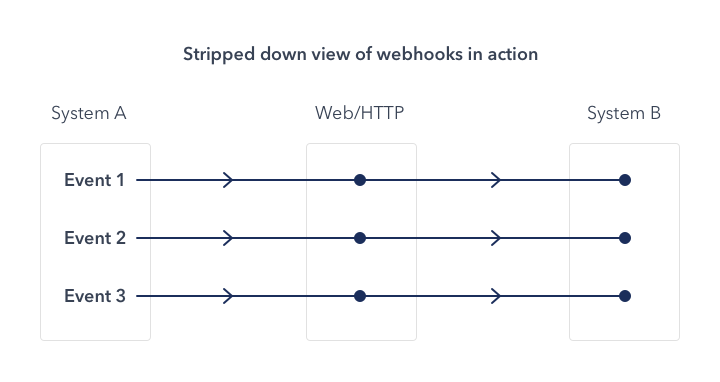 +(picture from the Internet) + +Here, your systems play the roles of system A as the picture, and Apache DevLake is system B. Now, you can use webhooks to: + +* record bugs or incidents when DevLake cannot collect data from issue applications directly. +* detect code deployments by custom deploy-time measurement + +DevLake does not limit the number of webhook requests. **But Notice**: Your Database or other servers may not handle unlimited requests. + +## Configuration +Configuring Webhook via config-ui. + +First, You can create a webhook connection. + + +We suggest that one connection must be used in one system. So you can input the name of your system here. + +Then, you can find the webhook URLs here. Copy what you need. (Or copy when you need them) + + + + + +## Incident / Issue + +If you want to collect issue or incident data from your system, you can use the webhook of issues. + +There are 2 hooks. **Notice**: `https://sample-url.com/` and `1` should be replaced with your URL and connectionId. + +#### Update or Create issues + +`POST https://sample-url.com/api/plugins/webhook/1/issues` + +Need to be called when an issue or incident is created. The body includes columns as follows: + +``` +board_key: issue belongs to which board/project +url(Optional): issue's URL +issue_key: issue's key, needs to be unique in a connection +title +description(Optional) +epic_key(Optional): in which epic. +type(Optional): type, such as bug/incident/epic/... +status: issue's status. Must be one of TODO DONE IN_PROGRESS +original_status: status in your system, such as created/open/closed/... +story_point(Optional) +resolution_date(Optional): date, Format should be 2020-01-01T12:00:00+00:00 +created_date: date, Format should be 2020-01-01T12:00:00+00:00 +updated_date(Optional): date, Format should be 2020-01-01T12:00:00+00:00 +lead_time_minutes(Optional): how long from this issue accepted to develop +parent_issue_key(Optional) +priority(Optional) +original_estimate_minutes(Optional) +time_spent_minutes(Optional) +time_remaining_minutes(Optional) +creator_id(Optional): the user id of the creator +creator_name(Optional): the user name of the creator, it will just be used to display +assignee_id(Optional) +assignee_name(Optional) +severity(Optional) +component(Optional): which component is this issue in. +``` + + + +#### Close issue (Optional) + +`POST https://sample-url.com/api/plugins/webhook/1/issue/:boardKey/:issueId/close` + +Need to be called when an issue or incident is closed. Replace `:boardKey` and `:issueId` with specific strings and keep the body empty. + + + +### Sample API Calls + +Sample CURL for Issue Creating : + +``` +curl http://127.0.0.1:4000/api/plugins/webhook/1/issues -X 'POST' -d '{"board_key":"DLK","url":"","issue_key":"DLK-1234","title":"a feature from DLK","description":"","epic_key":"","type":"BUG","status":"TODO","original_status":"created","story_point":0,"resolution_date":null,"created_date":"2020-01-01T12:00:00+00:00","updated_date":null,"lead_time_minutes":0,"parent_issue_key":"DLK-1200","priority":"","original_estimate_minutes":0,"time_spent_minutes":0,"time_remaining_minutes":0,"creat [...] +``` + +Sample CURL for Issue Closing: + +``` +curl http://127.0.0.1:4000/api/plugins/webhook/1/issue/DLK/DLK-1234/close -X 'POST' +``` + +Read more in Swagger: http://localhost:4000/api/swagger/index.html#/plugins%2Fwebhook/post_plugins_webhook__connectionId_issues. + +## Deployment + +Adding pipeline webhook in your deploy shells will help you collect data into DevLake. + +First, let us know there are 2 entities Tasks and Pipelines. A pipeline means one build or deployment, and a pipeline may have more than one task. + +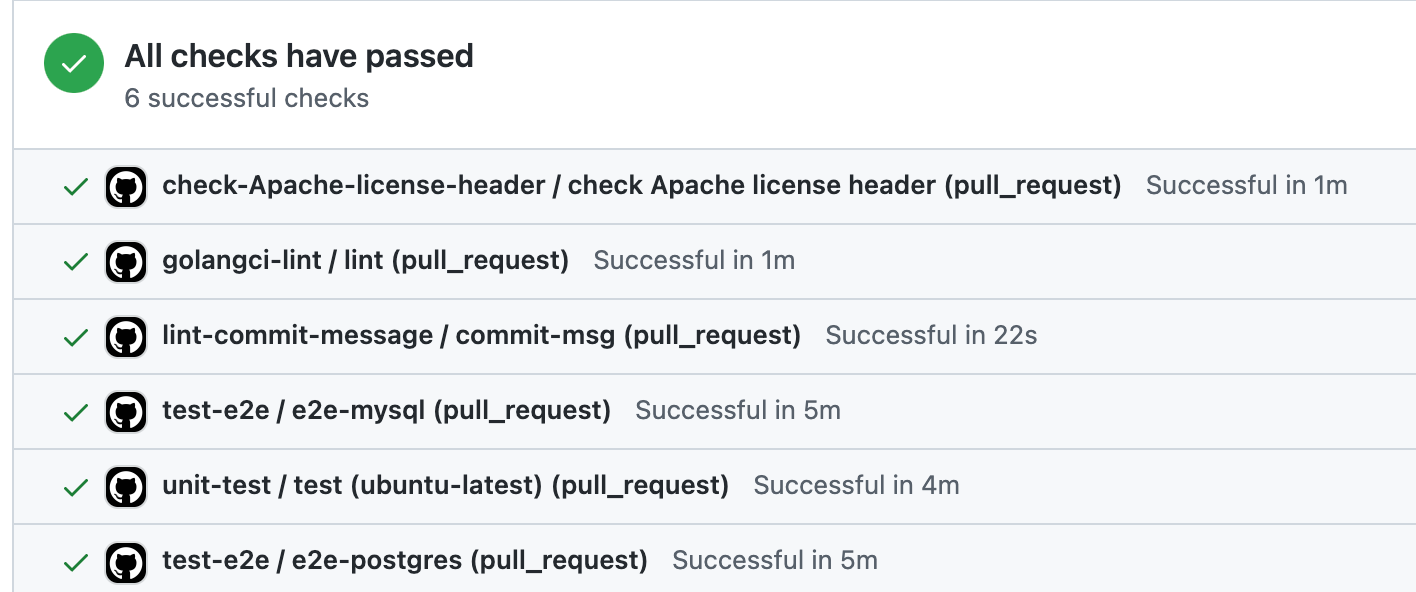 + +(Example 1) + +For example, we can find 6 tasks like `golangci-lint` and `unit-test` in one GitHub pipeline. + +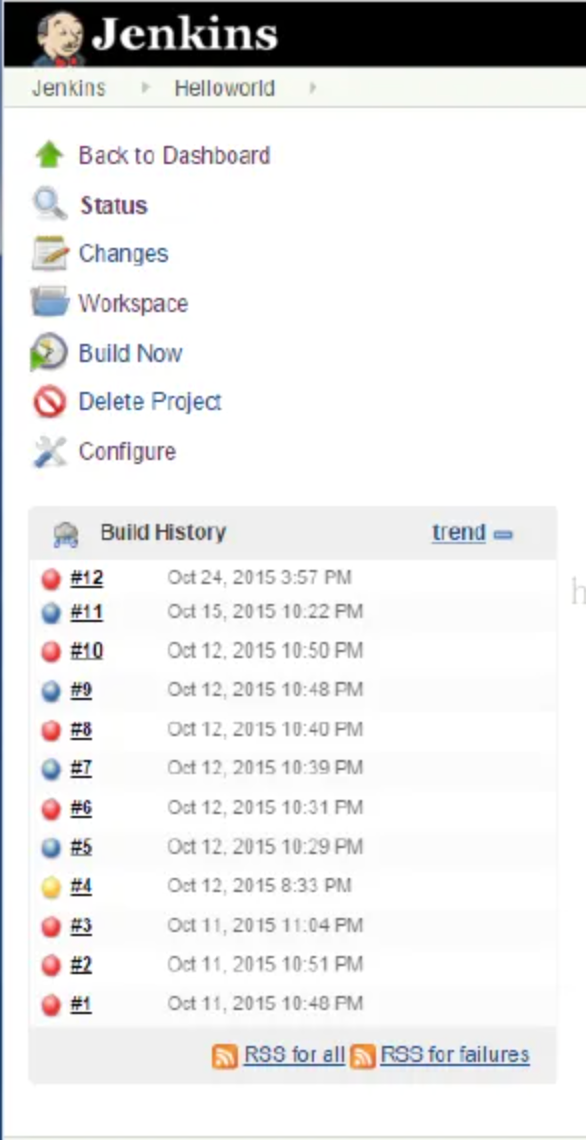 + +(Example 2. Picture from the Internet) + +In Example 2, we can find 12 Jenkins pipelines. + +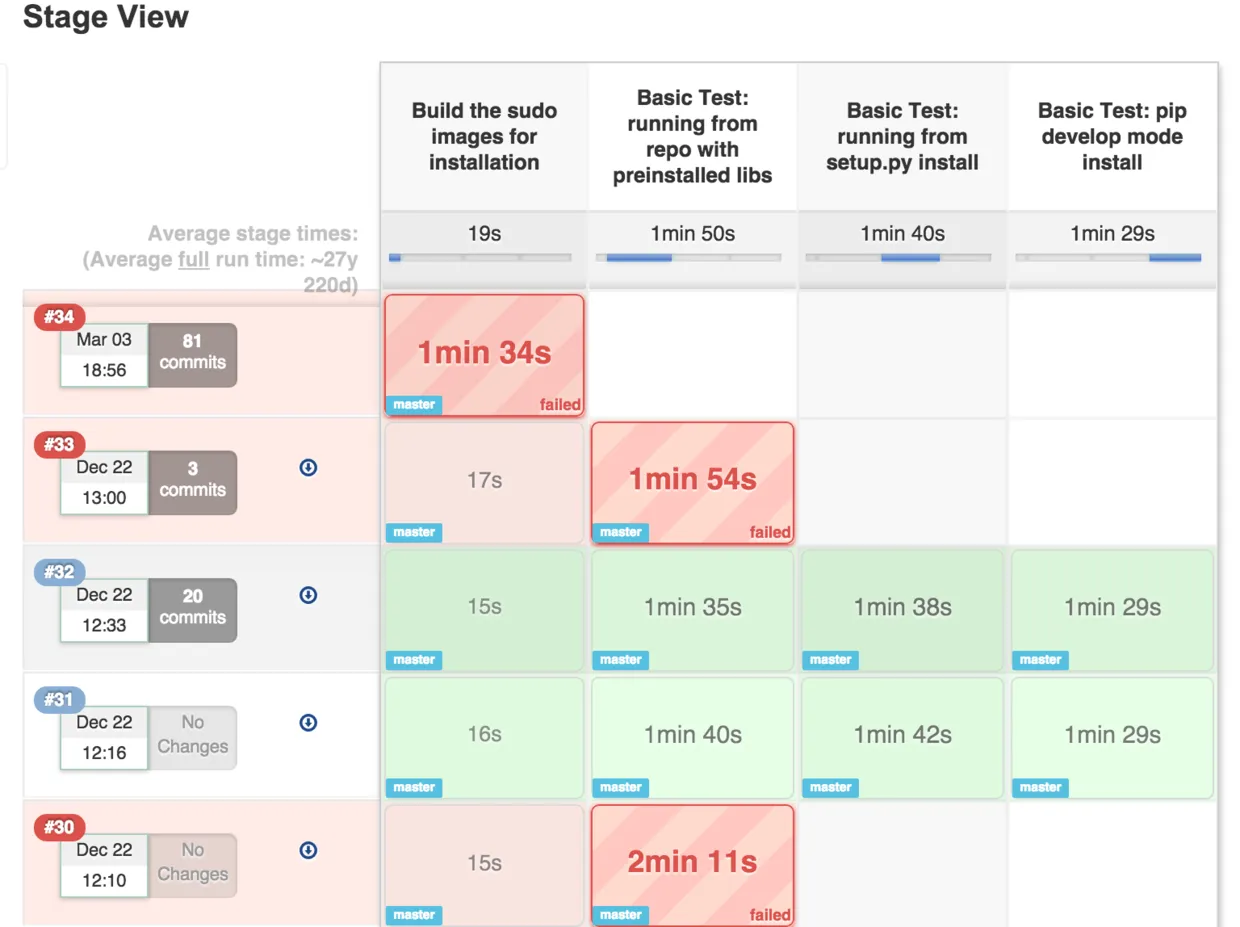 + +(Example 3. Picture from the Internet) + +In Example 3, we can find 5 Jenkins pipelines, and these pipelines have 1~4 task(s). + + + +After figuring out `pipeline` and `task`, we can start to add webhook. 2 hooks need to be added in shells. **Notice**: `https://sample-url.com/` and `1` should be replaced with your URL and connectionId. + +#### Update or Create the tasks in the pipeline + +This hook should be added when the task starts and finishes. So in Example 3, we need to add 8 CURLs in the 4 tasks. + +`POST https://sample-url.com/api/plugins/webhook/1/cicd_tasks` + +The body should be a JSON and include columns as follows: + +``` +pipeline_name: pipeline's name can be filled by any string unique in a connection +name: task's name should be unique in one pipeline +result: Must be one of SUCCESS FAILURE ABORT IN_PROGRESS +status: Must be one of IN_PROGRESS DONE +type: one of TEST LINT BUILD DEPLOYMENT +environment: which type of machine did this task run in. one of PRODUCTION STAGING TESTING +started_date: date, Format should be 2020-01-01T12:00:00+00:00 +finished_date(Optional): date, Format should be 2020-01-01T12:00:00+00:00 +repo_id: build for which repo/project. It can be a unique string that you can distinguish +branch(Optional) +commit_sha(Optional) +``` + + + +#### Close pipelines + +`POST https://sample-url.com/api/plugins/webhook/1/cicd_pipeline/:pipelineName/finish` + +This hook should be called to tell DevLake a pipeline finish when a pipeline is completed. `:pipelineName` need to be replaced with the pipeline name in the previous webhook. + +### Sample API Calls + +Sample CURL for the tasks starting and finishing in deploy pipelines: + +``` +curl http://127.0.0.1:4000/api/plugins/webhook/1/cicd_tasks -X 'POST' -d '{"pipeline_name":"A123","name":"unit-test","result":"IN_PROGRESS","status":"IN_PROGRESS","type":"TEST","environment":"PRODUCTION","created_date":"2020-01-01T12:00:00+00:00","finished_date":"2020-01-01T12:59:59+00:00","repo_id":"devlake","branch":"main","commit_sha":"015e3d3b480e417aede5a1293bd61de9b0fd051d"}' +``` + +Sample CURL for pipeline completed: + +``` +curl http://127.0.0.1:4000/api/plugins/webhook/1/cicd_pipeline/A123/finish -X 'POST' -d '' +``` + +Read more in Swagger: http://localhost:4000/api/swagger/index.html#/plugins%2Fwebhook/post_plugins_webhook__connectionId_issues.






