This is an automated email from the ASF dual-hosted git repository.

likyh pushed a commit to branch likyh/bitbucket-cloud
in repository https://gitbox.apache.org/repos/asf/incubator-devlake-website.git
The following commit(s) were added to refs/heads/likyh/bitbucket-cloud by this
push:
new cfad078f19 fix: fix for review
cfad078f19 is described below
commit cfad078f19afd9b3ee142a71ae9720b388d38dd4
Author: linyh <[email protected]>
AuthorDate: Tue Feb 28 22:45:11 2023 +0800
fix: fix for review
---
docs/Configuration/BitBucket.md | 21 +++++++++++++++------
1 file changed, 15 insertions(+), 6 deletions(-)
diff --git a/docs/Configuration/BitBucket.md b/docs/Configuration/BitBucket.md
index 9d3c003385..129dc03359 100644
--- a/docs/Configuration/BitBucket.md
+++ b/docs/Configuration/BitBucket.md
@@ -16,13 +16,13 @@ Name your connection.
#### Endpoint URL
-This should be a valid REST API endpoint for BitBucket Cloud:
`https://api.BitBucket.org/2.0/`. The endpoint URL should end with `/`.
+This should be a valid REST API endpoint for BitBucket Cloud:
`https://api.bitbucket.org/2.0/`. The endpoint URL should end with `/`.
DevLake will support BitBucket Server in the future.
#### Authentication
-BitBucket `username` and `app password` are required to add a connection.
Learn about [how to create a BitBucket app
password](https://support.atlassian.com/BitBucket-cloud/docs/create-an-app-password/).
+BitBucket `username` and `app password` are required to add a connection.
Learn about [how to create a BitBucket app
password](https://support.atlassian.com/bitbucket-cloud/docs/create-an-app-password/).
The following permissions are required to collect data from BitBucket
repositories:
@@ -80,14 +80,13 @@ Please go to the `Blueprints` page and switch to advanced
mode. See how to use a
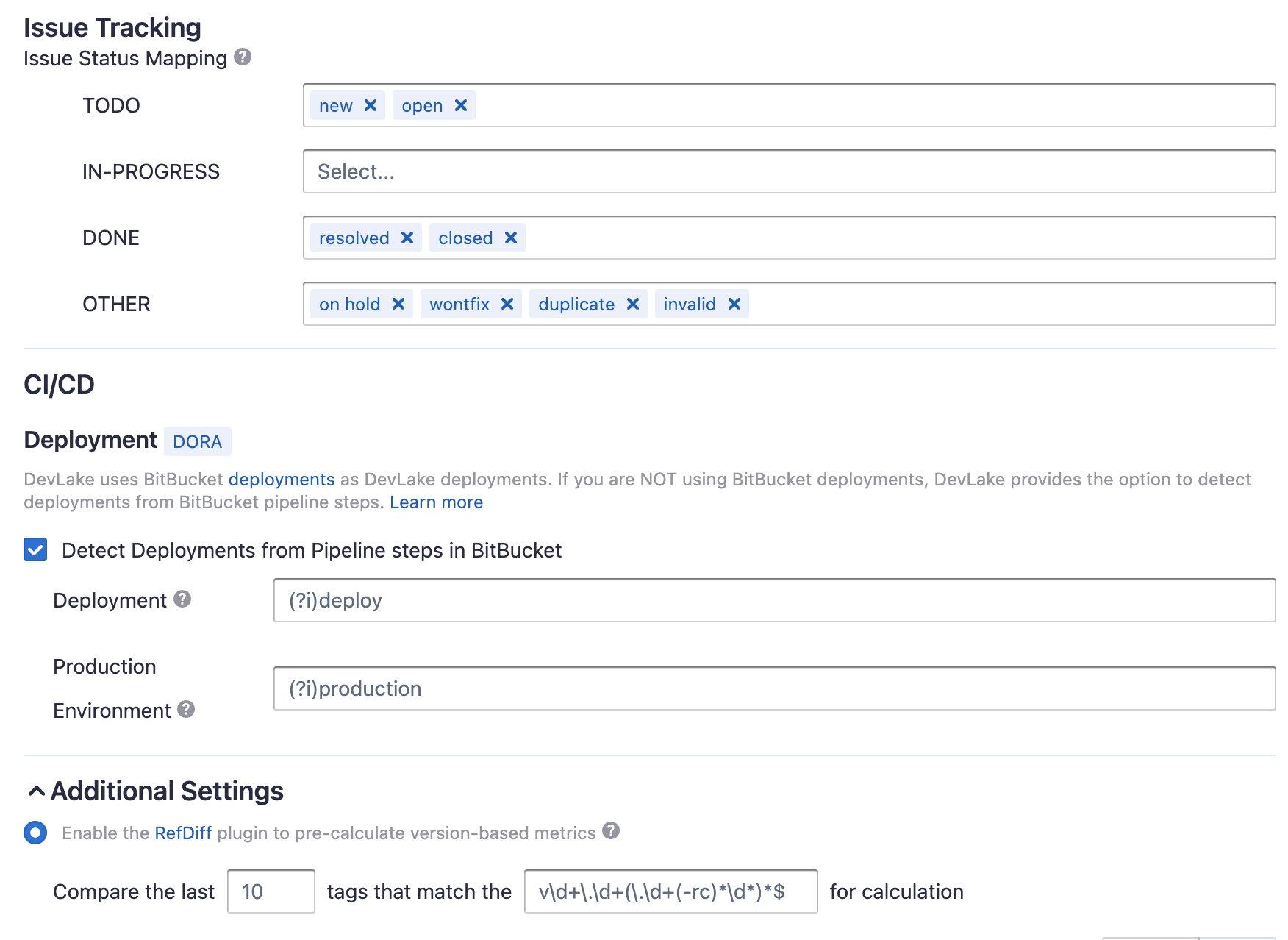
-Without changing default transformation rules, you can still view the Metrics
dashboard. However, if you want to view pre-built dashboards, the following
transformation rules, especially "Type/Bug", should be added.<br/>
+Without changing default transformation rules, you can still view the Metrics
dashboard. However, if you want to view pre-built dashboards, the following
transformation rules, especially "Issue Tracking" should be added.<br/>
Each BitBucket repo has at most ONE set of transformation rules.
#### Issue Tracking
- TODO: the issues with selected states can be recognized not start issues.
-
- IN-PROGRESS: The issues statuses that indicate an issue is work in progress.
- DONE: The issue statuses that indicate an issue is completed.
- OTHER: Other issues statuses that can not be mapped to the above three
statuses.
@@ -101,9 +100,19 @@ BitBucket has several key CI entities: `pipelines`,
`pipeline steps`, and `deplo
Each Bitbucket pipeline is converted to a cicd_pipeline in DevLake's domain
layer schema and each Bitbucket pipeline step is converted to a cicd_task in
DevLake's domain layer.

-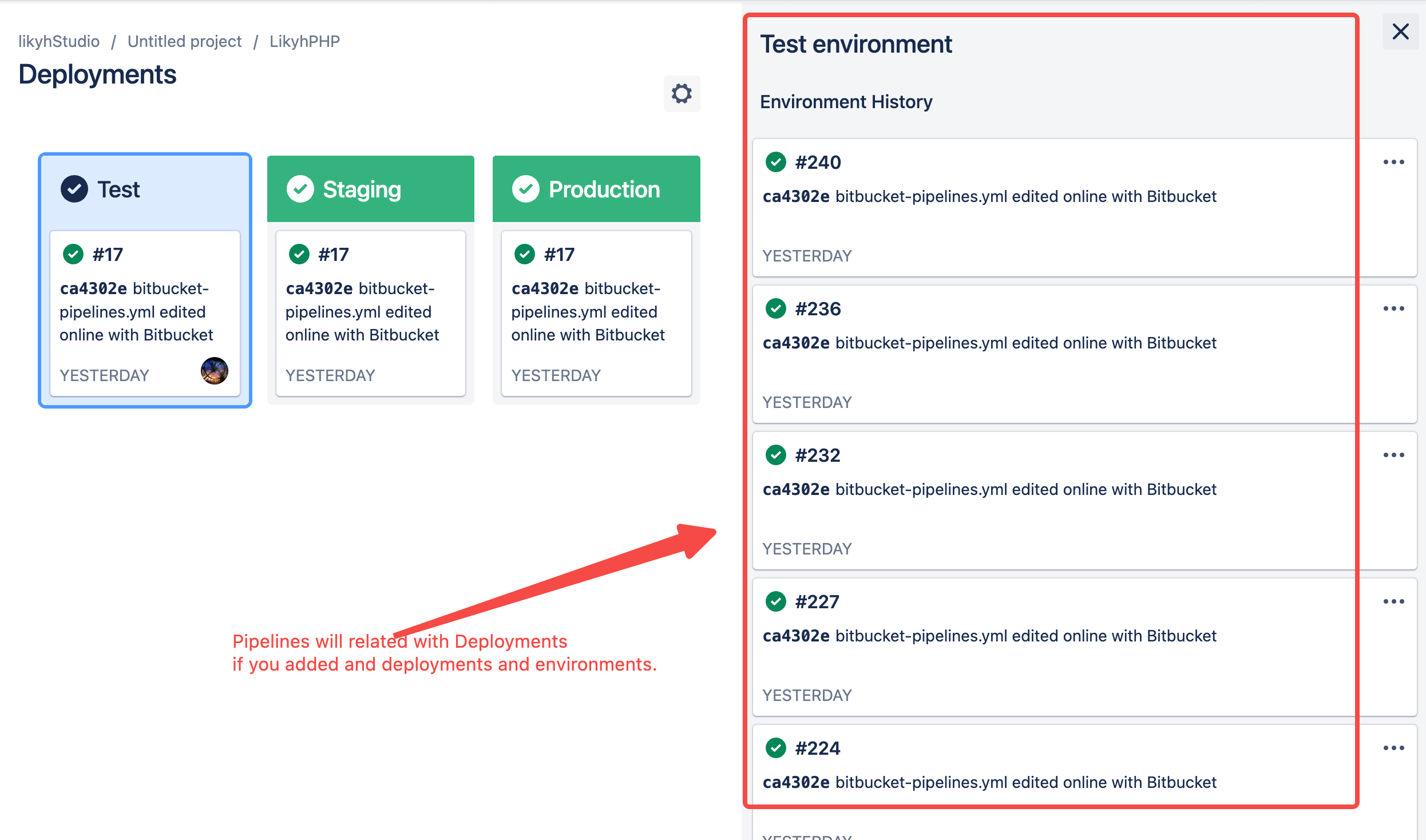
-If you are using BitBucket Deployments and Environments, DevLake will consider
the pipeline steps with deployment as a deployment and use the environment type
of deployment in cicd_task.
+
+If a pipeline step defines `deployment` with a value (usually means
envrionment), this pipeline step is also a BitBucket deployment.
+
+
+
+
+
+
+
+How does DevLake tell if a BitBucket pipeline step is a deployment? The
pipeline steps (defined in the .yaml) with the `deployment` key are considered
as `DevLake deployments`. The value of the `deployment` key will be considered
as the environment of DevLake deployments.
+
+These DevLake deployments will be recorded in table.cicd_tasks in DevLake's
domain layer, with `type` = 'deployment' and `environment` =
'{BitBucket-pipeline-step.deployment.value}', differentiating from other CI
tasks.
Or if you're using BitBucket pipelines to conduct `deployments`, please select
"Detect Deployments from Pipeline steps in BitBucket", and input the RegEx in
the following fields:





