jieguangzhou opened a new pull request, #12552:
URL: https://github.com/apache/dolphinscheduler/pull/12552
<!--Thanks very much for contributing to Apache DolphinScheduler. Please review https://dolphinscheduler.apache.org/en-us/community/development/pull-request.html before opening a pull request.--> ## Purpose of the pull request ### FILE Parameter Use the file parameter to pass files (or folders, hereinafter referred to as **files**) in the working directory of the upstream task to the downstream task in the same workflow instance. The following scenarios may be used - In the ETL task, pass the data files processed by multiple upstream tasks to a specific downstream task. - In the machine learning scenario, pass the data set file of the upstream data preparation task to the downstream model training task. #### Usage ##### Configure file parameter File parameter configuration method: click the plus sign on the right side of "Custom Parameters" on the task definition page to configure. ### Output file to downstream task **Four options of custom parameters are:** - Parameter name: the identifier used when passing tasks, such as `KEY1` and `KEY2` in the figure below - Direction: OUT, which means outputting the file to the downstream task - Parameter type: FILE, indicating file parameter - Parameter value: output file path, such as `data` and `data/test2/text.txt` in the figure below The configuration in the figure below indicates that the `output` task passes two file data to the downstream task, respectively: - Pass out the folder `data`, and mark it as `dir-data`. The downstream task can get this folder through `output.dir-data` - Pass out the file `data/test2/text.txt`, and mark it as `file-text`. The downstream task can get this folder through `output.file-text` 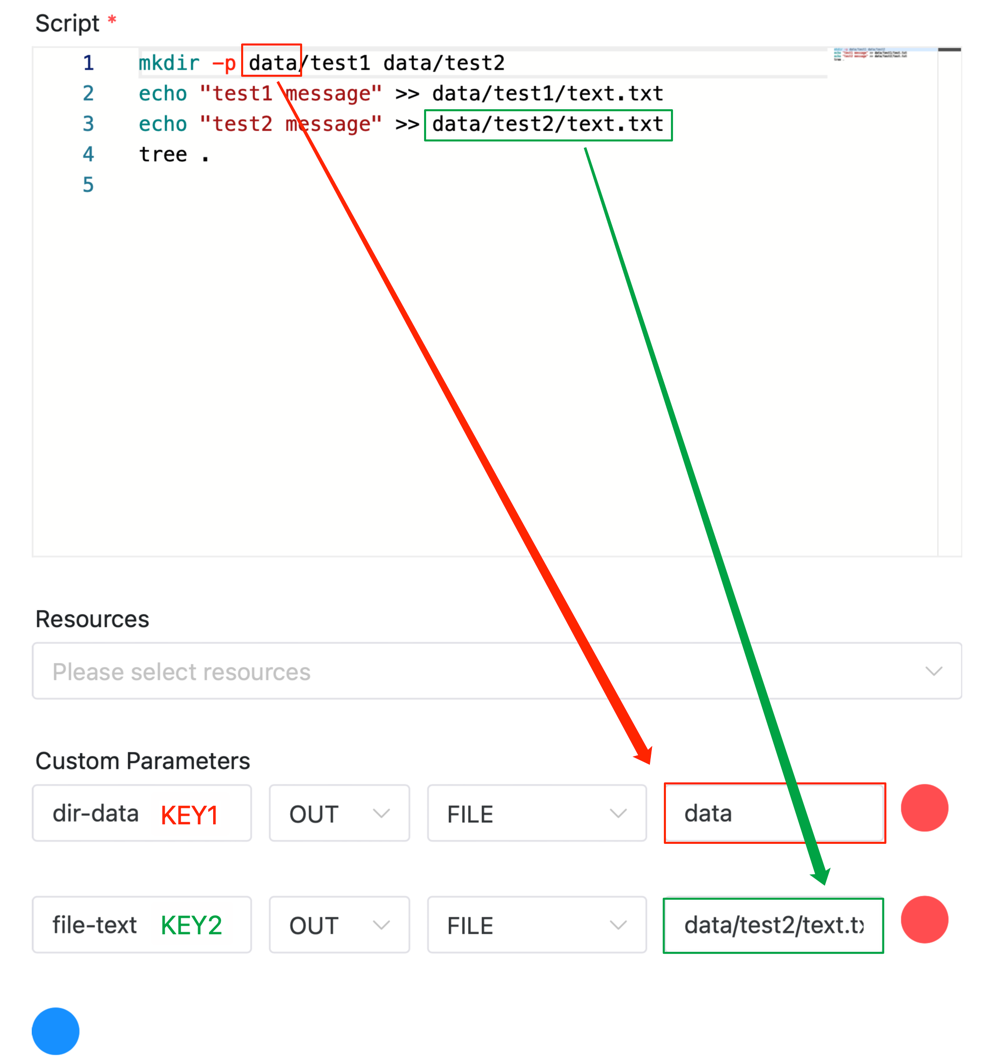 ##### Get the file from the upstream task **Four options of custom parameters are:** - Parameter name: the position where the upstream file is saved after input, such as `input_dir` used in the figure below - Direction: IN, which means to get the file from the upstream task - Parameter type: FILE, indicating file parameter - Parameter value: the identifier of the upstream file, in the format of `taskName.KEY`. For example, `output.dir-data` in the figure below, where `output` is the name of the upstream task, and `dir-data` is the file identifier output by the upstream task The configuration in the figure below indicates that the task gets the folder identified by `dir-data` from the upstream task `output` and saves it as `input_dir` 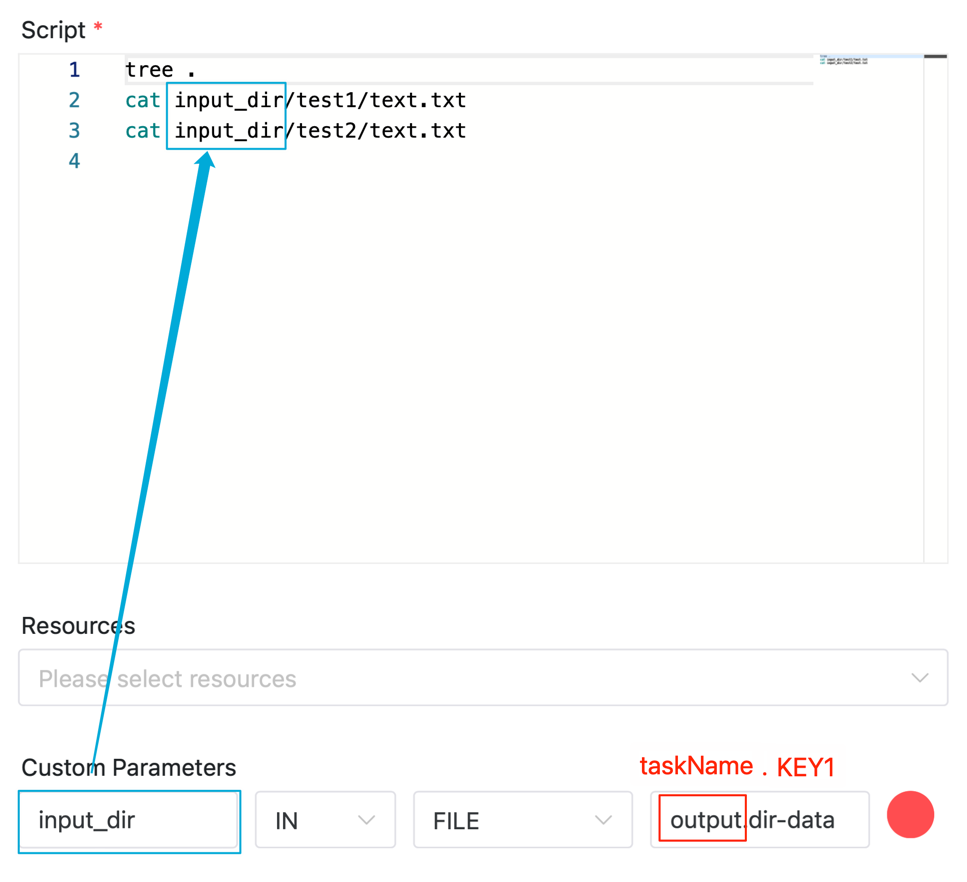 The configuration in the figure below indicates that the task gets the file identified by `file-text` from the upstream task `output` and saves it as `input.txt` 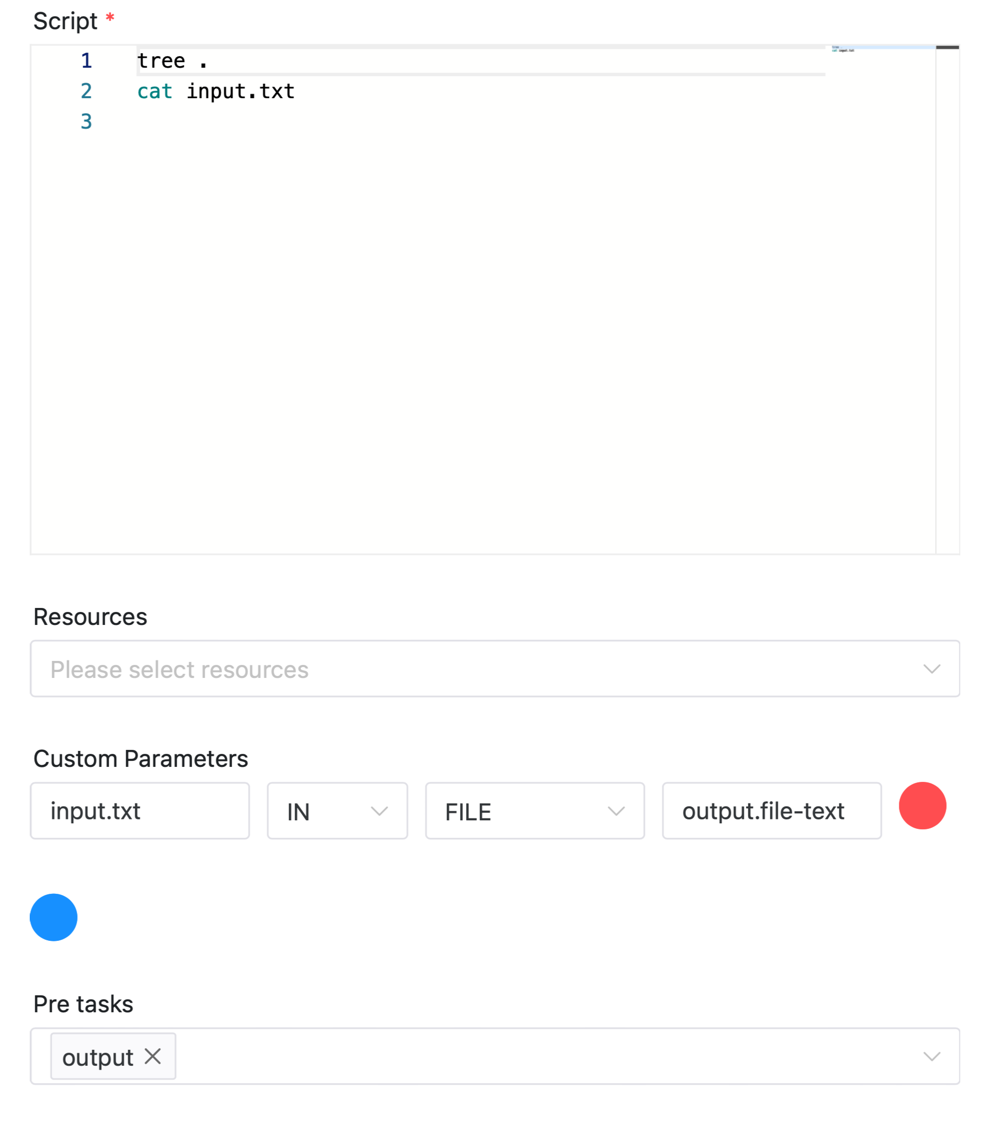 close: #12479 ## Brief change log <!--*(for example:)* - *Add maven-checkstyle-plugin to root pom.xml* --> ## Verify this pull request <!--*(Please pick either of the following options)*--> This pull request is code cleanup without any test coverage. *(or)* This pull request is already covered by existing tests, such as *(please describe tests)*. (or) This change added tests and can be verified as follows: <!--*(example:)* - *Added dolphinscheduler-dao tests for end-to-end.* - *Added CronUtilsTest to verify the change.* - *Manually verified the change by testing locally.* --> (or) If your pull request contain incompatible change, you should also add it to `docs/docs/en/guide/upgrede/incompatible.md` -- This is an automated message from the Apache Git Service. To respond to the message, please log on to GitHub and use the URL above to go to the specific comment. To unsubscribe, e-mail: [email protected] For queries about this service, please contact Infrastructure at: [email protected]



