echarts-bot[bot] commented on issue #16737:
URL: https://github.com/apache/echarts/issues/16737#issuecomment-1077349109
@mohitjain0824 It seems you are not using English, I've helped translate the
content automatically. To make your issue understood by more people and get
helped, we'd like to suggest using English next time. 🤗
<details><summary><b>TRANSLATED</b></summary><br>
**BODY**
### Version
5.3.1
### Link to Minimal Reproduction
_No response_
### Steps to Reproduce
Code:
`// prettier-ignore
let dataAxis = ['point', 'click', 'column', 'sub', 'or', 'person', 'two',
'pointing', 'on', 'touch', 'screen', 'on' ', 'Slide', 'Move', 'Can', 'Enough',
'Self', 'Move', 'Shrink', 'Release'];
// prettier-ignore
let data = [220, 182, 191, 234, 290, 330, 310, 123, 442, 321, 90, 149, 210,
122, 133, 334, 198, 123, 125, 220];
let yMax = 500;
let dataShadow = [];
for (let i = 0; i < data.length; i++) {
dataShadow.push(yMax);
}
option = {
title: {
text: 'Feature example: gradient shadow click to zoom',
subtext: 'Feature Sample: Gradient Color, Shadow, Click Zoom'
},
xAxis: {
data: dataAxis,
axisLabel: {
inside: true,
color: '#fff'
},
axisTick: {
show: false
},
axisLine: {
show: false
},
z: 10
},
yAxis: {
axisLine: {
show: false
},
axisTick: {
show: false
},
axisLabel: {
color: '#999'
}
},
dataZoom: [
{
type: 'inside'
}
],
series: [
{
type: 'bar',
showBackground: true,
itemStyle: {
color: new echarts.graphic.LinearGradient(0, 0, 0, 1, [
{ offset: 0, color: '#83bff6' },
{ offset: 0.5, color: '#188df0' },
{ offset: 1, color: '#188df0' }
])
},
emphasis: {
itemStyle: {
color: new echarts.graphic.LinearGradient(0, 0, 0, 1, [
{ offset: 0, color: '#2378f7' },
{ offset: 0.7, color: '#2378f7' },
{ offset: 1, color: '#83bff6' }
])
}
},
data: data
}
]
};
myChart.getZr().on('mouseover', function(params) {
console.log('mouseover');
});
myChart.getZr().on('click', function(params) {
console.log('clicked');
});
setInterval(function() {
myChart.dispatchAction({
type: 'highlight',
dataIndex: [0,1, 2,3,4,5,6,7,8,9]
});
}, 1500);
`
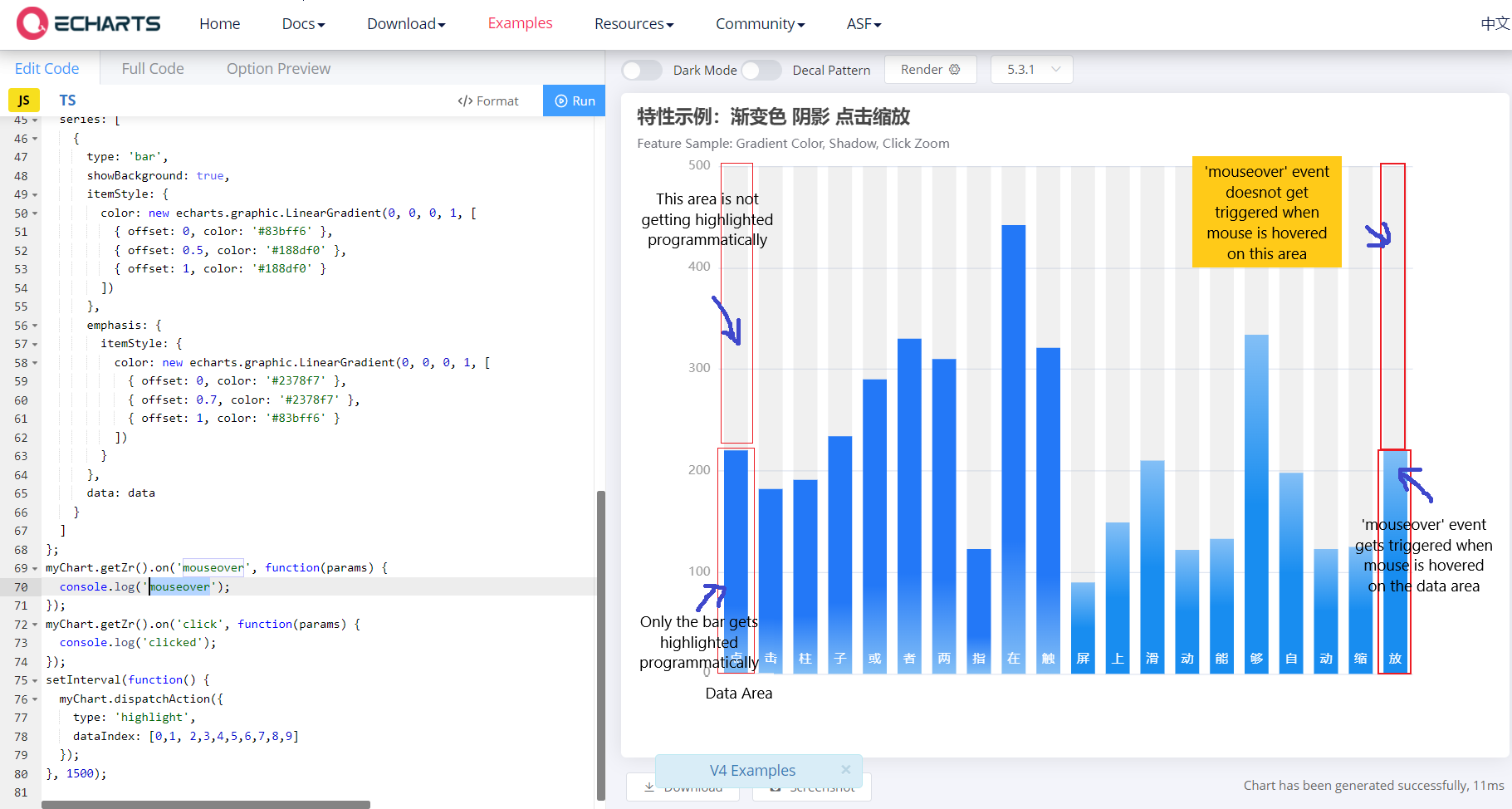
We are trying to achieve two things here:
1. We want to highlight the whole row programmatically, using
dispatchAction().
2. We want to use the 'mouseover' event on the whole row (not just the bars).
Steps to reproduce:
1. 'mouseover' event not getting triggered when we are hovering on the part
of the chart where there is no data.
but the 'click' event gets triggered.
If we click on the area of the chart where there is no data, the click
event gets triggered.
Code used: `myChart.getZr().on('mouseover', function(params) {
console.log('mouseover');
});
myChart.getZr().on('click', function(params) {
console.log('clicked');
});`
2. dispatchAction() only highlights the data bar, not the whole row.
Code used: `setInterval(function() {
myChart.dispatchAction({
type: 'highlight',
dataIndex: [0,1, 2,3,4,5,6,7,8,9]
});
}, 1500);`
### Current Behavior
1. 'mouseover' event not getting triggered when we are hovering on the part
of the chart where there is no data.
but the 'click' event gets triggered.
If we click on the area of the chart where there is no data, the click
event gets triggered.
Code used: `myChart.getZr().on('mouseover', function(params) {
console.log('clicked'); }); myChart.getZr().on('click',
function(params) { console.log('clicked'); });`
2. dispatchAction() only highlights the data bar, not the whole row.
Code used: `setInterval(function() { myChart.dispatchAction({ type:
'highlight', dataIndex: [0,1, 2,3,4,5,6,7,8,9] }); }, 1500 );`
### Expected Behavior
1. 'mouseover' event should get triggered when we are hovering on the part
of the chart where there is no data also.
and not just when we hover on the data bar.
2. dispatchAction() should highlight the whole row.
### Environment
````markdown
- OS:
- Browser:
- Framework:
````
### Any additional comments?
</details>
--
This is an automated message from the Apache Git Service.
To respond to the message, please log on to GitHub and use the
URL above to go to the specific comment.
To unsubscribe, e-mail: [email protected]
For queries about this service, please contact Infrastructure at:
[email protected]
---------------------------------------------------------------------
To unsubscribe, e-mail: [email protected]
For additional commands, e-mail: [email protected]

