This is an automated email from the ASF dual-hosted git repository.

ovilia pushed a commit to branch doc-custom-series
in repository https://gitbox.apache.org/repos/asf/echarts-handbook.git
commit 0250a804bf0d02bb805c8d518bc7cfba2b9b21bc Author: Ovilia <[email protected]> AuthorDate: Sun Jan 4 11:37:46 2026 +0800 doc: add doc for custom series --- contents/en/how-to/custom-series.md | 78 +++++++++++++++++++++++++++++++++++++ contents/en/posts.yml | 2 + contents/zh/how-to/custom-series.md | 78 +++++++++++++++++++++++++++++++++++++ contents/zh/posts.yml | 2 + 4 files changed, 160 insertions(+) diff --git a/contents/en/how-to/custom-series.md b/contents/en/how-to/custom-series.md new file mode 100644 index 0000000..0344fd3 --- /dev/null +++ b/contents/en/how-to/custom-series.md @@ -0,0 +1,78 @@ +# Custom Series + +Custom series allow for the customization of graphic element rendering within a series, enabling the extension of various chart types. This article will introduce how to develop or use custom series. For more detailed information, please refer to the [Option API](${optionPath}series-custom). + +## Registerable Custom Series (New) + +Starting from Apache ECharts v6.0.0, we support registerable custom series and provide several custom series that can be installed directly via NPM in [echarts-custom-series](https://github.com/apache/echarts-custom-series). + +| | | +|-|-| +| `@echarts-x/custom-violin`<br> [doc](https://github.com/apache/echarts-custom-series/tree/main/custom-series/violin) [npm](https://www.npmjs.com/package/@echarts-x/custom-violin) <br> 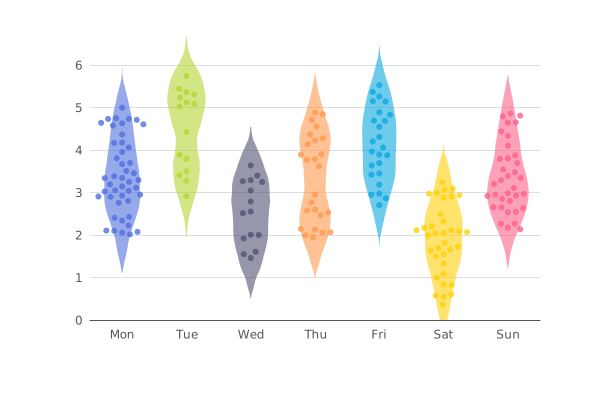 | `@echarts-x/custom-contour`<br> [doc](https://github.com/apache/echarts-custom-series/tree/main/custom-series/contour) [npm](https://www.npmjs.com/package/@echarts-x/cust [...] +| `@echarts-x/custom-stage`<br> [doc](https://github.com/apache/echarts-custom-series/tree/main/custom-series/stage) [npm](https://www.npmjs.com/package/@echarts-x/custom-stage) <br> 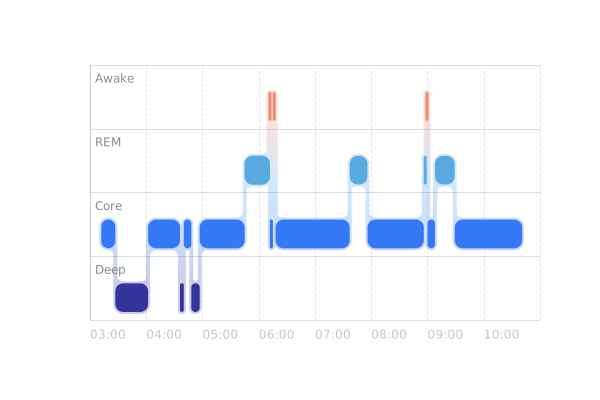 | `@echarts-x/custom-segmented-doughnut`<br> [doc](https://github.com/apache/echarts-custom-series/tree/main/custom-series/segmentedDoughnut) [npm](https://www.npmjs.com/package/ [...] +| `@echarts-x/custom-bar-range`<br> [doc](https://github.com/apache/echarts-custom-series/tree/main/custom-series/barRange) [npm](https://www.npmjs.com/package/@echarts-x/custom-bar-range) <br> 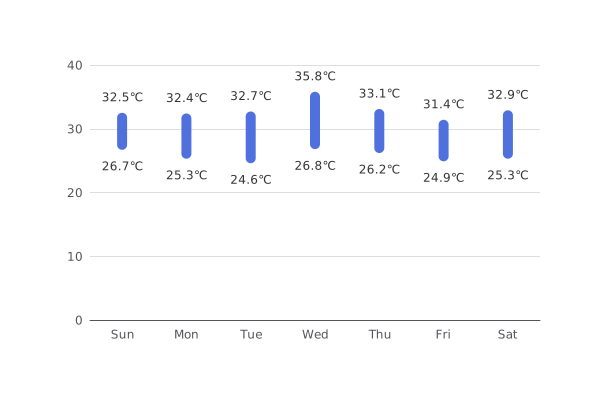 | `@echarts-x/custom-line-range`<br> [doc](https://github.com/apache/echarts-custom-series/tree/main/custom-series/lineRange) [npm](https://www.npmjs.com/pack [...] +| `@echarts-x/custom-liquid-fill`<br> [doc](https://github.com/apache/echarts-custom-series/tree/main/custom-series/liquidFill) [npm](https://www.npmjs.com/package/@echarts-x/custom-liquid-fill) <br>  | | + +You can directly use the custom series in this project to develop charts, use custom series published by others, or develop your own custom series (which will be introduced in detail later) and use them in a similar way. First, let's look at the simplest way—using officially published custom series. + +### Using Published Custom Series + +Below, we take the range bar chart as an example to introduce how to use published custom series. + +The documentation for the range bar chart is at [echarts-custom-series/custom-series/barRange](https://github.com/apache/echarts-custom-series/tree/main/custom-series/barRange), which includes detailed introductions, APIs, and examples. + +In short, when using a published custom series, you first need to download it using a command like `npm install @echarts-x/custom-bar-range`, and then choose the usage method based on your development environment. + +For example, if you are using it in a web environment without additional bundling tools, the simplest way is: + +```html +<script src="./node_modules/echarts/dist/echarts.js"></script> +<script src="./node_modules/@echarts-x/custom-bar-range/dist/bar-range.auto.js"></script> +<script> + // No need to call echarts.use(), automatically registered + const chart = echarts.init(...); + const option = { + series: [{ + type: 'custom', + renderItem: 'barRange', + data: [ + [0, 26.7, 32.5], + [1, 25.3, 32.4], + [2, 24.6, 32.7], + [3, 26.8, 35.8], + [4, 26.2, 33.1], + [5, 24.9, 31.4], + [6, 25.3, 32.9] + ], + itemPayload: { + barWidth: 10, + borderRadius: 5, + }, + encode: { + x: 0, + y: [1, 2], + tooltip: [1, 2], + } + }] + }; + chart.setOption(option); +</script> +``` + +The `auto` in `bar-range.auto.js` means that when it is loaded, it will automatically register the custom series to the `echarts` global variable. Developers do not need to register it manually; they only need to specify `type: 'custom'` in `setOption` and specify the name of the custom series used via `renderItem: 'barRange'`. + +You usually need to pass parameters to the custom series through `itemPayload`. You can find its configurable parameters in the README of each custom series. + +Note that you usually need to configure `encode` to specify data mapping. You can find the recommended usage for each custom series in its README and examples. + +### Developing Your Own Custom Series + +You can refer to the source code of [echarts-custom-series](https://github.com/apache/echarts-custom-series) to learn how to develop custom series. It is recommended to fork the project and use `npm run generate xxx` to generate a new custom series framework. It also provides scaffolding for compilation, documentation, examples, etc., which can help you quickly develop new custom series. + +The main development task is to implement a `renderItem`. For documentation, see the [Configuration Manual](${optionPath}series-custom.renderItem). + +If you develop a general-purpose custom series, it is recommended to submit it via a Pull Request so that more developers can use it. + +## Non-Registerable Custom Series + +If the custom series you develop is not intended for reuse, you can also implement the rendering algorithm for the custom series directly in `renderItem`. You can find many examples in the [Official Custom Series Examples](${mainSitePath}/examples#chart-type-custom) and develop based on them. diff --git a/contents/en/posts.yml b/contents/en/posts.yml index c0d8d79..e9f02d9 100644 --- a/contents/en/posts.yml +++ b/contents/en/posts.yml @@ -110,6 +110,8 @@ children: - title: Basic Scatter dir: basic-scatter + - title: Custom Series + dir: custom-series - title: Common Components dir: component-types children: diff --git a/contents/zh/how-to/custom-series.md b/contents/zh/how-to/custom-series.md new file mode 100644 index 0000000..e9c145b --- /dev/null +++ b/contents/zh/how-to/custom-series.md @@ -0,0 +1,78 @@ +# 自定义系列 + +自定义系列可以自定义系列中的图形元素渲染,从而能扩展出不同的图表。本文将介绍使用如何开发或使用自定义系列,更详细的内容参见[配置项手册](${optionPath}series-custom)。 + +## 可注册式自定义系列(新) + +从 Apache ECharts v6.0.0 版本起,我们支持了可注册的自定义系列,并且在 [echarts-custom-series](https://github.com/apache/echarts-custom-series) 中提供了多个可直接通过 NPM 安装的自定义系列。 + +| | | +|-|-| +| `@echarts-x/custom-violin`<br> [doc](https://github.com/apache/echarts-custom-series/tree/main/custom-series/violin) [npm](https://www.npmjs.com/package/@echarts-x/custom-violin) <br>  | `@echarts-x/custom-contour`<br> [doc](https://github.com/apache/echarts-custom-series/tree/main/custom-series/contour) [npm](https://www.npmjs.com/package/@echarts-x/cust [...] +| `@echarts-x/custom-stage`<br> [doc](https://github.com/apache/echarts-custom-series/tree/main/custom-series/stage) [npm](https://www.npmjs.com/package/@echarts-x/custom-stage) <br>  | `@echarts-x/custom-segmented-doughnut`<br> [doc](https://github.com/apache/echarts-custom-series/tree/main/custom-series/segmentedDoughnut) [npm](https://www.npmjs.com/package/ [...] +| `@echarts-x/custom-bar-range`<br> [doc](https://github.com/apache/echarts-custom-series/tree/main/custom-series/barRange) [npm](https://www.npmjs.com/package/@echarts-x/custom-bar-range) <br>  | `@echarts-x/custom-line-range`<br> [doc](https://github.com/apache/echarts-custom-series/tree/main/custom-series/lineRange) [npm](https://www.npmjs.com/pack [...] +| `@echarts-x/custom-liquid-fill`<br> [doc](https://github.com/apache/echarts-custom-series/tree/main/custom-series/liquidFill) [npm](https://www.npmjs.com/package/@echarts-x/custom-liquid-fill) <br>  | | + +你可以直接使用该项目中的自定义系列开发图表,或者使用其他人发布的自定义系列,或者自己开发自定义系列(后文将会详细介绍)并通过类似的方式使用。首先,让我们来了解一下最简单的方式——使用官方发布的自定义系列。 + +### 使用已发布的自定义系列 + +下面,我们以范围柱状图为例,介绍如何使用已发布的自定义系列。 + +范围柱状图的文档在 [echarts-custom-series/custom-series/barRange](https://github.com/apache/echarts-custom-series/tree/main/custom-series/barRange),其中有详细的介绍、API 和示例。 + +简单来说,我们在使用已发布的自定义系列的时候,首先需要通过 `npm install @echarts-x/custom-bar-range` 之类的命令下载,然后根据开发环境,选择使用的方式。 + +例如,你在网页环境中使用,并且没有额外的打包工具,那么最简单的方式是: + +```html +<script src="./node_modules/echarts/dist/echarts.js"></script> +<script src="./node_modules/@echarts-x/custom-bar-range/dist/bar-range.auto.js"></script> +<script> + // 无需调用 echarts.use(),已经自动注册过了 + const chart = echarts.init(...); + const option = { + series: [{ + type: 'custom', + renderItem: 'barRange', + data: [ + [0, 26.7, 32.5], + [1, 25.3, 32.4], + [2, 24.6, 32.7], + [3, 26.8, 35.8], + [4, 26.2, 33.1], + [5, 24.9, 31.4], + [6, 25.3, 32.9] + ], + itemPayload: { + barWidth: 10, + borderRadius: 5, + }, + encode: { + x: 0, + y: [1, 2], + tooltip: [1, 2], + } + }] + }; + chart.setOption(option); +</script> +``` + +`bar-range.auto.js` 中的 `auto` 指的是加载它的时候自动会将自定义系列注册到 `echarts` 全局变量上,无需开发者手动注册,只需要在 `setOption` 的时候通过 `type: 'custom'` 指定使用自定义系列,并通过 `renderItem: 'barRange'` 指定使用的自定义系列名称即可。 + +你通常需要通过 `itemPayload` 是把参数传递给自定义系列。你可以在每个自定义系列的 README 中找到它可配置的参数。 + +需要注意的是,通常你需要配置 `encode` 来指定数据映射。你可以在 README 和示例中找到每个自定义系列推荐的使用方式。 + +### 开发自己的自定义系列 + +你可以参考 [echarts-custom-series](https://github.com/apache/echarts-custom-series) 的源码来了解如何开发自定义系列。推荐 fork 该项目并通过 `npm run generate xxx` 来生成新的自定义系列框架,并且还提供了编译、文档、示例等脚手架,可以帮助你快速开发新的自定义系列。 + +主要的开发内容是实现一个 `renderItem`,文档参见 [配置项手册](${optionPath}series-custom.renderItem)。 + +如果你开发了一个通用的自定义系列,建议通过 Pull Request 将其提交,从而让更多开发者也可以使用。 + +## 非注册式自定义系列 + +如果你开发的自定义系列是不需要复用的,你也可以直接在 `renderItem` 中实现自定义系列的渲染算法。你可以在[官网自定义系列示例](${mainSitePath}/examples#chart-type-custom)找到很多例子,并在此基础上进行开发。 diff --git a/contents/zh/posts.yml b/contents/zh/posts.yml index 805b0a2..2deb0ec 100644 --- a/contents/zh/posts.yml +++ b/contents/zh/posts.yml @@ -112,6 +112,8 @@ children: - title: 基础散点图 dir: basic-scatter + - title: 自定义系列 + dir: custom-series - title: 常用组件 dir: component-types children: --------------------------------------------------------------------- To unsubscribe, e-mail: [email protected] For additional commands, e-mail: [email protected]




