This is an automated email from the ASF dual-hosted git repository.

paulirwin pushed a commit to branch docs/beta00018
in repository https://gitbox.apache.org/repos/asf/lucenenet.git
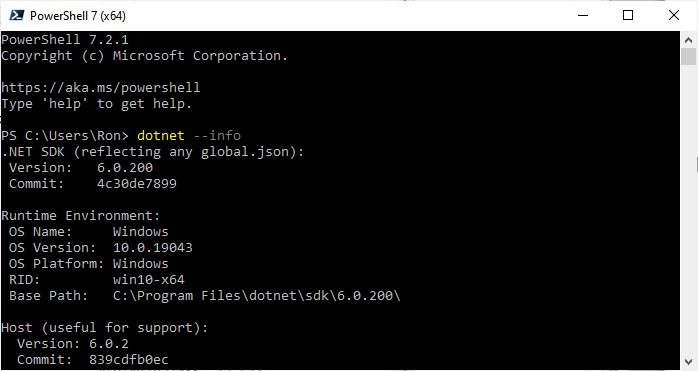
commit bd419bfa40352a478281db39ebc5737d0388159b Author: Paul Irwin <[email protected]> AuthorDate: Thu Nov 21 07:42:46 2024 -0700 Websites, CLI, and README updates for dropping .NET 6 --- README.md | 9 ++++----- src/dotnet/tools/lucene-cli/docs/index.md | 2 +- websites/site/quick-start/tutorial.md | 6 +++--- 3 files changed, 8 insertions(+), 9 deletions(-) diff --git a/README.md b/README.md index 9229562aa..2515cdc24 100644 --- a/README.md +++ b/README.md @@ -1,4 +1,4 @@ -# Welcome to Apache Lucene.NET +# Welcome to Apache Lucene.NET [](https://www.nuget.org/packages/Lucene.Net) [](https://dev.azure.com/lucene-net/Lucene.NET/_build?definitionId=3&_a=summary) @@ -25,7 +25,6 @@ The Apache Lucene.NET website is at: ### Lucene.NET 4.8.0 - [.NET 8.0](https://dotnet.microsoft.com/download/dotnet/8.0) -- [.NET 6.0](https://dotnet.microsoft.com/download/dotnet/6.0) - [.NET Standard 2.1](https://docs.microsoft.com/en-us/dotnet/standard/net-standard) - [.NET Standard 2.0](https://docs.microsoft.com/en-us/dotnet/standard/net-standard) - .NET Framework 4.6.2 @@ -38,8 +37,8 @@ Working toward Lucene.NET 4.8.0 (currently in BETA) * The beta version is extremely stable * Has more than 7800+ passing unit tests -* Integrates well with .NET 8.0 and .NET 6.0 (as well as other unsupported versions) -* Supports .NET Standard 2.1 and .NET Standard 2.0 +* Integrates well with .NET 8.0 (as well as other unsupported versions) +* Supports .NET Standard 2.1 and .NET Standard 2.0 * Supports .NET Framework 4.6.2+ * Some developers already use it in production environments @@ -74,7 +73,7 @@ PM> Install-Package Lucene.Net -Pre ##### All Packages -<!--- TO BE ADDED WHEN RELEASED +<!--- TO BE ADDED WHEN RELEASED - [Lucene.Net.Analysis.Nori](https://www.nuget.org/packages/Lucene.Net.Analysis.Nori/) - Korean Morphological Analyzer diff --git a/src/dotnet/tools/lucene-cli/docs/index.md b/src/dotnet/tools/lucene-cli/docs/index.md index d7c6a1572..cfca4ae65 100644 --- a/src/dotnet/tools/lucene-cli/docs/index.md +++ b/src/dotnet/tools/lucene-cli/docs/index.md @@ -4,7 +4,7 @@ The Lucene.NET command line interface (CLI) is a new cross-platform toolchain wi ## Prerequisites -- [.NET 6.0 Runtime or Higher](https://dotnet.microsoft.com/en-us/download/dotnet) (.NET 8.0 recommended) +- [.NET 8.0 Runtime or Higher](https://dotnet.microsoft.com/en-us/download/dotnet) ## Installation diff --git a/websites/site/quick-start/tutorial.md b/websites/site/quick-start/tutorial.md index a53ed95a0..bde4e9377 100644 --- a/websites/site/quick-start/tutorial.md +++ b/websites/site/quick-start/tutorial.md @@ -20,10 +20,10 @@ In these examples we will use the .NET CLI (Command Line Interface) because it's However you are totally free to use [Visual Studio](https://visualstudio.microsoft.com/) (Windows/Mac) or [Visual Studio Code](https://code.visualstudio.com/) (Windows/Unix/Max) to create the console application project and to add references to the Nuget packages. Whichever tool you use, you should end up with the same files and you can compare their contents to the contents that we show in the examples. ## Download and Install the .NET SDK -First you must install the .NET Core SDK, if it's not already installed on your machine. The .NET Core SDK contains the .NET runtime, .NET Libraries and the .NET CLI. If you haven't installed it yet, download it from https://dotnet.microsoft.com/en-us/download and run the installer. It's a pretty straightforward process. I'll be using the **.NET 6.0 SDK** in this tutorial. +First you must install the .NET Core SDK, if it's not already installed on your machine. The .NET Core SDK contains the .NET runtime, .NET Libraries and the .NET CLI. If you haven't installed it yet, download it from https://dotnet.microsoft.com/en-us/download and run the installer. It's a pretty straightforward process. I'll be using the **.NET 8.0 SDK** in this tutorial. > [!NOTE] -> The C# code we present **requires the .NET 6.0 SDK or later**. However, with a few simple modifications it can run on older SDKs including 4.x. To do that, the Program.cs file will need to have a namespace, Program class and a static void main method. See Microsoft docs [here](https://docs.microsoft.com/en-us/dotnet/core/tutorials/with-visual-studio?pivots=dotnet-5-0#code-try-3) for details. You will also need to add [braces to the using statements](https://docs.microsoft.com/en-us/ [...] +> The C# code we present **requires the .NET 8.0 SDK or later**. However, with a few simple modifications it can run on older SDKs including 4.x. To do that, the Program.cs file will need to have a namespace, Program class and a static void main method. See Microsoft docs [here](https://docs.microsoft.com/en-us/dotnet/core/tutorials/with-visual-studio?pivots=dotnet-5-0#code-try-3) for details. You will also need to add [braces to the using statements](https://docs.microsoft.com/en-us/ [...] ## Download and Install PowerShell PowerShell is cross platform and runs everywhere .NET runs, so we will be using PowerShell for all of our command line work. If you don't already have PowerShell installed you can download and find instructions for installing it on Window, Unix or Mac on this [Installing PowerShell](https://docs.microsoft.com/en-us/powershell/scripting/install/installing-powershell) page. In my examples I'm using PowerShell 7.2 but the specific version probably doesn't make a difference. @@ -35,7 +35,7 @@ Let's use PowerShell now to verify that you have the .NET SDK with the .NET CLI This command will show the latest version of the .NET SDK installed and also show a list of all versions installed. If the .NET SDK is not installed this the command will return an error indicating the command was not found. -Below I show the top of the results for the `dotnet --info` command ran on my machine. You can see I'm using .NET SDK 6.0.200 on windows for this demo. In my case I had to scroll the screen up to see this info since I have many versions of the .NET SDK installed and it shows info on each version which scrolled the info about the latest version off the screen. Your latest version will likely be different than mine and perhaps you may be running on Unix or Mac. That's fine. But remember ** [...] +Below I show the top of the results for the `dotnet --info` command ran on my machine. In my case I had to scroll the screen up to see this info since I have many versions of the .NET SDK installed and it shows info on each version which scrolled the info about the latest version off the screen. Your latest version will likely be different than mine and perhaps you may be running on Unix or Mac. That's fine. But remember **you need .NET SDK 8 or later**. Or you need to modify the example [...] <img src='https://lucenenet.apache.org/images/quick-start/tutorial/power-shell01.png'>