limbonicat opened a new issue #13734:
URL: https://github.com/apache/pulsar/issues/13734
**Describe the bug** Handshake failure error occurd when websocket client connect to Pulsar(Standalone mode) ; But its worked well on Win10 or Android or use other client(like Java Client); After anaylise logs and src code, i guess the bug occured because DISMATCH cipher suite between pulsar wss and ws client **To Reproduce** Steps to reproduce the behavior: 1. User C#/JS websocket client connect to pulsar wss service 2. client shows "disconnected" immediately 3. Use wireshark grap data from net traffic, after client hello ,it shows "Level: Fatal, Handshake failure(40)" from server side 4. In pulsar debug log, it shows `javax.net.ssl.SSLHandshakeException: Read error: ssl=0x7f81c401f458: Failure in SSL library, usually a protocol error error:100000b8:SSL routines:OPENSSL_internal:NO_SHARED_CIPHER (../ssl/handshake_server.cc:718 0x7f80390d5700:0x00000000)` **Expected behavior** Successful wss connection expected on Win7/8 **Configurations** 1. Server side: Pulsar 2.9.1 standalone; OpenJDK1.8 (after upgrade to openjdk11,still not working);OpenSSL(1.1.1c);Use self-signed certifacate;configs in pulsar standalone.conf ``` webServicePortTls=8443 brokerServicePortTls=6651 tlsCertificateFilePath=../CA/broker.cert.pem tlsKeyFilePath=../CA/broker.key-pk8.pem tlsTrustCertsFilePath=../CA/certs/ca.cert.pem tlsAllowInsecureConnection=false tlsProtocols=TLSv1.2,TLSv1.1,TLSv1 tlsCiphers= tlsRequireTrustedClientCertOnConnect=false tlsEnabledWithKeyStore=false # TLS Provider for KeyStore type tlsProvider= tlsKeyStoreType=JKS tlsKeyStore= tlsKeyStorePassword= tlsTrustStoreType=JKS tlsTrustStore= tlsTrustStorePassword= brokerClientTlsEnabledWithKeyStore=false brokerClientSslProvider= brokerClientTlsTrustStoreType=JKS brokerClientTlsTrustStore= brokerClientTlsTrustStorePassword= brokerClientTlsCiphers= brokerClientTlsProtocols= ``` 2. Client side: Win7/8 C# (with .Net Framework 4.8+) or Javascript client on Chrome/IE **Operations、Screenshots and My personal anaylise** 1. Pulsar startup logs:(it shows that pulsar broker use OpenSSL as its TLS support) ``` 10:49:32.044 [main] DEBUG io.netty.handler.ssl.OpenSsl - Supported protocols (OpenSSL): [SSLv2Hello, TLSv1, TLSv1.1, TLSv1.2, TLSv1.3] 10:49:32.044 [main] DEBUG io.netty.handler.ssl.OpenSsl - Default cipher suites (OpenSSL): [TLS_ECDHE_ECDSA_WITH_AES_256_GCM_SHA384, TLS_ECDHE_ECDSA_WITH_AES_128_GCM_SHA256, TLS_ECDHE_RSA_WITH_AES_128_GCM_SHA256, TLS_ECDHE_RSA_WITH_AES_256_GCM_SHA384, TLS_ECDHE_RSA_WITH_AES_128_CBC_SHA, TLS_ECDHE_RSA_WITH_AES_256_CBC_SHA, TLS_RSA_WITH_AES_128_GCM_SHA256, TLS_RSA_WITH_AES_128_CBC_SHA, TLS_RSA_WITH_AES_256_CBC_SHA, TLS_AES_128_GCM_SHA256, TLS_AES_256_GCM_SHA384, TLS_AES_128_GCM_SHA256, TLS_AES_256_GCM_SHA384] 10:49:32.046 [main] INFO org.apache.pulsar.broker.service.BrokerService - Started Pulsar Broker TLS service on /0.0.0.0:6651 - TLS provider: OPENSSL ``` 2. Use c# websocket client connect to pulsar wss port on Win7, shows "Disconnected" immediately 3. Use Wireshark grap net traffic data  4. Pulsar debug logs: ``` 09:28:02.059 [pulsar-web-59-5] DEBUG org.eclipse.jetty.io.AbstractConnection - onClose HttpConnection@77e58cb6::DecryptedEndPoint@4e357b77{l=0.0.0.0/0.0.0.0:6683,r=null,CLOSED,fill=-,flush=-,to=156/30000} 09:28:02.059 [pulsar-web-59-15] DEBUG org.eclipse.jetty.server.HttpConnection - javax.net.ssl.SSLHandshakeException: Read error: ssl=0x7f81c401f458: Failure in SSL library, usually a protocol error error:100000b8:SSL routines:OPENSSL_internal:NO_SHARED_CIPHER (../ssl/handshake_server.cc:718 0x7f80390d5700:0x00000000) at org.conscrypt.SSLUtils.toSSLHandshakeException(SSLUtils.java:361) ~[org.conscrypt-conscrypt-openjdk-uber-2.5.2.jar:2.5.2] at org.conscrypt.ConscryptEngine.convertException(ConscryptEngine.java:1138) ~[org.conscrypt-conscrypt-openjdk-uber-2.5.2.jar:2.5.2] at org.conscrypt.ConscryptEngine.unwrap(ConscryptEngine.java:923) ~[org.conscrypt-conscrypt-openjdk-uber-2.5.2.jar:2.5.2] at org.conscrypt.ConscryptEngine.unwrap(ConscryptEngine.java:751) ~[org.conscrypt-conscrypt-openjdk-uber-2.5.2.jar:2.5.2] at org.conscrypt.ConscryptEngine.unwrap(ConscryptEngine.java:716) ~[org.conscrypt-conscrypt-openjdk-uber-2.5.2.jar:2.5.2] at org.conscrypt.Java8EngineWrapper.unwrap(Java8EngineWrapper.java:236) ~[org.conscrypt-conscrypt-openjdk-uber-2.5.2.jar:2.5.2] at org.eclipse.jetty.io.ssl.SslConnection.unwrap(SslConnection.java:429) ~[org.eclipse.jetty-jetty-io-9.4.43.v20210629.jar:9.4.43.v20210629] at org.eclipse.jetty.io.ssl.SslConnection$DecryptedEndPoint.fill(SslConnection.java:718) ~[org.eclipse.jetty-jetty-io-9.4.43.v20210629.jar:9.4.43.v20210629] at org.eclipse.jetty.server.HttpConnection.fillRequestBuffer(HttpConnection.java:345) [org.eclipse.jetty-jetty-server-9.4.43.v20210629.jar:9.4.43.v20210629] at org.eclipse.jetty.server.HttpConnection.onFillable(HttpConnection.java:260) [org.eclipse.jetty-jetty-server-9.4.43.v20210629.jar:9.4.43.v20210629] at org.eclipse.jetty.io.AbstractConnection$ReadCallback.succeeded(AbstractConnection.java:311) [org.eclipse.jetty-jetty-io-9.4.43.v20210629.jar:9.4.43.v20210629] at org.eclipse.jetty.io.FillInterest.fillable(FillInterest.java:105) [org.eclipse.jetty-jetty-io-9.4.43.v20210629.jar:9.4.43.v20210629] at org.eclipse.jetty.io.ssl.SslConnection$DecryptedEndPoint.onFillable(SslConnection.java:555) [org.eclipse.jetty-jetty-io-9.4.43.v20210629.jar:9.4.43.v20210629] at org.eclipse.jetty.io.ssl.SslConnection.onFillable(SslConnection.java:410) [org.eclipse.jetty-jetty-io-9.4.43.v20210629.jar:9.4.43.v20210629] at org.eclipse.jetty.io.ssl.SslConnection$2.succeeded(SslConnection.java:164) [org.eclipse.jetty-jetty-io-9.4.43.v20210629.jar:9.4.43.v20210629] at org.eclipse.jetty.io.FillInterest.fillable(FillInterest.java:105) [org.eclipse.jetty-jetty-io-9.4.43.v20210629.jar:9.4.43.v20210629] at org.eclipse.jetty.io.ChannelEndPoint$1.run(ChannelEndPoint.java:104) [org.eclipse.jetty-jetty-io-9.4.43.v20210629.jar:9.4.43.v20210629] at org.eclipse.jetty.util.thread.strategy.EatWhatYouKill.runTask(EatWhatYouKill.java:338) [org.eclipse.jetty-jetty-util-9.4.43.v20210629.jar:9.4.43.v20210629] at org.eclipse.jetty.util.thread.strategy.EatWhatYouKill.doProduce(EatWhatYouKill.java:315) [org.eclipse.jetty-jetty-util-9.4.43.v20210629.jar:9.4.43.v20210629] at org.eclipse.jetty.util.thread.strategy.EatWhatYouKill.tryProduce(EatWhatYouKill.java:173) [org.eclipse.jetty-jetty-util-9.4.43.v20210629.jar:9.4.43.v20210629] at org.eclipse.jetty.util.thread.strategy.EatWhatYouKill.run(EatWhatYouKill.java:131) [org.eclipse.jetty-jetty-util-9.4.43.v20210629.jar:9.4.43.v20210629] at org.eclipse.jetty.util.thread.ReservedThreadExecutor$ReservedThread.run(ReservedThreadExecutor.java:386) [org.eclipse.jetty-jetty-util-9.4.43.v20210629.jar:9.4.43.v20210629] at java.util.concurrent.ThreadPoolExecutor.runWorker(ThreadPoolExecutor.java:1128) [?:?] at java.util.concurrent.ThreadPoolExecutor$Worker.run(ThreadPoolExecutor.java:628) [?:?] at io.netty.util.concurrent.FastThreadLocalRunnable.run(FastThreadLocalRunnable.java:30) [io.netty-netty-common-4.1.72.Final.jar:4.1.72.Final] at java.lang.Thread.run(Thread.java:829) [?:?] Caused by: javax.net.ssl.SSLProtocolException: Read error: ssl=0x7f81c401f458: Failure in SSL library, usually a protocol error error:100000b8:SSL routines:OPENSSL_internal:NO_SHARED_CIPHER (../ssl/handshake_server.cc:718 0x7f80390d5700:0x00000000) at org.conscrypt.NativeCrypto.ENGINE_SSL_read_direct(Native Method) ~[org.conscrypt-conscrypt-openjdk-uber-2.5.2.jar:2.5.2] at org.conscrypt.NativeSsl.readDirectByteBuffer(NativeSsl.java:567) ~[org.conscrypt-conscrypt-openjdk-uber-2.5.2.jar:2.5.2] at org.conscrypt.ConscryptEngine.readPlaintextDataDirect(ConscryptEngine.java:1099) ~[org.conscrypt-conscrypt-openjdk-uber-2.5.2.jar:2.5.2] at org.conscrypt.ConscryptEngine.readPlaintextDataHeap(ConscryptEngine.java:1119) ~[org.conscrypt-conscrypt-openjdk-uber-2.5.2.jar:2.5.2] at org.conscrypt.ConscryptEngine.readPlaintextData(ConscryptEngine.java:1091) ~[org.conscrypt-conscrypt-openjdk-uber-2.5.2.jar:2.5.2] at org.conscrypt.ConscryptEngine.unwrap(ConscryptEngine.java:880) ~[org.conscrypt-conscrypt-openjdk-uber-2.5.2.jar:2.5.2] ... 23 more ``` 5. Anaylise client handshake data trans, in "Client Hello" request: cipher suites list  6. Use SSL_Scan tool to scan pulsar wss port: ``` Version: 2.0.11 Windows 64-bit (Mingw) OpenSSL 1.1.1e-dev xx XXX xxxx Connected to 192.168.3.112 Testing SSL server 192.168.3.112 on port 8443 using SNI name 192.168.3.112 SSL/TLS Protocols: TLSv1.0 disabled TLSv1.1 disabled TLSv1.2 enabled TLSv1.3 enabled TLS Fallback SCSV: Server supports TLS Fallback SCSV TLS renegotiation: Session renegotiation not supported TLS Compression: Compression disabled Heartbleed: TLSv1.3 not vulnerable to heartbleed TLSv1.2 not vulnerable to heartbleed Supported Server Cipher(s): Preferred TLSv1.3 256 bits TLS_CHACHA20_POLY1305_SHA256 Curve 25519 DHE 253 Accepted TLSv1.3 128 bits TLS_AES_128_GCM_SHA256 Curve 25519 DHE 253 Accepted TLSv1.3 256 bits TLS_AES_256_GCM_SHA384 Curve 25519 DHE 253 Preferred TLSv1.2 256 bits ECDHE-RSA-CHACHA20-POLY1305 Curve 25519 DHE 253 Accepted TLSv1.2 128 bits ECDHE-RSA-AES128-GCM-SHA256 Curve 25519 DHE 253 Accepted TLSv1.2 256 bits ECDHE-RSA-AES256-GCM-SHA384 Curve 25519 DHE 253 Server Key Exchange Group(s): TLSv1.3 128 bits secp256r1 (NIST P-256) TLSv1.3 192 bits secp384r1 (NIST P-384) TLSv1.3 128 bits x25519 TLSv1.2 128 bits secp256r1 (NIST P-256) TLSv1.2 192 bits secp384r1 (NIST P-384) TLSv1.2 128 bits x25519 SSL Certificate: Signature Algorithm: sha256WithRSAEncryption RSA Key Strength: 2048 Subject: 192.168.3.112 Issuer: Test Pulsar Not valid before: Dec 22 01:51:46 2021 GMT Not valid after: Sep 17 01:51:46 2024 GMT ``` 7. Scan port 6651(broker tls) findout that pulsar 6651 supported more cipher suite(default set tlsCiphers=) than 8443 wss port, and its match configuration with tlsProtocols options(i remove tlsv1.3) in conf/standalone.conf file ``` Connected to 192.168.3.112 Testing SSL server 192.168.3.112 on port 6651 using SNI name 192.168.3.112 SSL/TLS Protocols: **TLSv1.0 enabled TLSv1.1 enabled TLSv1.2 enabled TLSv1.3 disabled** TLS Fallback SCSV: Server supports TLS Fallback SCSV TLS renegotiation: Secure session renegotiation supported TLS Compression: Compression disabled Heartbleed: TLSv1.2 not vulnerable to heartbleed TLSv1.1 not vulnerable to heartbleed TLSv1.0 not vulnerable to heartbleed Supported Server Cipher(s): Preferred TLSv1.2 128 bits ECDHE-RSA-AES128-GCM-SHA256 Curve 25519 DHE 253 Accepted TLSv1.2 256 bits ECDHE-RSA-AES256-GCM-SHA384 Curve 25519 DHE 253 Accepted TLSv1.2 128 bits ECDHE-RSA-AES128-SHA Curve 25519 DHE 253 Accepted TLSv1.2 256 bits ECDHE-RSA-AES256-SHA Curve 25519 DHE 253 Accepted TLSv1.2 128 bits AES128-GCM-SHA256 Accepted TLSv1.2 128 bits AES128-SHA Accepted TLSv1.2 256 bits AES256-SHA Preferred TLSv1.1 128 bits ECDHE-RSA-AES128-SHA Curve 25519 DHE 253 Accepted TLSv1.1 256 bits ECDHE-RSA-AES256-SHA Curve 25519 DHE 253 Accepted TLSv1.1 128 bits AES128-SHA Accepted TLSv1.1 256 bits AES256-SHA Preferred TLSv1.0 128 bits ECDHE-RSA-AES128-SHA Curve 25519 DHE 253 Accepted TLSv1.0 256 bits ECDHE-RSA-AES256-SHA Curve 25519 DHE 253 Accepted TLSv1.0 128 bits AES128-SHA Accepted TLSv1.0 256 bits AES256-SHA Server Key Exchange Group(s): TLSv1.2 128 bits secp256r1 (NIST P-256) TLSv1.2 192 bits secp384r1 (NIST P-384) TLSv1.2 128 bits x25519 SSL Certificate: Signature Algorithm: sha256WithRSAEncryption RSA Key Strength: 2048 Subject: 192.168.3.112 Issuer: Test Pulsar ``` 8. As DOCs said > Pulsar uses OpenSSL if the OpenSSL is available, but if the OpenSSL is not available, Pulsar defaults back to the JDK implementation I think its worked just for broker tls(6651) 9. Change tlsProtocols/tisCiphers does NOT effect wss(8443) tls support 9. Define brokerClientTlsCiphers/brokerClientTlsProtocols does NOT effect wss(8443) tls support 10. Upgrade OpenJDK1.8 to OpenJDK11 or chage java.security 's jdk.tls.disabledAlgorithmsdoes NOT working 11. **Question : Why Pulsar WSS(8443) support only 6 ciphers by default and can not be configured ? or where can i change/define its supported ciphers ? Pulsar Websocket TLS support come from which component?** pulsar websocket service use jetty handle tls http( supported by Conscrypto) found jetty load ciphers in startup logs ``` 11:54:31.913 [main] DEBUG org.eclipse.jetty.util.ssl.SslContextFactory - Selected Protocols [TLSv1, TLSv1.1, TLSv1.2, TLSv1.3] of [TLSv1, TLSv1.1, TLSv1.2, TLSv1.3] 11:54:31.913 [main] DEBUG org.eclipse.jetty.util.ssl.SslContextFactory - Selected Ciphers [TLS_AES_128_GCM_SHA256, TLS_AES_256_GCM_SHA384, TLS_CHACHA20_POLY1305_SHA256, TLS_ECDHE_ECDSA_WITH_CHACHA2 0_POLY1305_SHA256, TLS_ECDHE_ECDSA_WITH_AES_128_GCM_SHA256, TLS_ECDHE_ECDSA_WITH_AES_256_GCM_SHA384, TLS_ECDHE_RSA_WITH_CHACHA20_POLY1305_SHA256, TLS_ECDHE_RSA_WITH_AES_128_GCM_SHA256, TLS_ECDHE_RSA_ WITH_AES_256_GCM_SHA384, TLS_EMPTY_RENEGOTIATION_INFO_SCSV] of [TLS_AES_128_GCM_SHA256, TLS_AES_256_GCM_SHA384, TLS_CHACHA20_POLY1305_SHA256, TLS_ECDHE_ECDSA_WITH_CHACHA20_POLY1305_SHA256, TLS_ECDHE_ RSA_WITH_CHACHA20_POLY1305_SHA256, TLS_ECDHE_PSK_WITH_CHACHA20_POLY1305_SHA256, TLS_ECDHE_ECDSA_WITH_AES_128_GCM_SHA256, TLS_ECDHE_RSA_WITH_AES_128_GCM_SHA256, TLS_ECDHE_ECDSA_WITH_AES_256_GCM_SHA384 , TLS_ECDHE_RSA_WITH_AES_256_GCM_SHA384, TLS_ECDHE_ECDSA_WITH_AES_128_CBC_SHA, TLS_ECDHE_RSA_WITH_AES_128_CBC_SHA, TLS_ECDHE_PSK_WITH_AES_128_CBC_SHA, TLS_ECDHE_ECDSA_WITH_AES_256_CBC_SHA, TLS_ECDHE_ RSA_WITH_AES_256_CBC_SHA, TLS_ECDHE_PSK_WITH_AES_256_CBC_SHA, TLS_RSA_WITH_AES_128_GCM_SHA256, TLS_RSA_WITH_AES_256_GCM_SHA384, TLS_RSA_WITH_AES_128_CBC_SHA, TLS_PSK_WITH_AES_128_CBC_SHA, TLS_RSA_WIT H_AES_256_CBC_SHA, TLS_PSK_WITH_AES_256_CBC_SHA, SSL_RSA_WITH_3DES_EDE_CBC_SHA, TLS_EMPTY_RENEGOTIATION_INFO_SCSV, TLS_FALLBACK_SCSV] 11:54:31.915 [main] DEBUG org.eclipse.jetty.util.ssl.SslContextFactory - Customize org.conscrypt.Java8EngineWrapper@35570a84 ``` noticed that: jetty select only xxx_GCM_SHAxxx or xxx_POLY1305_SHAxxx from support cipher list so the question again: where jetty load and decide which tls cipher support? from SslContectFactory src code: ``` selectCipherSuites(enabled.getCipherSuites(), supported.getCipherSuites()); .... in method : processIncludeExcludePatterns there is DEFAULT include/exclude pattern to choose ciphers: private static final String[] DEFAULT_EXCLUDED_CIPHER_SUITES = { // Exclude weak / insecure ciphers "^.*_(MD5|SHA|SHA1)$", // Exclude ciphers that don't support forward secrecy "^TLS_RSA_.*$", // The following exclusions are present to cleanup known bad cipher // suites that may be accidentally included via include patterns. // The default enabled cipher list in Java will not include these // (but they are available in the supported list). "^SSL_.*$", "^.*_NULL_.*$", "^.*_anon_.*$" }; ``` ok, its exclude weak and bad name cipher ( removed all xxx_CBC_SHA) if i guess right, when Win7/8 client support xxx_CBC_SHA mostly, server did not support. but where jetty decide SUPPORTED ciphers? from src code ``` something like this: SslContextFactory.SSLContext getSupportedSSLParameters.getCipherSuites() sslEngine.setSSLParameters(customize(sslEngine.getSSLParameters())); in customize: if (_selectedCipherSuites != null) sslParams.setCipherSuites(_selectedCipherSuites); ``` also from debug log: ``` 11:54:31.915 [main] DEBUG org.eclipse.jetty.util.ssl.SslContextFactory - Customize org.conscrypt.Java8EngineWrapper@35570a84 11:54:31.918 [main] DEBUG org.eclipse.jetty.util.component.AbstractLifeCycle - STARTED @36002ms SslContextFactoryWithAutoRefresh@79e33802[provider=Conscrypt,keyStore=null,trustStore=null] 11:54:32.007 [main] DEBUG org.eclipse.jetty.util.ssl.SslContextFactory - Customize org.conscrypt.Java8EngineWrapper@380ea757 11:54:32.010 [main] DEBUG org.eclipse.jetty.util.component.AbstractLifeCycle - STARTED @36094ms SslConnectionFactory@7a285418{SSL->HTTP/1.1} 11:54:32.010 [main] DEBUG org.eclipse.jetty.util.component.AbstractLifeCycle - starting HttpConnectionFactory@7e9d171c[HTTP/1.1] 11:54:32.011 [main] DEBUG org.eclipse.jetty.util.component.AbstractLifeCycle - STARTED @36095ms HttpConnectionFactory@7e9d171c[HTTP/1.1] 11:54:32.011 [main] DEBUG org.eclipse.jetty.util.component.AbstractLifeCycle - starting SelectorManager@PulsarServerConnector@74471600{SSL, (ssl, http/1.1)}{0.0.0.0:8443} ``` shows that jetty use Consrypto.Java8EngineWrapper(i guest its ConscrpytoEngine) and where did jetty set _selectedCipherSuites in SslContextFactory ? from ssl_conext creation: ``` SSLContext sslCtx = CONSCRYPT_PROVIDER != null ? SSLContext.getInstance("TLS", CONSCRYPT_PROVIDER) : SSLContext.getInstance("TLS"); sslCtx.init(keyManagers, trustManagers, new SecureRandom()); sslCtx.getDefaultSSLParameters(); ``` i guess SSLContext set sslParameters(which defined support cipher suites) by CONSCRYPT_PROVIDER so i come to Conscypto github site and findout what ciphers its support https://github.com/google/conscrypt/blob/master/CAPABILITIES.md ``` TLS 1.0-1.2 TLS_ECDHE_ECDSA_WITH_AES_128_CBC_SHA TLS_ECDHE_ECDSA_WITH_AES_128_GCM_SHA256 TLS_ECDHE_ECDSA_WITH_AES_256_CBC_SHA TLS_ECDHE_ECDSA_WITH_AES_256_GCM_SHA384 TLS_ECDHE_ECDSA_WITH_CHACHA20_POLY1305_SHA256 TLS_ECDHE_RSA_WITH_AES_128_CBC_SHA TLS_ECDHE_RSA_WITH_AES_128_GCM_SHA256 TLS_ECDHE_RSA_WITH_AES_256_CBC_SHA TLS_ECDHE_RSA_WITH_AES_256_GCM_SHA384 TLS_ECDHE_RSA_WITH_CHACHA20_POLY1305_SHA256 TLS_RSA_WITH_AES_128_CBC_SHA TLS_RSA_WITH_AES_128_GCM_SHA256 TLS_RSA_WITH_AES_256_CBC_SHA TLS_RSA_WITH_AES_256_GCM_SHA384 ``` yes, pulsar use conscrypto's ciphers as its websocket tls support But i found that " TLS_ECDHE_ECDSA_WITH_AES_128_GCM_SHA256" is selected from startup logs and my c# client support this cipher , still got no share cipher error 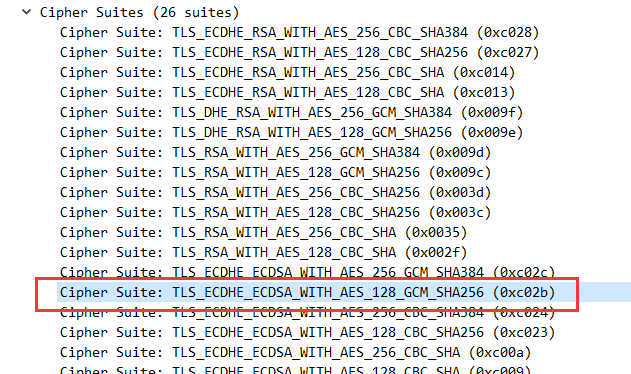 i found pulsar jetty selected many ciphers ,and selected TLSv1.1 , TLSv1 , but when i scan WSS port it shows that only support tlsv1.2, tlsv1.3 so why pulsar jetty failed on tls handshake when its has right cipher? whats real supported cipher suites in jetty SSL Context/connection/session? **Finally** So is this a BUG or where i missing / wrong with pulsar src code please point out if im correct , how to set/add/config more cipher support by pulsar websocket TLS service(because for some reason i cant change client side code ) ? -- This is an automated message from the Apache Git Service. To respond to the message, please log on to GitHub and use the URL above to go to the specific comment. To unsubscribe, e-mail: [email protected] For queries about this service, please contact Infrastructure at: [email protected]



