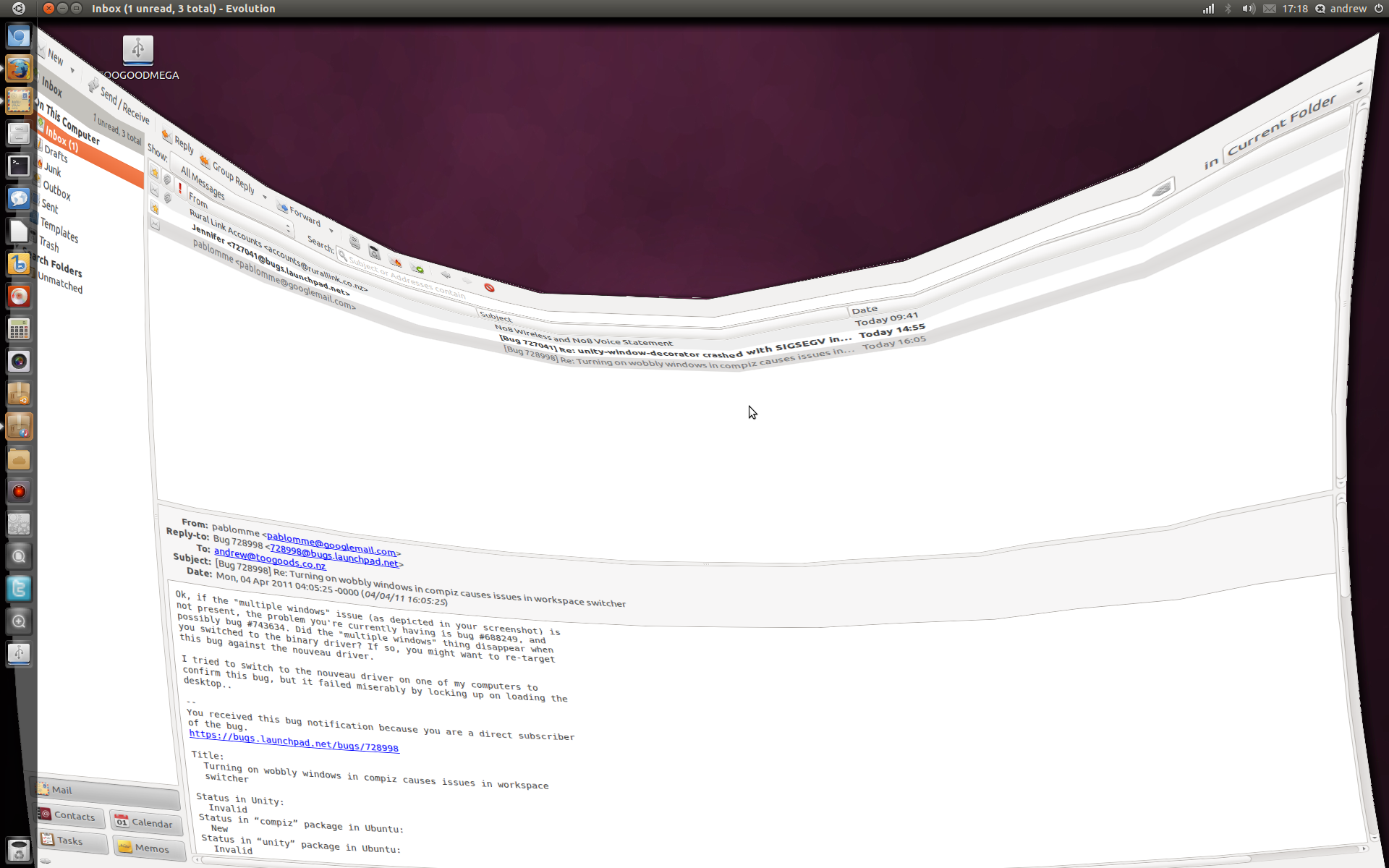
This is a screen shot of what it does now, the multiple screen issue has
not happened since about alpha2 but still major issues with this compiz
plugin.
As you can see from the screen-shot it gets stuck while in maximised
form.

Its not 100% reproducible but do the following it it is likely to
happen.

Turn on wobbly windows
open any window
move it to another window
maximise the window
Activate windows switcher
move the mouse around (it will bend like it is stuck to it.

hope that makes sense!

On Mon, 2011-04-04 at 04:05 +0000, pablomme wrote:

> Ok, if the "multiple windows" issue (as depicted in your screenshot) is
> not present, the problem you're currently having is bug #688249, and
> possibly bug #743634. Did the "multiple windows" thing disappear when
> you switched to the binary driver? If so, you might want to re-target
> this bug against the nouveau driver.
>
> I tried to switch to the nouveau driver on one of my computers to
> confirm this bug, but it failed miserably by locking up on loading the
> desktop..
>
> --
> You received this bug notification because you are a direct subscriber
> of the bug.
> https://bugs.launchpad.net/bugs/728998
>
> Title:
>   Turning on wobbly windows in compiz causes issues in workspace
>   switcher
>
> Status in Unity:
>   Invalid
> Status in “compiz” package in Ubuntu:
>   New
> Status in “unity” package in Ubuntu:
>   Invalid
>
> Bug description:
>   Binary package hint: unity
>
>   When you turn wobbly windows on in compiz (old Ubuntu default) the
>   desktop switch does some odd things the most obvious is when you try
>   and move windows around. Please see attached Screen shot.
>
>   It looks like multiple windows not one, and the don't always stay in
>   the right place
>
>   ProblemType: Bug
>   DistroRelease: Ubuntu 11.04
>   Package: unity 3.6.0-0ubuntu2
>   ProcVersionSignature: Ubuntu 2.6.38-5.32-generic 2.6.38-rc6
>   Uname: Linux 2.6.38-5-generic x86_64
>   Architecture: amd64
>   CompizPlugins:
> [core,bailer,detection,composite,opengl,decor,grid,resize,imgpng,compiztoolbox,place,regex,animation,mousepoll,session,vpswitch,wall,workarounds,wobbly,gnomecompat,move,expo,ezoom,staticswitcher,fade,scale,unityshell]
>   CompositorRunning: compiz
>   DRM.card0.HDMI.A.1:
>    status: disconnected
>    enabled: disabled
>    dpms: Off
>    modes:
>    edid-base64:
>   DRM.card0.LVDS.1:
>    status: connected
>    enabled: enabled
>    dpms: On
>    modes: 1920x1200 1920x1200 1920x1080 1600x1200 1680x1050 1400x1050
> 1280x1024 1280x960 1152x864 1024x768 800x600 640x480 720x400 640x400 640x350
>    edid-base64:
>   DRM.card0.VGA.1:
>    status: disconnected
>    enabled: disabled
>    dpms: Off
>    modes:
>    edid-base64:
>   Date: Fri Mar  4 11:07:40 2011
>   DistUpgraded: Fresh install
>   DistroCodename: natty
>   DistroVariant: ubuntu
>   GraphicsCard:
>    nVidia Corporation G84 [GeForce 8600M GT] [10de:0407] (rev a1) (prog-if 00
> [VGA controller])
>      Subsystem: Toshiba America Info Systems Device [1179:0001]
>   LiveMediaBuild: Ubuntu 11.04 "Natty Narwhal" - Alpha amd64 (20110228.1)
>   LiveMediaBuild_: Ubuntu 11.04 "Natty Narwhal" - Alpha amd64 (20110228.1)
>   LiveMediaBuild__: Ubuntu 11.04 "Natty Narwhal" - Alpha amd64 (20110228.1)
>   MachineType: TOSHIBA Qosmio G40
>   PccardctlIdent:
>    Socket 0:
>      no product info available
>   PccardctlStatus:
>    Socket 0:
>      no card
>   ProcEnviron:
>    LANGUAGE=en_US:en
>    LANG=en_US.UTF-8
>    SHELL=/bin/bash
>   ProcKernelCmdLine: noprompt cdrom-detect/try-usb=true persistent
> file=/cdrom/preseed/hostname.seed boot=casper initrd=/casper/initrd.lz quiet
> splash -- maybe-ubiquity
>   ProcVersionSignature_: Ubuntu 2.6.38-5.32-generic 2.6.38-rc6
>   ProcVersionSignature__: Ubuntu 2.6.38-5.32-generic 2.6.38-rc6
>   Renderer: Unknown
>   SourcePackage: unity
>   UpgradeStatus: No upgrade log present (probably fresh install)
>   dmi.bios.date: 02/29/2008
>   dmi.bios.vendor: TOSHIBA
>   dmi.bios.version: Version 2.20
>   dmi.board.name: Portable PC
>   dmi.board.vendor: TOSHIBA
>   dmi.board.version: Version A0
>   dmi.chassis.asset.tag: 00000000
>   dmi.chassis.type: 10
>   dmi.chassis.version: A
>   dmi.modalias:
> dmi:bvnTOSHIBA:bvrVersion2.20:bd02/29/2008:svnTOSHIBA:pnQosmioG40:pvrPQG40A-00Y014:rvnTOSHIBA:rnPortablePC:rvrVersionA0:cvnTSI:ct10:cvrA:
>   dmi.product.name: Qosmio G40
>   dmi.product.version: PQG40A-00Y014
>   dmi.sys.vendor: TOSHIBA
>   version.compiz: compiz 1:0.9.4-0ubuntu3
>   version.libdrm2: libdrm2 2.4.23-1ubuntu3
>   version.libgl1-mesa-glx: libgl1-mesa-glx
> 7.10.1~git20110215.cc1636b6-0ubuntu2
>   version.xserver-xorg: xserver-xorg 1:7.6~3ubuntu11
>   version.xserver-xorg-video-ati: xserver-xorg-video-ati 1:6.14.0-0ubuntu2
>   version.xserver-xorg-video-intel: xserver-xorg-video-intel 2:2.14.0-4ubuntu1
>   version.xserver-xorg-video-nouveau: xserver-xorg-video-nouveau
> 1:0.0.16+git20110107+b795ca6e-0ubuntu5
>
> To unsubscribe from this bug, go to:
> https://bugs.launchpad.net/unity/+bug/728998/+subscribe


** Attachment added: "example.png"
   https://bugs.launchpad.net/bugs/728998/+attachment/1976075/+files/example.png

--
You received this bug notification because you are a member of compiz
packagers, which is subscribed to compiz in Ubuntu.
https://bugs.launchpad.net/bugs/728998

Title:
  Turning on wobbly windows in compiz causes issues in workspace
  switcher

_______________________________________________
Mailing list: https://launchpad.net/~compiz
Post to     : [email protected]
Unsubscribe : https://launchpad.net/~compiz
More help   : https://help.launchpad.net/ListHelp