Til orientering.
Scriptet giver et godt overblik.

Leif
---------- Forwarded message ---------
From: Mike Saunders <[email protected]>
Date: tir. 8. jan. 2019 07.41
Subject: [libo-marketing-priv] Video script draft: New Features in
LibreOffice 6.2
To: Marketing private list <[email protected]
>


Hello everyone,

Here's my script, based on the release notes -- I still need to add more
graphics, and possibly some other features. But so far:


New Features in LibreOffice 6.2


LibreOffice 6.2 brings a new user interface design, extra features,
better compatibility, and performance improvements.


NotebookBar

The NotebookBar is a new - but optional - user interface. It unifies
toolbars, and groups them into tabs, helping you to work smarter and faster.

[pic of tabbed version]

It's not enabled by default, so to try it, go to View in the menu, User
Interface, and choose Tabbed.

[animation of it being enabled]

Now you can switch between the tabs to access different features and
options, all neatly grouped together. To find out more about what a
button does, just hover the mouse pointer over it.

[animation of switching tabs, to references, then hovering over Table of
Contents]

Quick shortcut buttons are in the top-left, for saving a document,
undo/redo, and printing.

You can also open the full menu here. If you want to go back to the
regular user interface, simply go to View, User Interface, and choose
Standard Toolbar.

An alternative NotebookBar design called Groupedbar Compact is also
available. This gives you quick access to common features, and drop-down
menus to access more of them.

[credit: Andreas Kainz, Rizal Muttaqin, Pedro Rosmaninho and others]

To return to the regular interface, click Menu, User Interface, Standard
Toolbar.


General

Many improvements have been made to OOXML and EMF support, especially
for charts and animations, for even better compatibility with Microsoft
Office documents.

[file format icons]

[credit: Bartosz Kosiorek, Balazs Varga, Mark Hung]

In addition, OOXML agile encryption has been implemented, along with
HMAC verification, for enhanced document security.

[padlock icon]

[credit: Tomaž Vajngerl (Collabora)]

Signature Lines can now be signed with an image of a handwritten signature.

[credit: Samuel Mehrbrodt (CIB)]

The help system now has faster filtering of index keywords, highlighting
your search term as you type, and displaying results based on the
selected module.

[credit: Ilmari Lauhakangas]

Context menus have been tidied up, to be more consistent across the
different components in the suite.

[https://colibreoffice.files.wordpress.com/2018/11/graphic.png]

[credit: Andreas Kainz]

Finally, LibreOffice's personalization dialog is now much faster,
efficient, and stable. You can choose from several built-in themes, or
add other ones.

[lo62_themes.png]

[credit: Muhammet Kara (Pardus)]


Writer

In Writer, you can now directly copy spreadsheet data into tables,
instead of just inserting them as objects.

[credit: László Németh (NISZ)]

When you're exporting a document, UTF-8 and UTF-16-encoded text may now
be saved without the byte-order mark.

[https://wiki.documentfoundation.org/File:ASCIIFilterDialogBOMOption.png]

[credit: Martin van Zijl]

LibreLogo, the programming interface for graphic design and education
has got unit testing, compiler fixes and improvements.

[http://librelogo.org/wp-content/uploads/2018/11/dragoncurve_big2.png]

[credit: László Németh (FSF.hu Foundation)]

When you're tracking changes in a document, performance is much faster
now, especially in large documents.

[animation of changes being tracked]

[credit: Michael Stahl (CIB)]


Calc

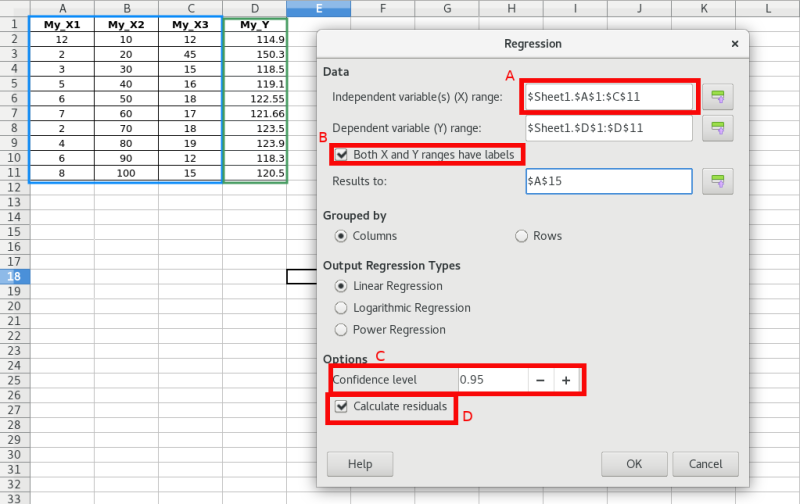
In the spreadsheet, it's now possible to do multivariate regression
analysis using the regression tool. In addition, many more statistical
measures are now available in the analysis output.

[
https://wiki.documentfoundation.org/images/c/c6/Multivariate-regression-calc.png
]

[credit: Dennis Francis (Collabora)]

Meanwhile, data dalidation now supports custom formulas.

[credit: Marco Cecchetti (Collabora)]

A new function, REGEX, was added, to match text against a regular
expression and optionally replace it.

[credit: Eike Rathke (Red Hat)]


Impress & Draw

When you're editing an animation, you can now change the motion path by
dragging its control points.

[credit: Mark Hung]

A couple of text-related drawing styles were added, while a Table
submenu was added to the to Format menu in Draw.

[credit: Heiko Tietze, Justin Luth]


LibreOffice Online

LibreOffice Online, the cloud-based version of the suite, includes many
improvements too. On mobile devices, the user interface has been
simplified, with better responsiveness and updates to the on-screen
keyboard.

[image/animation of UI on mobile device]

[credit: Marco Cecchetti, Henry Castro, Tor Lillqvist, Jan Holesovsky
(Collabora)]

Meanwhile, security has been strengthened with Vereign compatible
authentication and document signing, along with a new signing infobar

[https://wiki.documentfoundation.org/images/0/07/Online-Signing.png]

[credit: Tomaž Vajngerl, (Collabora)]


A big thanks to our worldwide community, and certified developers, for
making this release possible!

Deploying LibreOffice in a business? Learn about long-term support
versions from our partners: https://tdf.io/business

--
Send en e-mail til [email protected] for instruktioner om
hvordan du ophæver dit abonnement
Problemer? https://da.libreoffice.org/kontakt-os/postlister/
Posting guidelines + more: https://wiki.documentfoundation.org/Netiquette
Listens arkiv er tilgængelig på https://listarchives.libreoffice.org/da/dansk/
Privacy Policy: https://www.documentfoundation.org/privacy