Le mardi 17 juin 2008 à 15:52 +0200, Thue Janus Kristensen a écrit :
> Package: gnome-desktop-environment
> Version: 1:2.20.2.4
> Severity: normal
>
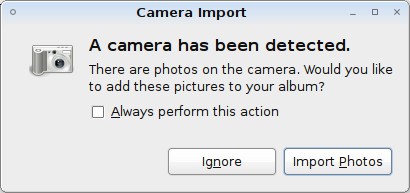
> Whenever I connect my camera to my USB port, the gnome desktop pops up
> a "Camera Import" dialogue such as this one:
> http://tombuntu.com/wp-content/uploads/2008/05/ipoddialog.jpg
>
> However when I click "import photos" nothing happens except that the
> dialogue goes away, even though there are pictures on the camera. I am
> perfectly able to download the photos using digiKam. Obviously something
> was supposed to happen...
>
> I am reporting this bug on gnome-desktop-environment since I don't know
> which component is popping up the dialogue.
It is popped by gnome-volume-manager. You can set its preferences in
System -> Preferences -> Removable Drives and Media, and tell it e.g. to
use digikam (the default being gthumb).

I will add a Recommends on gthumb in the next meta-gnome2 upload, as it
is indeed a useful application to install for this case.

Cheers,
--
 .''`.
: :' :      We are debian.org. Lower your prices, surrender your code.
`. `'       We will add your hardware and software distinctiveness to
  `-        our own. Resistance is futile.
 signature.asc
Description: Ceci est une partie de message numériquement signée