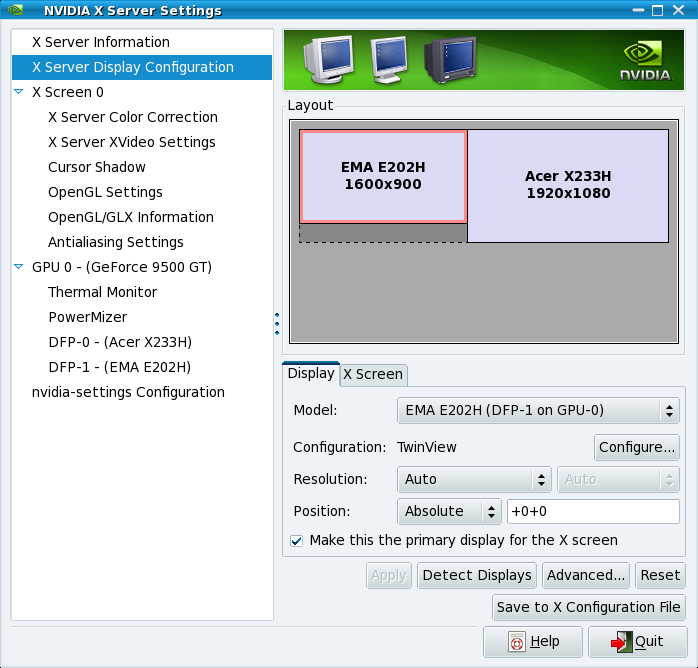
Hi,
Here's my xorg. If I manually try to change the resolution the small Dell
E175FP turns off, and can only be reactivated by going into nvidia-settings
and setting either 640x480 or 320xsomething low. Wonderinf it's a dpi issue,
as my other screen's a bit big.
Any suggestions  gratefully received.

Jim


# nvidia-settings: X configuration file generated by nvidia-settings
# nvidia-settings:  version 1.0  (buildmeis...@builder58)  Wed Dec  9
16:35:48 PST 2009


Section "ServerLayout"
    Identifier     "Layout0"
    Screen      0  "Screen0" 0 0
    InputDevice    "Keyboard0" "CoreKeyboard"
    InputDevice    "Mouse0" "CorePointer"
    Option         "Xinerama" "0"
EndSection

Section "Files"
EndSection

Section "InputDevice"

    # generated from default
    Identifier     "Mouse0"
    Driver         "mouse"
    Option         "Protocol" "auto"
    Option         "Device" "/dev/psaux"
    Option         "Emulate3Buttons" "no"
    Option         "ZAxisMapping" "4 5"
EndSection

Section "InputDevice"

    # generated from default
    Identifier     "Keyboard0"
    Driver         "kbd"
EndSection

Section "Monitor"

    # HorizSync source: xconfig, VertRefresh source: xconfig
    Identifier     "Monitor0"
    VendorName     "Unknown"
    ModelName      "CRT-1"
    HorizSync       28.0 - 33.0
    VertRefresh     43.0 - 72.0
    Option         "DPMS"
EndSection

Section "Device"
    Identifier     "Device0"
    Driver         "nvidia"
    VendorName     "NVIDIA Corporation"
    BoardName      "GeForce 9500 GT"
EndSection

Section "Screen"

# Removed Option "metamodes" "CRT: 1280x1024 +0+0, DFP: 1920x1080 +0+0"
# Removed Option "metamodes" "CRT: 800x600 +0+0, DFP: 1920x1080 +0+0"
    Identifier     "Screen0"
    Device         "Device0"
    Monitor        "Monitor0"
    DefaultDepth    24
    Option         "TwinView" "1"
    Option         "TwinViewXineramaInfoOrder" "CRT-1"
    Option         "metamodes" "CRT: nvidia-auto-select +0+0, DFP: 1920x1080
+0+0; CRT: NULL, DFP: 1920x1080 +0+0"
    SubSection     "Display"
        Depth       24
    EndSubSection
EndSection


On 18 May 2010 17:04, Merciadri Luca <[email protected]>wrote:

> This tool is really useful. I am using two screens with a Nvidia GeForce
> FX5700 on this computer. I do not use `twin view' but `dual screen.'
> Here is my whole xorg.conf. You might notice that nvidia-settings did
> the whole stuff for me.
>
> ==
> # nvidia-settings: X configuration file generated by nvidia-settings
> # nvidia-settings:  version 1.0  (bui...@ninsei)  Tue Jun 24 18:11:48
> UTC 2008
>
> # nvidia-xconfig: X configuration file generated by nvidia-xconfig
> # nvidia-xconfig:  version 1.0  (bui...@ninsei)  Fri Sep  5 22:23:08 UTC
> 2008
>
> Section "ServerLayout"
>    Identifier     "Layout0"
>    Screen      0  "Screen0" 0 0
>    InputDevice    "Keyboard0" "CoreKeyboard"
>    InputDevice    "Mouse0" "CorePointer"
> EndSection
>
> Section "Files"
>    RgbPath         "/usr/X11R6/lib/X11/rgb"
> EndSection
>
> Section "Module"
>    Load           "dbe"
>    Load           "extmod"
>    Load           "type1"
>    Load           "freetype"
>    Load           "glx"
> EndSection
>
> Section "ServerFlags"
>    Option         "Xinerama" "0"
> EndSection
>
> Section "InputDevice"
>
>    # generated from default
>    Identifier     "Mouse0"
>    Driver         "mouse"
>    Option         "Protocol" "auto"
>    Option         "Device" "/dev/psaux"
>    Option         "Emulate3Buttons" "no"
>    Option         "ZAxisMapping" "4 5"
> EndSection
>
> Section "InputDevice"
>
>    # generated from default
>    Identifier     "Keyboard0"
>    Driver         "kbd"
>    Option       "XkbRules"    "xorg"
>    Option       "XkbModel"    "pc105"
>    Option       "XkbLayout"    "be"
> EndSection
>
> Section "Monitor"
>    Identifier     "Monitor0"
>    VendorName     "Unknown"
>    ModelName      "Samsung SyncMaster"
>    HorizSync       30.0 - 81.0
>    VertRefresh     56.0 - 75.0
>    Option         "DPMS"
> EndSection
>
> Section "Device"
>    Identifier     "Device0"
>    Driver         "nvidia"
>    VendorName     "NVIDIA Corporation"
> EndSection
>
> Section "Device"
>    Identifier     "Videocard0"
>    Driver         "nvidia"
>    VendorName     "NVIDIA Corporation"
>    BoardName      "GeForce 8400 GS"
> EndSection
>
> Section "Screen"
>    Identifier     "Screen0"
>    Device         "Videocard0"
>    Monitor        "Monitor0"
>    DefaultDepth    24
>    Option         "TwinView" "1"
>    Option         "TwinViewXineramaInfoOrder" "DFP-0"
>    Option         "metamodes" "CRT: nvidia-auto-select +1680+0, DFP:
> nvidia-auto-select +0+0; CRT: 1280x1024 +0+0, DFP: NULL; CRT: 1280x1024
> +1680+0, DFP: nvidia-auto-select +0+0"
>    SubSection     "Display"
>        Depth       24
>    EndSubSection
> EndSection
> ==
>
>
> Sebastian Weisgerber wrote:
> > One possible solution is using the "nvidia-settings"-Tool.
> > You can configure your display-settings in a GUI and save it
> > permanently to an xorg file.
> > I'm using this method since years and it works very well and flawlessly.
> >
> > [Screenshot]
> > http://ourcraft.files.wordpress.com/2009/12/nvidia-settings.png
> >
> >
> > -
> > Sebastian
> >
> >
> >
> > Zitat von James Allsopp <[email protected]>:
> >
> >> Hi,
> >> I've a small 4:3 monitor which was working fine with Debian at about
> >> 1152x864 (VGA connection) on a nvidia 9500GT with the proprietary
> >> drivers
> >> (sorry want to experiment with CUDA so non-free wasn't an option).
> >> However,
> >> I've just bought a new 1080p TV and connected it to the computer via
> >> HDMI.
> >> This unfortunately has permanently knocked the resolution down on the
> >> monitor to 800x600, which is next to unusable. Would anyone with a
> >> similar
> >> configuration be willing to share an xorg.conf or share some advice
> >> on this.
> >> I think I'd like the monitor to be either 1280x960, 1152x864,
> >> 1024x768 and
> >> the TV to work at 1600x900 1366x768 or 1280x720.
> >>
> >>
> >> Thanks for any help!
> >> Jim
> >>
> >
> >
> >
> >
> >
>
>
> --
> Merciadri Luca
> See
> http://www.student.montefiore.ulg.ac.be/~merciadri/<http://www.student.montefiore.ulg.ac.be/%7Emerciadri/>
> I use PGP. If there is an incompatibility problem with your mail
> client, please contact me.
>
>
>
>
>