On Fri, 2013-09-13 at 06:19 -0400, Bric wrote:
>
> > On September 11, 2013 at 11:40 AM Richard Shann <[email protected]>
> > wrote:
> >
> >
> <skip>
>
> > > * when I added mezzopiano, the symbol, looked like a png rather than a
> > > (scalable) svg (relatively bad-looking)
> > >
>
> just a side-note here: the above seems to be fixed in the latest git.  The p,
> pp, mf, ff are all fine (though they do look different in denemo and final
> lilypond render, of course)
actually there is no good reason that the guy that wrote this chose a
funny font for the dynamics in the display. The LilyPond one is
available, someone should fix the script!

>
>
> > >
> <skip>
>
> > > * lilypond error: I inserted an empty staff, while working in 0.9.3,
> > > (because my
> > > top staff was being cut off in the window — couldn't see high slurs,
> > > etc.),
> >
> > This could have been fixed by Staff->Staff Properties->Space Above, but
> > now in 1.0.9 you just use the mouse scroll wheel on the top staff to get
> > more space at the top.
>
>
> OK, I used the above, and it seems to be non-printing.
>
> However, there still seems to be a problem.  Adding 40 unites to the Staff
> Properties -> Space Above does NOT make my arbitrary text visible.
>
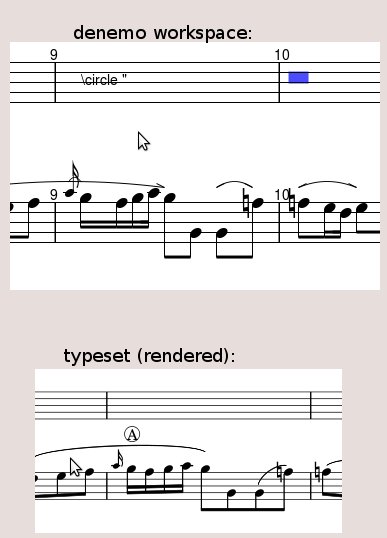
> I imported a score i created with 0.9.3, which had '\circle "A"' inserted by
> means of Notes/Rests -> Markings -> Arbitrary Text
>
> Funny thing is: The file got imported OK, and the typeset music window is
> showing my cicled "A", "B", "C", etc... but (1) I don't see the inserted text
> in
> the main staff (main denemo workspace), initially (2) I can't find the command
> to edit it (3) When I insert a blank staff above the one and only staff the
> score has, the insertions suddenly appear WAY HIGH, WHERE THE NEW STAFF IS —
> in
> other words the inserted text '\circle "' suddenly becomes visible, around the
> middle staff line of the blank staff above
>
>
> Here's what it looks like. Again — this is in 1.0.9 (git), and is an imported
> file created in 0.9.3, with a staff added afterwards. The second staff (the
> one
> with the music) has Staff Properties "space above" set to 40:
>
>           http://www.flight.us/misc/denemo/arbitrary_text_problem.jpg
>
>
> And, again, that extra staff above is just temporary experimentation and is
> not
> wanted (to be deleted)
>
> OK. I just went back and deleted the blank staff, but also set the "space
> above"
> the good staff to 240, and, lo and behold, the text is now (still) visible,
> without the blank staff, at same height as it is when the blank staff is
> there.
> Which means, it's a height/space problem (apparently)

absolutely, the semantics of the height of graphic and text display
marks has undergone several convulsions since those early versions, and
there is no upgrading when loaded, so you need to delete and re-instate
the marking (or do a low-level edit on the directive, editing the gy or
ty fields to bring the graphic or text into the right position).

If you have old .denemo files it is important to re-load and re-save
them as eventually various out-of-date features will be dropped and the
file will not load. We have been shipping a script denemo-update.sh I
think it is that goes through a hierarchy of directories updating all
the .denemo files.

There is one feature of old files that prevents them typesetting with
modern versions of LilyPond, this is the beam endings rules which they
contain. This is fixed by invoking the command
Score->Use Normal Beam Endings

At the moment I don't think any old files have been rendered
un-readable, but eventually we should clear out the old parsing code
which copes with the old forms so upgrade your .denemo files before that
happens.

Richard


_______________________________________________
Denemo-devel mailing list
[email protected]
https://lists.gnu.org/mailman/listinfo/denemo-devel