Hi Kendy,

> So - what about to only show the percentage in the right bottom corner
> always, and when the user places the mouse pointer over that, it would
> [after a short timeout] extend to left (or upwards - whatever works
> better for the users], and show the entire slider?
If we're discussing showing only one of the elements always, I'd
strongly favour showing only the slider; not showing only the
percentage. The reason is pretty simple: you can't interact with the
percentage (at least today you can't), thus it seems more important
that people can position their mouse cursor easily on the place where
the slider is and use it immediately without having to wait for an
animation to happen.


> At the moment, the right bottom corner is mostly unused when we have
> both scrollbars visible, so we would occupy just a slightly more space
> than now in the case it is not extended.

Even today, we can't really put a 3–5 character percentage value
between the scrollbars. Also, we'll have to deal with differently
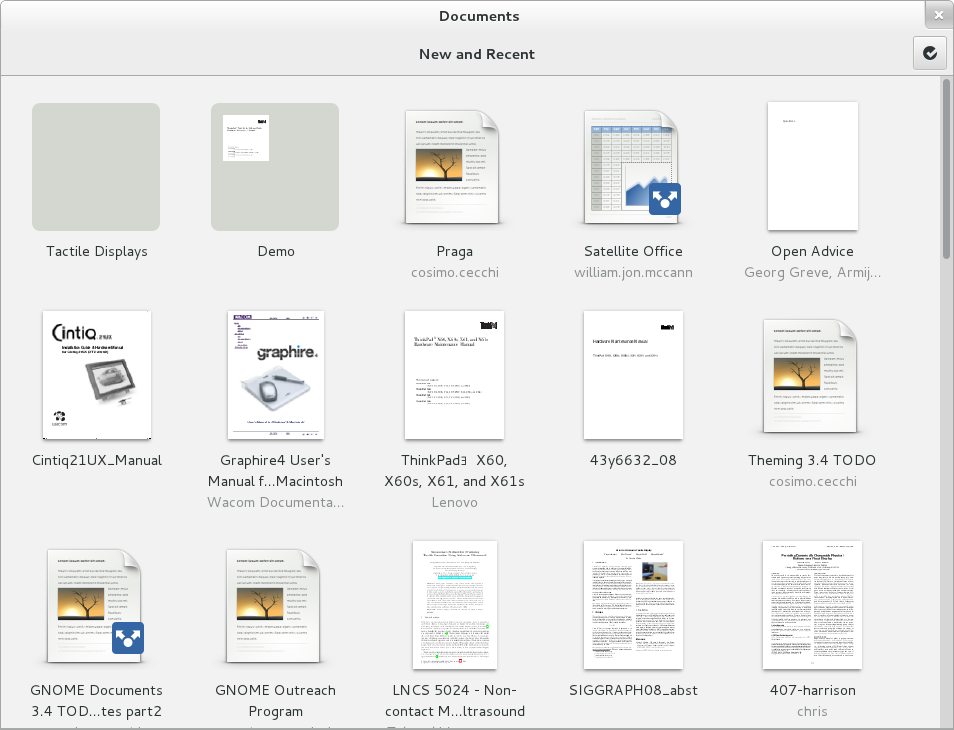
sized (read: tiny) scrollbars, Gnome 3.4's default scrollbars will
look like [1], for instance. Ubuntu already does this sort of thing
since a couple of releases with its overlay scrollbars. On the Mac OS
X Lion, scrollbars in native apps are shown only when actually
scrolling. [2] [3]
Mirek's point of "Gnome uses the bottom right corner already" today is
only true for Gnome Shell, but in the future it might also be a
concern with other OS's. Windows 8 for instance uses screen corners in
much the same way Gnome Shell does (albeit they don't currently use
the bottom right corner).


Regards,
Astron.


[1] http://afaikblog.files.wordpress.com/2012/02/documents.png
[2] This probably reads like an argumentation for the original
proposal ... aungh. I believe though, that my proposal would be able
to better serve legacy and new platforms at the same time. Not that I
could be sure of that.
[3] I am getting the feeling that it will be necessary to move Calc's
"split windows" functionality elsewhere soon. Else, users won't be
able to access this easily any more on enough Linux/Mac systems.

--
Unsubscribe instructions: E-mail to [email protected]
Problems? http://www.libreoffice.org/get-help/mailing-lists/how-to-unsubscribe/
Posting guidelines + more: http://wiki.documentfoundation.org/Netiquette
List archive: http://listarchives.libreoffice.org/global/design/
All messages sent to this list will be publicly archived and cannot be deleted