Public bug reported:

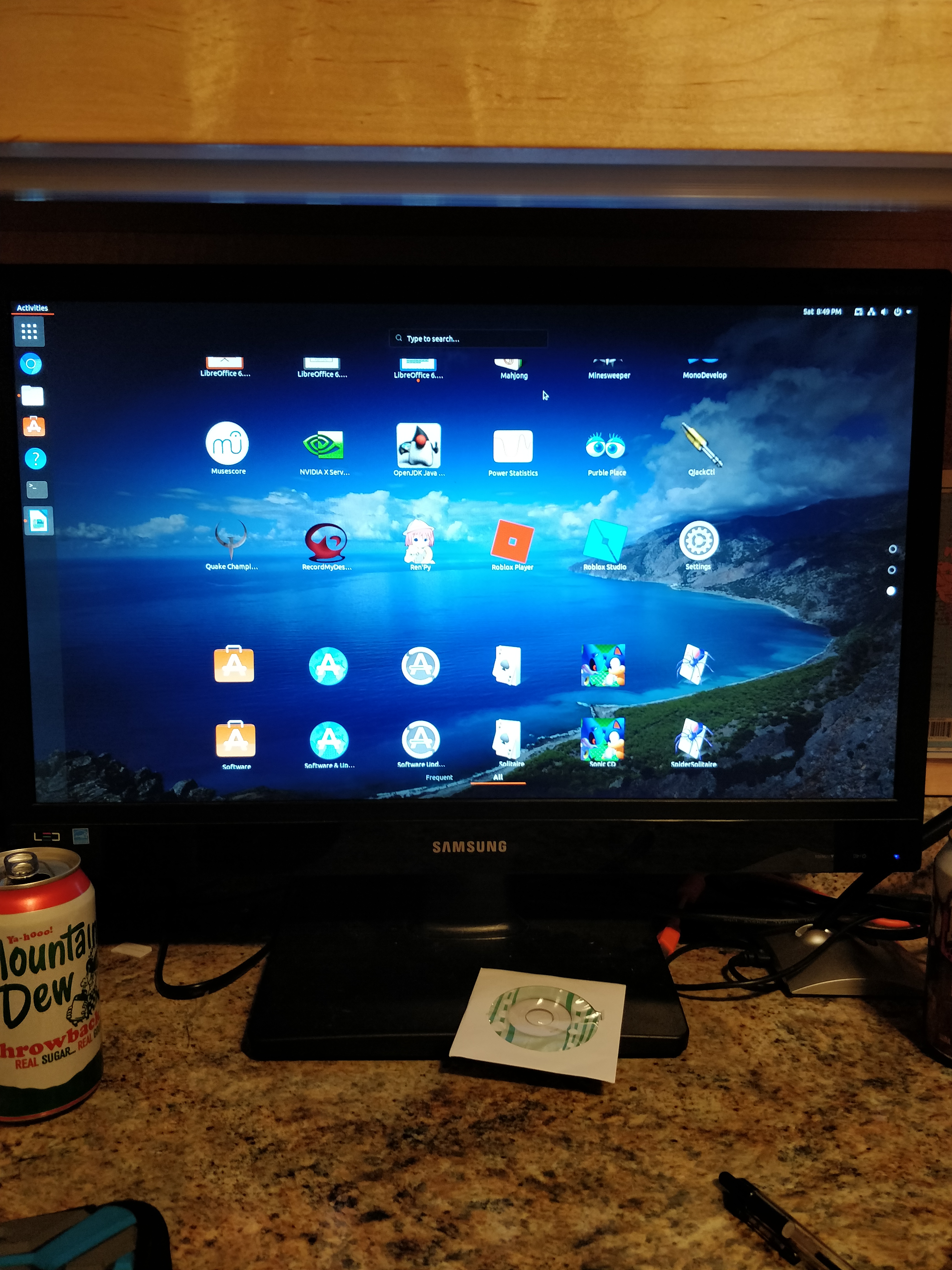
After installing an update for Ubuntu 18.04 LTS, GNOME's App Launcher
screen faces graphical issues when scrolling. To reproduce this, simply
open the Application menu and scroll in the paginated list. If the bug
is present, the screen will fail to update completly; the animation wil
play through, but the icons will remain in place or "chopped off," it
seems the frame isn't completly refreshed? It's fixed after a few
seconds or by moving the mouse.
I'm using GNOME 3.28.2 on Ubuntu 18.04 LTS

I'm also using an Nvidia card for graphics (with drivers installed)

I attached a picture (Sorry that it isn't a screenshot!)

ProblemType: Bug
DistroRelease: Ubuntu 18.04
Package: gnome-shell 3.28.3-0ubuntu0.18.04.4
ProcVersionSignature: Ubuntu 4.15.0-48.51-generic 4.15.18
Uname: Linux 4.15.0-48-generic x86_64
NonfreeKernelModules: nvidia_modeset nvidia
ApportVersion: 2.20.9-0ubuntu7.6
Architecture: amd64
CurrentDesktop: communitheme:ubuntu:GNOME
Date: Sat Apr 27 20:51:07 2019
DisplayManager: gdm3
InstallationDate: Installed on 2018-12-25 (123 days ago)
InstallationMedia: Ubuntu 18.04.1 LTS "Bionic Beaver" - Release amd64 (20180725)
ProcEnviron:
 PATH=(custom, no user)
 XDG_RUNTIME_DIR=<set>
 LANG=en_US.UTF-8
 SHELL=/bin/bash
SourcePackage: gnome-shell
UpgradeStatus: No upgrade log present (probably fresh install)

** Affects: gnome-shell (Ubuntu)
     Importance: Undecided
         Status: New


** Tags: amd64 apport-bug bionic

** Attachment added: "Demonstration of the bug"

https://bugs.launchpad.net/bugs/1826688/+attachment/5259594/+files/IMG_20190427_204950.jpg

--
You received this bug notification because you are a member of Desktop
Packages, which is subscribed to gnome-shell in Ubuntu.
https://bugs.launchpad.net/bugs/1826688

Title:
  GNOME Shell has graphical issue in Applications menu

Status in gnome-shell package in Ubuntu:
  New

Bug description:
  After installing an update for Ubuntu 18.04 LTS, GNOME's App Launcher
  screen faces graphical issues when scrolling. To reproduce this,
  simply open the Application menu and scroll in the paginated list. If
  the bug is present, the screen will fail to update completly; the
  animation wil play through, but the icons will remain in place or
  "chopped off," it seems the frame isn't completly refreshed? It's
  fixed after a few seconds or by moving the mouse.

  I'm using GNOME 3.28.2 on Ubuntu 18.04 LTS

  I'm also using an Nvidia card for graphics (with drivers installed)

  I attached a picture (Sorry that it isn't a screenshot!)

  ProblemType: Bug
  DistroRelease: Ubuntu 18.04
  Package: gnome-shell 3.28.3-0ubuntu0.18.04.4
  ProcVersionSignature: Ubuntu 4.15.0-48.51-generic 4.15.18
  Uname: Linux 4.15.0-48-generic x86_64
  NonfreeKernelModules: nvidia_modeset nvidia
  ApportVersion: 2.20.9-0ubuntu7.6
  Architecture: amd64
  CurrentDesktop: communitheme:ubuntu:GNOME
  Date: Sat Apr 27 20:51:07 2019
  DisplayManager: gdm3
  InstallationDate: Installed on 2018-12-25 (123 days ago)
  InstallationMedia: Ubuntu 18.04.1 LTS "Bionic Beaver" - Release amd64
(20180725)
  ProcEnviron:
   PATH=(custom, no user)
   XDG_RUNTIME_DIR=<set>
   LANG=en_US.UTF-8
   SHELL=/bin/bash
  SourcePackage: gnome-shell
  UpgradeStatus: No upgrade log present (probably fresh install)

To manage notifications about this bug go to:
https://bugs.launchpad.net/ubuntu/+source/gnome-shell/+bug/1826688/+subscriptions

--
Mailing list: https://launchpad.net/~desktop-packages
Post to     : [email protected]
Unsubscribe : https://launchpad.net/~desktop-packages
More help   : https://help.launchpad.net/ListHelp