emloxe opened a new issue #8543: 如何为不同种类的图表定制主题? URL: https://github.com/apache/incubator-echarts/issues/8543 <!-- 为了方便我们能够复现和修复 bug,请遵从下面的规范描述您的问题。 --> ### One-line summary [问题简述] 问题一:如何根据类别来自定义颜色 在定制主题中通过更改主题颜色可以自定义颜色基本颜色 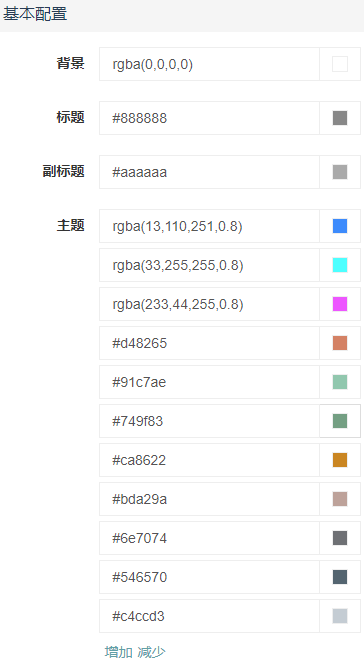 饼状图显示的也是3个颜色  如果我需要显示如下效果  可否在主题配置中单独对饼图设置特殊的样式,以达到不同类别的图表可以单独配置不同的效果。setoption可以达到单个图表的配置,可是觉得这样来写每个都要写,会有些麻烦 问题二:如何进行主题切换? 在图表初始化的时候可以通过init时传入主题,那么初始化后还有相关set方法更改主题吗? 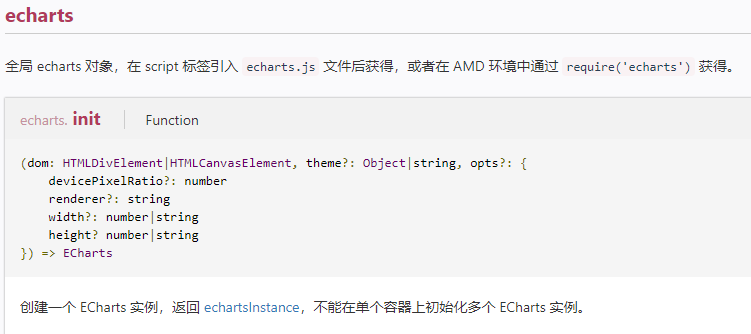 ### Version & Environment [版本及环境] + ECharts version [ECharts 版本]: 4 + Browser version [浏览器类型和版本]: 谷歌 67.0.3396.87 + OS Version [操作系统类型和版本]: win10 ### Expected behaviour [期望结果] ### ECharts option [ECharts配置项] <!-- Copy and paste your 'echarts option' here. --> <!-- [下方贴你的option,注意不要删掉下方 ```javascript 和 尾部的 ``` 字样。最好是我们能够直接运行的 option。如何得到能运行的 option 参见上方的 guidelines for contributing] --> ```javascript { "version": 1, "themeName": "customed", "theme": { "seriesCnt": 3, "backgroundColor": "rgba(0,0,0,0)", "titleColor": "#888888", "subtitleColor": "#aaaaaa", "textColorShow": false, "textColor": "#333", "markTextColor": "#eeeeee", "color": [ "rgba(13,110,251,0.8)", "rgba(33,255,255,0.8)", "rgba(233,44,255,0.8)", "#d48265", "#91c7ae", "#749f83", "#ca8622", "#bda29a", "#6e7074", "#546570", "#c4ccd3" ], "borderColor": "#4f4646", "borderWidth": 0, "visualMapColor": [ "rgba(13,110,251,1)", "#333333" ], "legendTextColor": "#666666", "kColor": "#c23531", "kColor0": "#314656", "kBorderColor": "#c23531", "kBorderColor0": "#314656", "kBorderWidth": 1, "lineWidth": 2, "symbolSize": "1", "symbol": "circle", "symbolBorderWidth": 1, "lineSmooth": false, "graphLineWidth": 1, "graphLineColor": "#aaaaaa", "mapLabelColor": "#000000", "mapLabelColorE": "rgb(100,0,0)", "mapBorderColor": "#444444", "mapBorderColorE": "#444444", "mapBorderWidth": 0.5, "mapBorderWidthE": 1, "mapAreaColor": "#888888", "mapAreaColorE": "rgba(255,215,0,0.8)", "axes": [ { "type": "all", "name": "通用坐标轴", "axisLineShow": true, "axisLineColor": "#333", "axisTickShow": true, "axisTickColor": "#333", "axisLabelShow": true, "axisLabelColor": "#333", "splitLineShow": true, "splitLineColor": [ "#ccc" ], "splitAreaShow": false, "splitAreaColor": [ "rgba(250,250,250,0.3)", "rgba(200,200,200,0.3)" ] }, { "type": "category", "name": "类目坐标轴", "axisLineShow": true, "axisLineColor": "#084db6", "axisTickShow": false, "axisTickColor": "#084db6", "axisLabelShow": true, "axisLabelColor": "rgba(13,110,251,0.7)", "splitLineShow": true, "splitLineColor": [ "#182639" ], "splitAreaShow": false, "splitAreaColor": [ "rgba(250,250,250,0.3)", "rgba(200,200,200,0.3)" ] }, { "type": "value", "name": "数值坐标轴", "axisLineShow": true, "axisLineColor": "#084db6", "axisTickShow": false, "axisTickColor": "#084db6", "axisLabelShow": true, "axisLabelColor": "rgba(13,110,251,0.7)", "splitLineShow": true, "splitLineColor": [ "#182639", "#182639" ], "splitAreaShow": false, "splitAreaColor": [ "rgba(250,250,250,0.3)", "rgba(200,200,200,0.3)" ] }, { "type": "log", "name": "对数坐标轴", "axisLineShow": true, "axisLineColor": "#084db6", "axisTickShow": true, "axisTickColor": "#084db6", "axisLabelShow": true, "axisLabelColor": "rgba(13,110,251,0.7)", "splitLineShow": true, "splitLineColor": [ "#182639", "#182639" ], "splitAreaShow": false, "splitAreaColor": [ "rgba(250,250,250,0.3)", "rgba(200,200,200,0.3)" ] }, { "type": "time", "name": "时间坐标轴", "axisLineShow": true, "axisLineColor": "#084db6", "axisTickShow": true, "axisTickColor": "#084db6", "axisLabelShow": true, "axisLabelColor": "#333", "splitLineShow": true, "splitLineColor": [ "#084db6" ], "splitAreaShow": false, "splitAreaColor": [ "rgba(250,250,250,0.3)", "rgba(200,200,200,0.3)" ] } ], "axisSeperateSetting": true, "toolboxColor": "#999999", "toolboxEmpasisColor": "#666666", "tooltipAxisColor": "#888888", "tooltipAxisWidth": 1, "timelineLineColor": "#293c55", "timelineLineWidth": 1, "timelineItemColor": "#2273db", "timelineItemColorE": "#a9334c", "timelineCheckColor": "#d1596e", "timelineCheckBorderColor": "rgba(194,53,49,0.5)", "timelineItemBorderWidth": 1, "timelineControlColor": "#3268d4", "timelineControlBorderColor": "#2d78db", "timelineControlBorderWidth": "0.5", "timelineLabelColor": "#477fd4", "datazoomBackgroundColor": "rgba(5,26,48,0.8)", "datazoomDataColor": "rgba(158,188,209,0.3)", "datazoomFillColor": "rgba(68,109,163,0.4)", "datazoomHandleColor": "#4870a8", "datazoomHandleWidth": "100", "datazoomLabelColor": "rgba(49,105,193,0.8)" } } ``` 以上为导出的主题数据 ### Other comments [其他信息] <!-- For example: Screenshot or Online demo --> <!-- [例如,截图或线上实例 (JSFiddle/JSBin/Codepen)] -->
----------------------------------------------------------------
This is an automated message from the Apache Git Service.
To respond to the message, please log on GitHub and use the
URL above to go to the specific comment.

For queries about this service, please contact Infrastructure at:
[email protected]


With regards,
Apache Git Services

---------------------------------------------------------------------
To unsubscribe, e-mail: [email protected]
For additional commands, e-mail: [email protected]




