> > > You can use `top`/`right`/`bottom`/`left` properties to layout each
> > > componet. But I don't suggest you displaying so many components in such a
> > > small area.
> >
> >
> > I can remove other components, only remain chart content, but it's the same
> > issue:
> > ```js
> > option = {
> > xAxis: {
> > data: ["shirt","cardign","chiffon shirt","pants","heels","socks"]
> > },
> > yAxis: {},
> > series: [{
> > name: 'Sales',
> > type: 'bar',
> > data: [5, 20, 36, 10, 10, 20]
> > }]
> > }
> > ```
> >
> >
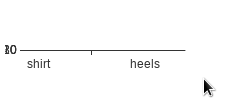
> > The result like below:
> > 
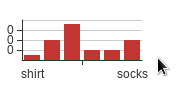
> > Once you change the height smaller, it should be much better:
> > `<div id="chart" style="width: 150px;height: 80px;">`
> > 
>
> set the option.grid.top and option.grid.bottom at suitable value , the result
> will be normal
Got it. Thanks.

[ Full content available at:
https://github.com/apache/incubator-echarts/issues/9084 ]
This message was relayed via gitbox.apache.org for [email protected]


