Hello Caty,

  First a use-case of my first perception of the the page:
     1) quick glance at the items in the left
     2) distracted by the cube animation
     3) try to click the cube thinking it does something
     4) analyze what info is in the blogposts section
     5) quick glance at Community hearbeat and powered by
     6) scroll the page down and learn that there's nothing important for me
there
     7) scroll back to the top and study the connections
     8) try to hovering the mouse on the cubes and watch them animate
     9) (a lot later) notice that when I hover the mouse, description changes
     10) (accidentally) click one of the buttons of the carousel and surprised
by the animation
     12) I thought that those screens were different options for new xwiki home
page so I tried comparing them. Finally I understood that those are different
info screens.
     13) Compared design of cubes on page 1 and 3 (3 seemed better)
     14) tried clicking on the cube with "+" on page 3
     15) realized that I have a feeling of inconsistency with the colors
     16) never noticed "All projects" on the first page
     17) got frustrated how the animation starts for the cube on the page 1.
Then understood that it starts when mouse enters the slide area. Noticed that
cubes shiver like going to explode when reduce in size.
  I have following major comments
   * Fonts. Mix of different font types, different font sizes and all-capital
vs camel words makes it hard to understand which info is important and which is
not.
   * Size as relevance. Object sizes on the first page MUST hint the user what
information he would rather look at next (e.g. http://www.ibm.com/us/en/, even
http://www.jetbrains.com/youtrack/ ) . There's a misbalance in it. E.g.
Platform, Enterprise, Manager, XEclipse and XOffice are the first candidates
for the next browsing, but they are represented as tiny cubes, more over they
are "pushed" out of sight into the left corner (1680x1050).
   * I literally look at 3 dots and the empty space around while focused at the
center of my screen (1680x1050)
   * Animation.
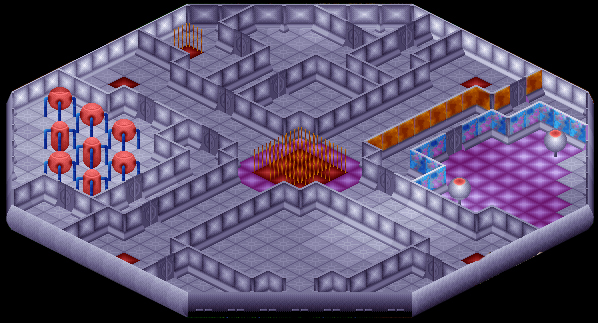
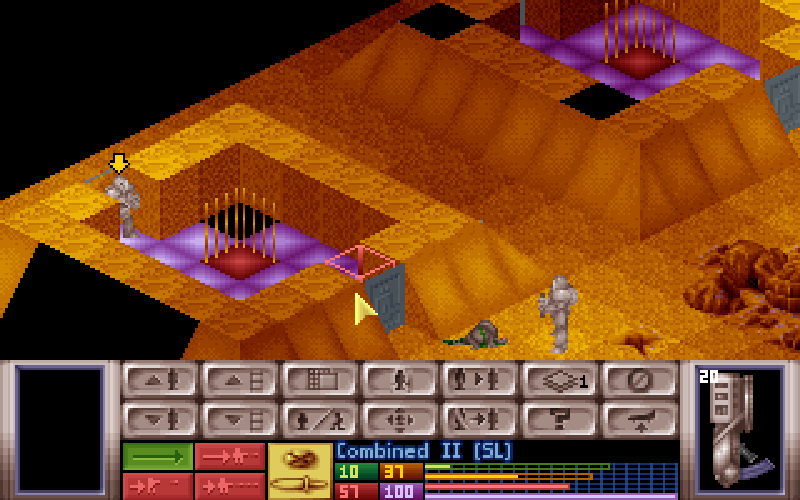
   * Colors. I first got a feeling of deja vu about the cube colors. Then I
remembered where I saw similar:
            http://www.xcomufo.com/ufo/battleship2.jpg
            http://push.cx/wp-content/uploads/2009/02/xcom.png

http://www.mobygames.com/images/shots/l/421342-x-com-ufo-defense-windows-screenshot-entering-an-alien-base.jpg


http://i4.photobucket.com/albums/y143/Uberbucket/UFO%20Lets%20Play/62%20CydoniaSurface/24TenthSectoidDead.png

            http://www.linuxsoft.cz/screenshot_img/1349-a.jpg
       to name some ... I would agree that it brings extraterrestrial look, and
would agree that you can combine all those colors (pink-purple, green, red,
orange) in one page
(http://echostorms.net/Resources/Items/diablo%202%20gems%20and%20jewels.png)
but I personally dislike mixes of some colors within one shape (I mean gradient
in the cubes Violer-Puple-Red, Red-Orange-Yellow-Pink etc). And those colors do
not match the header color.
   * Mix of styles. The cubes are in simplistic 2D style, while the menu bar
has a Win-7-like bevel and glossiness.

  I know I'm not in the position to make suggestions however ...
   * I like that your cubes if totally mapped to 2D turn into hexagons (
http://www.clker.com/clipart-3d-hexagon.html ) . It's pretty common to use
cubes to show extensibility. But hexagons could be used for the same purpose (
http://www.mcfunkypants.com/wp-content/uploads/2010/11/Catan.jpg ) , leaving
more place for styling:
          http://www.shutterstock.com/pic.mhtml?id=55704010
          http://www.shutterstock.com/pic.mhtml?id=58237474

http://www.shutterstock.com/pic-70819066/stock-vector-vector-illustration-of-d-hexagonal-symbols.html
 (you can put logo of the component inside)
   * I like the concept of mapping Platform, Enterprise and Manager colors onto
animated cube to show their places in the system. But I think that
semi-transparent 2-d image on the back would better serve the purpose. The info
could be displayed in the following way. E.g. Platform hexagon as the center,
Enterprise, Manager, XEclipse, XOffice, More Projects hexagons around it, then
a bit detached hexagon highlighting extensions (those that currently on the
page 3 + "more" ). Then we can do the animation - highlight different groups of
hexagons and display relevant info side to this "mind map". I can make a
drawing later today if you're interested ...

  Regards,
Roman

-----Original Message-----
From: [email protected] [mailto:[email protected]] On Behalf Of
Ecaterina Moraru (Valica)
Sent: Wednesday, February 29, 2012 23:03 PM
To: XWiki Mailinglist
Subject: [xwiki-devs] [Vote] New XWiki.org Homepage

Hi devs,

I've been working for a new XWiki.org homepage. You can find it live at
http://www.xwiki.org/xwiki/bin/view/XWikiOrgCode/WebHome

Static screenshots at:
Slide1<http://incubator.myxwiki.org/xwiki/bin/download/Improvements/XWikiOrgHomepage/WebHomeV3S1.png>,
Slide2<http://incubator.myxwiki.org/xwiki/bin/download/Improvements/XWikiOrgHomepage/WebHomeV3S2.png>,
Slide3<http://incubator.myxwiki.org/xwiki/bin/download/Improvements/XWikiOrgHomepage/WebHomeV3S3.png>

Any feedback regarding this work is welcomed.

I'm asking for your vote to make this proposal the default homepage for
XWiki.org.
This is my +1.

Thanks,
Caty
_______________________________________________
devs mailing list
[email protected]
http://lists.xwiki.org/mailman/listinfo/devs
_______________________________________________
devs mailing list
[email protected]
http://lists.xwiki.org/mailman/listinfo/devs