On Wed, Jun 4, 2014 at 10:27 AM, Denis Gervalle <[email protected]> wrote:
> On Mon, Jun 2, 2014 at 8:49 AM, [email protected] <[email protected]>
> wrote:
>
>>
>>
>>
>>
>> On 29 May 2014 at 11:23:01, Marius Dumitru Florea (
>> [email protected](mailto:[email protected]))
>> wrote:
>>
>> > On Wed, May 28, 2014 at 4:18 PM, Guillaume "Louis-Marie" Delhumeau
>> > wrote:
>> > > Hi,
>> > >
>> > > In Flamingo, we have created the concept of Application Bar, that we
>> have
>> > > implemented as a Panel:
>> > > http://jira.xwiki.org/browse/XWIKI-10254
>> > >
>> > > I propose to put the Application Bar by default on the left column.
>> > >
>> > > Since we do not have a configuration system at the skin level, it
>> would be
>> > > present for both Colibri & Flamingo. I think it is not a problem
>> because I
>> > > have managed to make it look good for both (except for the size of the
>> > > icons) :
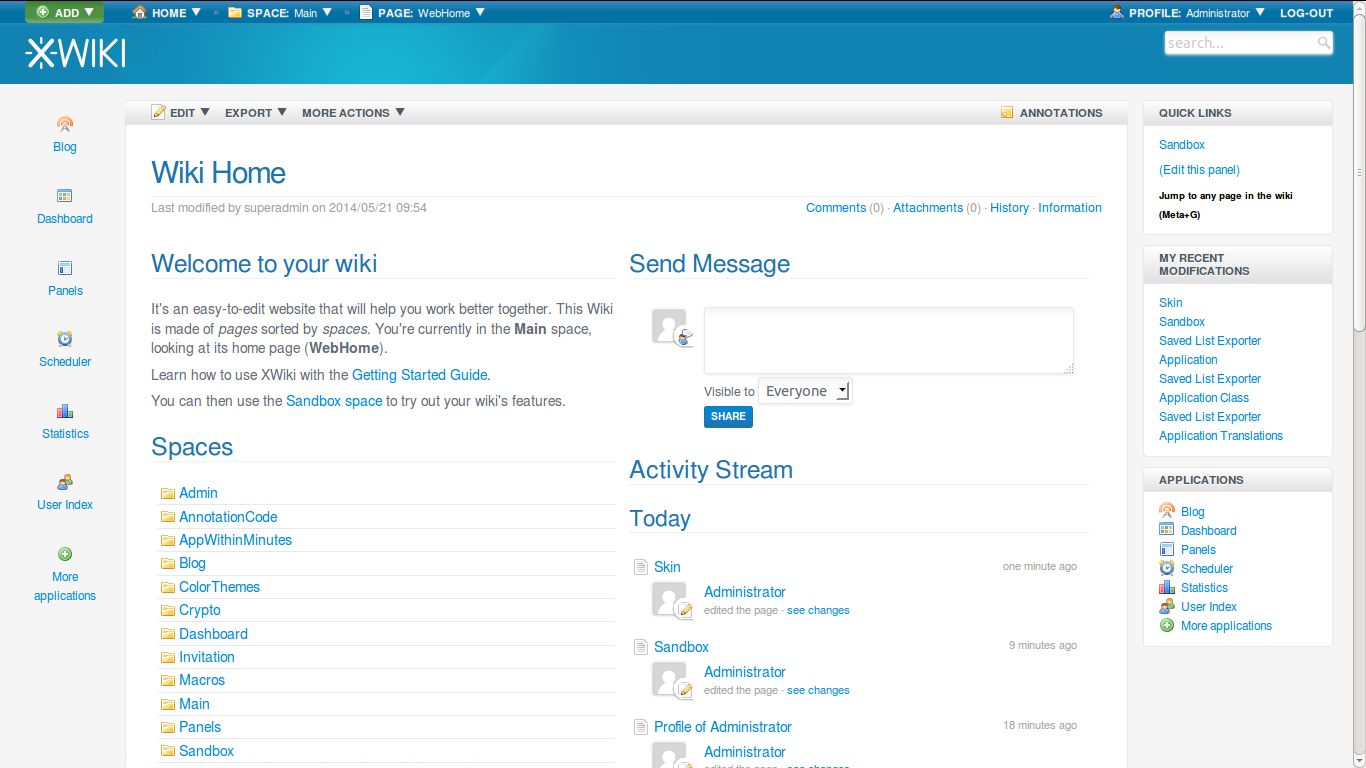
>> > > http://jira.xwiki.org/secure/attachment/27707/appbar.png
>> > >
>> >
>> > > WDYT?
>> >
>> > It doesn't look very well, and the Applications panel is redundant. I
>> > don't have a solution though. Need to think about it.
>>
>> Note that Guillaume forgot to mention that the icons will be larger (see
>> http://design.xwiki.org/xwiki/bin/download/Improvements/Skin4x/homepageDesktopDetails.png).
>> Right now they are the ones from the panel in medium width mode because
>> Guillaume has implemented it yet.
>>
>> @Guillaume: regarding icon colors, what would be your plan? Blue and white
>> colors as on
>> http://design.xwiki.org/xwiki/bin/download/Improvements/Skin4x/homepageDesktopDetails.png
>> even for the Colibri skin or different coloring depending on the skin?
>>
>> I also think that it might be best to not change Colibri since people are
>> probably used to it for now. Now we need to find a way to have panels
>> defined differently for each skin for that.
>>
>
> I do not really agree. Panels is (at least intended to be) a standalone
> application, that is not directly related to skins. Panels themselves are
> also independent. Linking panel app, panels and skin would not increase the
> modularity of our solution. I do not really understand why adding that
> AppBar panel change anything. If the user want an AppBar, she could
> configure it easily in the panel configuration.
> And regarding the default
> distribution, I do not see why in the 6.x release, we couldn't change the
> default panel layout.
>This will have no impact on existing users that are
> migrating.
> I do not see any reason not to have the AppBar in colibri by
> default in the new distribution.

Because it doesn't look good? Do you think the AppBar is well
integrated into the Colibri skin as it looks like in
http://jira.xwiki.org/secure/attachment/27707/appbar.png . I don't. It
doesn't look like a panel and the first impression I had is that some
styles are missing.

I don't mind having  the AppBar in Colibri, but it needs to be
integrated. The missing panel header and background may be good for
flamingo, but I don't find it nice for Colibri.

Thanks,
Marius

>
>
>>
>> There are various solutions for this:
>> * Solution 1: Add support for storing configuration (XWikiPreferences) in
>> skin pages and modify the DefaultConfigurationSource to be profile > skin >
>> space > wiki or possibly better: profile > space > wiki > skin
>> * Solution 2: Refactor the UI configuration in the Admin UI by moving all
>> UI-related configuration parameters in some UIConfig xobjects that depend
>> on the selected skin (one xobject per skin). Make the skin selection the
>> first item on the page and when you change it the rest of the UI
>> configuration below reflects the content of the UIConfig page corresponding
>> to that skin. This means introduction a UIConfigurationSource component
>> impl but that’s easy to do.
>> * Solution 3: Modify the leftpanels/rightpanels configuration properties
>> from String to TextArea and allow scripting to be put inside. Then, by
>> default, have some “if” to handle both Colibri and Flaming default panels.
>> When the user uses the Panel Wizard the first time, the value will be
>> overridden by the list of panels selected by the user.
>> * Solution 4: In the DefaultSkin page, override
>> leftpanels.vm/leftpanels.vm and check if the user has defined any panel
>> preferences in XWikiPreferences. If so, then use them. If not, then compute
>> the left and right panels default values.
>>
>> There are obviously downsides to all these solutions...
>>
>> Personally I think I prefer solution 1 with profile > space > wiki > skin,
>> i.e. if the leftpanels/rightpanels xproperties are not defined at the
>> profile, space, wiki levels (and by default we should leave it empty there)
>> then the value is taken from the skin configuration component. We would
>> need to define how the Panel Wizard works (we probably have an issue even
>> now when the panels are defined in a user’s profile). It should probably be
>> possible int he Panel Wizard UI to select what level is being configured
>> (wiki, space, profile, skin). That’s the main issue for which we need a
>> solution: that it is not too magical for the user when they go to the Panel
>> Wizard. More generally speaking a we have an issue in the Admin UI. We
>> should probably show the inferred values (real value used) and indicate the
>> value for a given property at all levels (wiki, space, profile, skin) and
>> allow users to easily change the value for the level they wish.
>>
>> We need some more brainstorming about this. Any other ideas or variations?
>>
>> Thanks
>> -Vincent
>>
>> > > Thanks,
>> > > Guillaume
>>
>> _______________________________________________
>> devs mailing list
>> [email protected]
>> http://lists.xwiki.org/mailman/listinfo/devs
>>
>
>
>
> --
> Denis Gervalle
> SOFTEC sa - CEO
> _______________________________________________
> devs mailing list
> [email protected]
> http://lists.xwiki.org/mailman/listinfo/devs
_______________________________________________
devs mailing list
[email protected]
http://lists.xwiki.org/mailman/listinfo/devs