Hi,

About the different kind of borders in the Newton UI:
The normal dialog boxes (which they call "slips" in newtonese) looks
like that :
(the white dot is there to allow resizing, while the gray border let
you move the dialog, afaik)
The alert boxes looks like that (and I really like them):
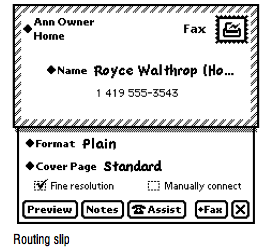
The "routing slips" are used to show something that will be sent
(don't forget, the Newton was billed as a communication device);
basically you could select anything and click on the "mail" icon to
choose how you want to send it:
and again I quite like the look idea :
The small slip below is exactly similar to Cocoa sheets ;-)
-- the "international letter" look present the "rounting"
informations (where will I send...)
and the below sheet let you specify some parameters..
As with the assistant, any application can register itself as a new
routing capacity. Basically, for us it's the equivalent of a
specialized openstep service.
--
Nicolas Roard
"Any sufficiently advanced technology is indistinguishable from magic."
 -Arthur C. Clarke
